You can auto post tweets within X's rules if the posting goes through the official X API, the account owner has clearly agreed to it, and the content is not spam. X's Automation rules page (updated April 2026) bans scripting the x.com website and allows automated posts for informational, entertainment or novelty purposes.
This guide covers automatic twitter posting: where scheduling ends and automation begins, what X allows, what the API enforces, and what TrackMedia's X connector, REST API, SDK, CLI and webhooks do. For X's own scheduler, see our guide to scheduling and editing posts on X.
What counts as automation on X?
X's Automation rules page defines automation as accounts or apps that take repeated actions without a person actively performing them. The page does not mention scheduling, so any app that posts for you through the API falls under these rules.
In this guide, scheduling means you write each post and pick its time, and automation means a rule or feed decides the content or trigger. That split is ours, not X's.
The same page says you are ultimately responsible for actions taken with your account or by apps associated with it. X may filter your posts from search results or suspend the account if automated activity breaks its rules.
What does X allow you to automate?
The Automation rules page sorts activity into allowed, conditional and not permitted. Here is each group as the page states it.
- Allowed. Posts based on outside information, such as an RSS feed or weather data, if you are authorized to publish that information. Other automated posts for entertainment, informational or novelty purposes, provided you follow every other rule. Automated Reposts and Quote posts for those purposes, but not in bulk.
- Allowed with conditions. Automated replies and mentions, only to people who have asked for them or clearly signaled they want them, for example by replying to your post. You must offer an easy opt-out and send only one automated reply or mention per user interaction. For campaigns based on replies to your post, the reply must go to the user's original post. A follow alone is not enough, and replying to keyword searches alone is banned. Automated Direct Messages need the same opt-in and opt-out.
- Needs X's approval. AI-powered reply bots require prior written and explicit approval from X. Advertisers, publishers and brands running auto-response campaigns must also request approval.
- Not permitted. Automated likes and hiding replies. Bulk, aggressive or indiscriminate following and unfollowing. Bulk or indiscriminate adding of users to lists. Non-API automation such as scripting the x.com website, which X says may result in permanent suspension.
Scheduled posting of your own content comes closest to the first group, but the page never mentions scheduling, so that placement is our reading. The stricter rules cover acting toward other people.
What counts as spam when you auto post?
The Automation rules page lists three spam patterns to avoid: automatically posting about trending topics or trying to manipulate them, posting duplicative or substantially similar posts on one account or across accounts you operate, and posting links that deceptively redirect through landing or ad pages before the final content.
X's Authenticity page (April 2025) adds specifics under content spam. It does not allow repeatedly posting identical or nearly identical posts, posting and deleting the same content repeatedly, posting excessive unrelated hashtags, or posting links without commentary so that they make up the bulk of your activity. Neither page gives numeric thresholds, so varied posts are safer than one text repeated on a timer.
The Authenticity page allows up to ten accounts for different, non-duplicative purposes, and managing accounts for a third party if no rules are broken. See our guide to managing multiple social media accounts.
How does auto posting work through the X API?
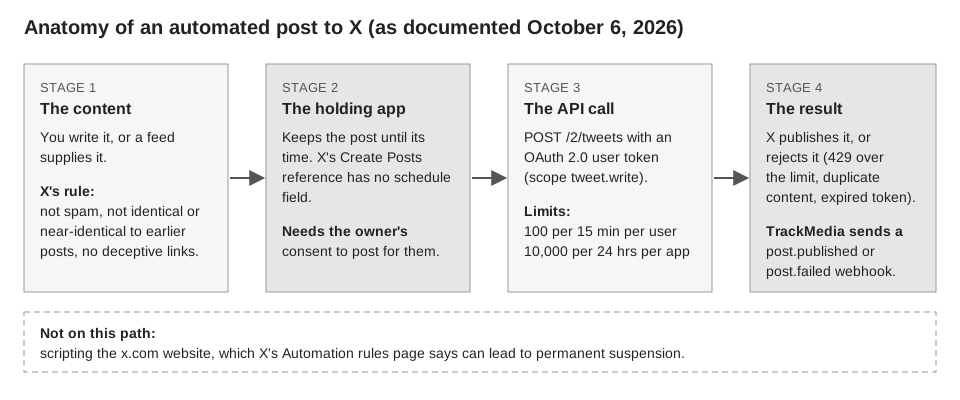
An app posts with the Create Posts endpoint, POST /2/tweets, documented in X's API reference. It authorizes with an OAuth 2.0 user token. The scopes listed are tweet.read, tweet.write and users.read, and tweet.write is described as creating and reposting on your behalf.
The reference lists no scheduling parameter among the fields we read (text, media, poll, reply, quote and others). An app that schedules therefore holds the post itself and calls X when the time arrives. X's OAuth 2.0 guide says a refresh token, which lets an app get a new access token without asking the user again, is issued only if offline.access was requested.
These API facts matter when you automate:
- Rate limits. X's rate limits page lists
POST /2/tweetsat 100 per 15 minutes per user and 10,000 per 24 hours per app. The page says per-user limits apply with OAuth user tokens and per-app limits with an app-only Bearer Token. Going over returns a 429 until the window resets. - Cost. X's pay-per-usage page says X API usage is paid for with purchased credits, lists a higher rate for creating a post with a URL than for a plain post, and says prices are subject to change, pointing to the Developer Console for current rates. We do not quote dollar amounts for that reason. If you build on the API yourself, the usage is billed through your own developer account.
- Consent. X's Developer Policy says authenticating does not by itself count as consent. A service must get express, informed consent before posting for someone, and must show exactly what will be published before publishing.
- Bots and AI. The policy says an API-based bot account must clearly state what it is and who runs it, and may not circumvent rate limits. The Create Posts reference has a
made_with_aifield to disclose AI-generated media.
How to auto post tweets with TrackMedia
TrackMedia posts to X through the official API with the account owner's OAuth 2.0 connection, and holds the schedule itself. Nothing scripts the x.com website, and scheduled posts do not appear in X's own lists.
- Connect X. The connector requests the scopes
tweet.read,tweet.write,users.read,media.writeandoffline.access, so the connection can renew itself. - Write one master draft. Add an X version if the text should differ. The counter shows plain text length and X posts are limited to 280 characters in the web composer. See X's character limit for the weighted counting TrackMedia does not apply.
- Check the preview and the preflight. Each account shows ready or blocked before anything is sent.
- Choose when. In the composer pick Schedule for a date and time, Queue, or Post now. A past time is rejected. A queue is a weekly set of time slots and each post takes the next free one, so refilling it keeps posting going without you picking every time.
- Review and change it. Open the post to Edit it while it is a Draft or Scheduled, Publish now, Unschedule it, or Delete it from the queue.
A failed post shows its reason with Retry now, and a Reconnect link when the connection expired. The connector maps an X duplicate-content rejection to its own error. TrackMedia does not edit a post after it publishes.
Automate from code with the API, SDK, CLI and webhooks
TrackMedia has a REST API, a typed SDK and a CLI. A post is created with POST /v1/posts using a scheduledAt time. The CLI form is trackmedia post "text" --to x --at "tomorrow 9am", and --dry-run validates against each platform and creates nothing. The server publishes at the time, so nothing needs to keep running on your machine.
Requests can carry an Idempotency-Key so a retry cannot create the post twice. Webhooks include post.published and post.failed, signed with an HMAC-SHA256 header the SDK can verify.
API keys carry an approval policy: draft_only (the default), require_human, or auto. With the first two, a script or AI agent cannot put a post live without a person. The MCP server's create_post tool also defaults to draft.
What TrackMedia does not automate on X
| Automated action | X's Automation rules | TrackMedia |
|---|---|---|
| Scheduled or queued posts | Page does not mention scheduling; automated posts allowed for informational, entertainment, novelty purposes | Yes |
| Replies and mentions | Only to opted-in users | No reply bot |
| Direct Messages | Only to opted-in users | Not in the X connector |
| Likes, follows, lists | Likes not permitted; bulk follows and bulk list-adding not permitted | No |
| Reposts and Quote posts | Allowed, not in bulk | Not published |
The connector publishes text with up to four images, one GIF or one video. Threads, sent as replies to your own earlier part, and the 25,000-character Premium limit exist only through the API, not the web composer. We found no Repost or Quote post calls in the connector, and X's reference says quote-posting needs an Enterprise plan.
Crosspost rules can copy new Bluesky posts to X, which is a destination only. Rules start switched off and in review mode, where copies wait as drafts. The connector sends only text, media and reply fields, so it does not set made_with_ai.
TrackMedia does not judge whether your content is spam or whether you may post it, and those rules stay with you. Start free with TrackMedia to queue posts for X, or see how to automate Instagram posts and how publishing works.
How we checked this
We opened each page below in a browser on October 6, 2026 and copied rules, limits and prices from it. TrackMedia's behavior comes from its X connector, API, SDK, CLI and MCP code, read the same day.
- Automation rules (X Help Center, updated April 2026): definition, allowed, conditional and prohibited activity, user responsibility.
- Authenticity (X Help Center, April 2025): content spam, multiple accounts. We opened it from the older platform-manipulation address, which redirected there.
- X Developer Policy (docs.x.com): consent, bots, rate-limit circumvention, application limits.
- Create Posts (X API reference): endpoint, scopes, fields, media, quote-posting plan requirement.
- OAuth 2.0 Authorization Code Flow with PKCE (docs.x.com): refresh tokens and
offline.access. - X API Rate Limits and pay-per-usage pricing (docs.x.com):
POST /2/tweetslimits, the per-user versus per-app definition, and the pricing model (dollar figures deliberately not quoted because the page says prices are subject to change).
What we could not verify: whether X counts a scheduled post as "automated" in enforcement, any numeric spam thresholds, how X treats posts published by third-party apps in its own edit feature, and what applies to X's Automated account labels (that page's details did not load fully). Current X API prices are not quoted because we could not confirm them against the Developer Console. We did not test posting on a live account.