Does Instagram notify when you screenshot? Instagram's Help Center describes a screenshot alert in one place only: disappearing photos and videos sent in chats. For posts, Reels and Stories, the pages we read describe no screenshot notification, and the Stories insights list no screenshot count.
This guide is based on Instagram's Help Center pages on sending disappearing photos or videos, their sent status, who can tell you saw a Story, Stories insights and post insights, read on October 22, 2026. It also explains what you can see about your own content, and what that means if you create for a living.
Sources: sending disappearing photos or videos · their sent status · who can tell you saw a Story · Stories insights · post insights
Does Instagram notify when you screenshot a Story?
Instagram's pages do not describe a screenshot notification for a regular Story. The Help Center article on who can tell you saw a Story says only that when you see someone's Story, they can tell that you have seen it. It says nothing about screenshots.
The Stories insights page lists what the creator can view: Views, Viewers, Interactions, Accounts engaged and Profile activity. A screenshot count is not on the list. Instagram also says Interactions include replies, shares, sticker taps and link taps, which are different actions.
Since Instagram can change this at any time, the safe habit is the one we give creators below: assume anything you post can be saved by someone else.
Does Instagram notify when you screenshot a post or Reel?
Instagram's post insights page lists what the account owner can see: Views, Interactions (likes, comments, saves and shares) and Profile activity. Its Reels insights page lists Views, Watch time, Viewers, Average watch time and Follows. Neither has an entry for screenshots, and Instagram's pages describe no notification when someone screenshots a feed post or Reel.
What the owner does see are saves and shares. Instagram's page on saving posts says that when you save someone's post, they are not able to tell that you saved it. The owner's Interactions figure does include saves, and a save is Instagram's built-in way to keep something, which is why creators watch it.
What about disappearing photos and videos in chats?
This is the one case where Instagram's pages mention screenshots, and two of them word it differently. Both are for photos and videos sent in a chat that disappear after being viewed:
- The page on sending them says the sender cannot view the content again but can see "if they were seen or if we detect someone took a screenshot."
- The page on checking their status says taking a screenshot is now disabled for a disappearing photo or video you have sent in a chat.
Both agree that the sender can see the status under the message. To check it on iPhone, tap Messages at the bottom, then tap the conversation: the status appears under the content. The first page also says you can only send these to people who follow you or have already approved messages from you.
The send options matter here. Instagram lets you pick View once, View twice or Unlimited views before you tap Send. The recipient can replay a disappearing photo or video by tapping Photo or Video in the chat after viewing it. Because the two pages word the screenshot behavior differently, trust what your own app shows.
Does Instagram show screenshots to the person who posted?
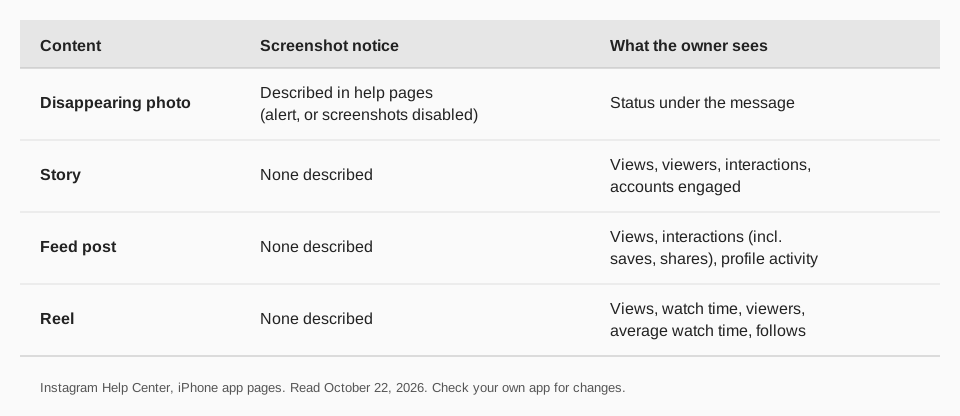
For feed posts, Reels and regular Stories, none of the Help Center pages we read says so. What Instagram shows the owner, per its insights pages, is this:
| Content | The owner can see | Screenshot notice |
|---|---|---|
| Feed post | Views, interactions (likes, comments, saves, shares), profile activity | None described |
| Reel | Views, watch time, viewers, average watch time, follows | None described |
| Story | Views, viewers, interactions, accounts engaged, profile activity | None described |
| Disappearing photo or video in a chat | Status of the content, as shown under the message | Described in the help pages above |
If you want to know more about what these numbers mean for your account, see our guides to what Instagram insights mean and Instagram Story analytics.
Can you see if someone screenshots your Story?
You can see who viewed it, because Instagram says people can tell when you see their Story. You cannot see a screenshot count: Stories insights do not list one. On iPhone, tap your profile picture at the top of your feed to open your Story, tap Activity, then Insights.
For past Stories, go to your profile, tap More to reach Settings and activity, then Insights (professional account) or Your dashboard (personal account), and choose Content you shared. Instagram says a Story's insights stay available for up to two years, although the Story itself expires after 24 hours. Insights need a public personal or professional account.
How creators should think about screenshots, saves and shares
If Instagram does not tell you when someone screenshots your content, treat screenshots as a possible, invisible action. Three habits follow from that:
- Do not post what you would not want kept. Anything public can be copied by any viewer, in any app.
- Put your name on it. Credit and a handle in the image or caption mean a screenshot still points back to you.
- Watch saves and shares. They are the visible signs that people want to keep or pass on a post. Instagram counts both under Interactions.
Tracking those signs across many posts is easier in one place. Our comparison Reel vs Story vs post helps you choose the format that gets saved and shared.
Track saves and shares with TrackMedia
TrackMedia reads the numbers Instagram does share with creators, per post, so you can see which ones people keep and pass on. For each Instagram post, its analytics show views, reach, likes, comments, saves and shares, and they include posts you did not publish with TrackMedia.
- See the pattern. Compare posts side by side and see which formats earn saves and shares, then plan more of them.
- Plan the next one. Write once in the composer, fit it to Instagram and 20 other networks, and add it to the calendar or a queue. The Best times view reads your own posts.
- Add tracked links. Links in captions and your bio get UTM tags and real-time clicks, visitors and referrers, so you can see which posts bring people to your site.
For Stories, use the Instagram app. The free plan includes 15 posts a month and one account per network, with no card. Start free with TrackMedia, or read about scheduling Instagram Stories.
Questions people also ask
Does Instagram notify when you screenshot a story?
Instagram's Help Center pages we read describe no screenshot notification for a regular Story. They say people can tell when you view their Story. The only screenshot notice described is for disappearing photos and videos in chats.
Does Instagram show screenshots?
Not in the insights. Post insights list views, interactions and profile activity, Reels insights list views, watch time, viewers, average watch time and follows, and Story insights list views, viewers, interactions, accounts engaged and profile activity. Neither lists screenshots.
Does Instagram notify when you screenshot a post?
Instagram's pages describe no notification for a feed post or Reel screenshot. The owner can see saves and shares among interactions, but not who took a screenshot.
Can people see if you screenshot their story?
Per the pages above, not for a regular Story. They can see that you viewed it. For a disappearing photo or video sent to you in a chat, Instagram says the sender can see the status and whether a screenshot was detected.
Can you see if someone screenshots your story?
No screenshot figure appears in Story insights. You can open Activity then Insights to see views, viewers, interactions, accounts engaged and profile activity.
How we checked this
We opened each Instagram Help Center page below in a browser on October 22, 2026, in its iPhone app version. Instagram edits these pages and the app, so check the live page if your screen differs. We did not test screenshots on a live account. TrackMedia's metrics come from reading its Instagram connector code the same day.
- Send disappearing photos or videos in chats on Instagram: view options, the sender's view of status and screenshot detection.
- See the status of a disappearing photo or video you've sent: status steps and the line on screenshots being disabled.
- Replay a disappearing photo or video you receive: how replays work.
- Who can tell that you've seen their Instagram story: Story views are visible to the poster.
- View insights on your Instagram Stories: the metrics list, steps and two-year availability.
- View insights on your Instagram posts: post metrics and steps.
- View insights on your Instagram reels: Reels metrics list.
- Save posts you see on Instagram: saves are private to the person saving.