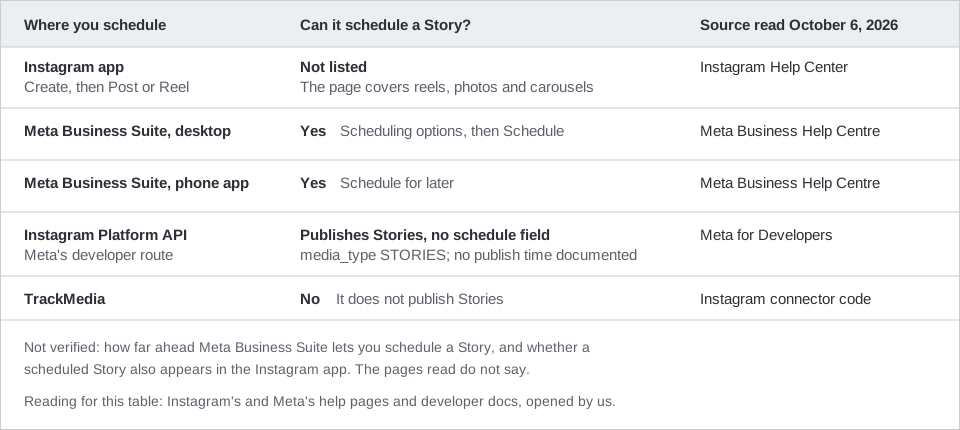
Yes, you can schedule story posts on Instagram, but the documented route is Meta Business Suite, not the Instagram app. Meta's tool for managing Facebook and Instagram content has a Schedule option for Stories on desktop and in its phone app. Instagram's own scheduling page covers posts and Reels and does not list Stories.
This guide uses the wording on Instagram's Help Center, Meta's Business Help Centre and Meta's developer documentation, all opened on October 6, 2026. It also says what Meta's API allows for Stories and what TrackMedia does not do: it does not publish Stories.
Can you schedule story posts on Instagram in the app?
Instagram's help page on creating and managing scheduled posts and Reels says that with a public account you can schedule "reels, photos and carousel posts" from the Instagram app. Its steps tell you to tap Create, then Post or Reel, and turn on Schedule this post or Schedule this reel. Stories are not mentioned anywhere on the page.
The page that explains how to share a photo or video to your story (we read its iPhone app version) is just as quiet. It walks through Create, then Story, then Your Story, and says nothing about picking a future time.
Instagram does not say the app can never schedule a Story, and menus change between versions. We did not test the app. What we can say is that, as of October 6, 2026, Instagram documents scheduling for posts and Reels and does not document it for Stories.
How to schedule an Instagram Story in Meta Business Suite
Meta's guide to creating and managing stories in Meta Business Suite says you can create Stories there to publish on Facebook and Instagram. To use it you need full control of the Page or Instagram account, or content permission for it.
On desktop
- Start the story. In Meta Business Suite, click Create story from the home page or the Content tab.
- Pick where it goes. Under Post to, choose your Facebook Page, your Instagram profile or both.
- Add media. Under Media, click Add photo/video. Meta says you can upload up to ten photos or videos, and use Edit to crop, trim or add text, mentions or stickers.
- Choose the time. Under Scheduling options, select Share now or Schedule, then pick the date and time.
- Finish. Click Share or Schedule.
To manage it afterward, click Content, then the Stories tab, and choose Active, Scheduled or Archived. Select the story, click the ... icon, and Meta says you can publish, reschedule or delete it.
On your phone
Meta's page on scheduling content in the Meta Business Suite mobile app says to tap Content at the bottom, choose Stories at the top, and tap Create. Add your media, tap Next, then tap Schedule for later, pick the date and time, and tap Schedule. Meta says you can see the content on its date by going to Planner. The page also says you need at least partial access and must be assigned to manage the Facebook and Instagram accounts.
What Meta's pages do not say
- How far ahead you can schedule a Story. The Instagram app's limit is 25 posts a day, up to 30 days ahead, but that page covers posts and Reels, so we do not apply it to Stories.
- Whether a Story scheduled in Meta Business Suite also shows up inside the Instagram app.
- Which Instagram account types the Stories tool accepts. The page names Page or Instagram account access, nothing more.
Can the Instagram API schedule Stories?
The API can publish a Story, but its documentation shows no way to schedule one. Meta's Content Publishing guide says you create a media container with media_type set to STORIES, then publish it. Only Instagram professional accounts are supported.
Meta's IG User Media reference lists these Story limitations:
- Stories expire after 24 hours.
- Publishing stickers (it names link, poll and location) is not supported, though mentioning users without a sticker is.
- Image Stories must be JPEG, 8 MB at most. Video Stories must be MOV or MP4, 3 to 60 seconds, 100 MB at most, and Meta recommends 9:16.
- Containers expire if they are not published within 24 hours.
Neither page lists a field for a future publish time. The Content Publishing guide does say to enforce the publishing limit yourself if your app lets users schedule posts for later. Meta does not say how an app that offers scheduling should do it. TrackMedia holds the schedule for feed posts itself and calls the API at the chosen time, as described below, but that is TrackMedia's design, not a Meta requirement.
The missing link sticker matters if you planned a link in your Story. Meta's desktop guide for Meta Business Suite says you can click Add link while editing a Story to add a URL that viewers can visit, and we did not test it. To add the Link sticker by hand in the Instagram app, see our guide to adding a link to an Instagram Story.
What TrackMedia does and does not do with Stories
TrackMedia does not publish Instagram Stories, so you cannot schedule a Story with it. In its Instagram connector the Story type exists only as an unused label, and the publish code builds feed image posts and carousels, and Reels only when an API override asks for one. Use Meta Business Suite or the Instagram app for Stories.
What TrackMedia does schedule on Instagram is feed content. It publishes images and carousels of up to 10 items, with a caption of up to 2,200 characters. The schedule is held by TrackMedia, which publishes at the time you chose, so a scheduled post there will not appear in Instagram's Scheduled content list. For how that works, see how to see scheduled posts on Instagram and how to automate Instagram posts.
A workable split is to schedule your feed posts in TrackMedia, which also covers the other networks you post to, and schedule Stories in Meta Business Suite. If you want one copy of a post on both Instagram and Facebook, see posting to Instagram and Facebook at the same time, or look at how publishing works in TrackMedia. When you are ready, you can start free with TrackMedia.
How we checked this
We opened each page below in a browser on October 6, 2026 and copied the menu names and limits from it. We did not schedule anything on a live Instagram or Meta Business Suite account, so where a page is silent we say so. Menus change, so check the live page if a label looks different. TrackMedia's behavior comes from its Instagram connector code, read the same day.
- How to create and manage scheduled posts and Reels on Instagram (Instagram Help Center): scope is reels, photos and carousel posts; steps; 25 posts a day, 30 days ahead; no Stories.
- Share a photo or video to your Instagram story (Instagram Help Center, iPhone app version): Story steps, no scheduling. The web version of the page says "This feature isn't available on the web app."
- Create and manage stories in Meta Business Suite (Meta Business Help Centre): create, schedule and manage Stories on desktop.
- Schedule Facebook and Instagram content on Meta Business Suite mobile app (Meta Business Help Centre): Stories on mobile.
- Content Publishing (Meta for Developers, updated Jun 30, 2026 per the page): Stories supported through the API, professional accounts only, container expiry.
- IG User Media (Meta for Developers, updated Sep 28, 2026 per the page): Story limitations and file specifications.
We could not verify how far ahead Meta Business Suite schedules Stories, whether those Stories appear in the Instagram app, or which account types the Stories tool accepts. Meta's developer pages are updated often, so recheck them before you build on them.