To add a link to an Instagram Story, open Stories, add a photo or video, tap the sticker icon, choose the Link sticker, paste your URL and share the Story. Anyone watching can then tap the sticker to open your link.
This guide gives the steps in Instagram's current wording, explains why the Link sticker may be missing, and shows where to see how many people tapped it. TrackMedia does not publish Stories or add the Link sticker for you, so the steps below happen in the Instagram app.
How to add link to Instagram Story, step by step
These steps follow Instagram's own guide to Stories and its help page on stickers, both checked in October 2026.
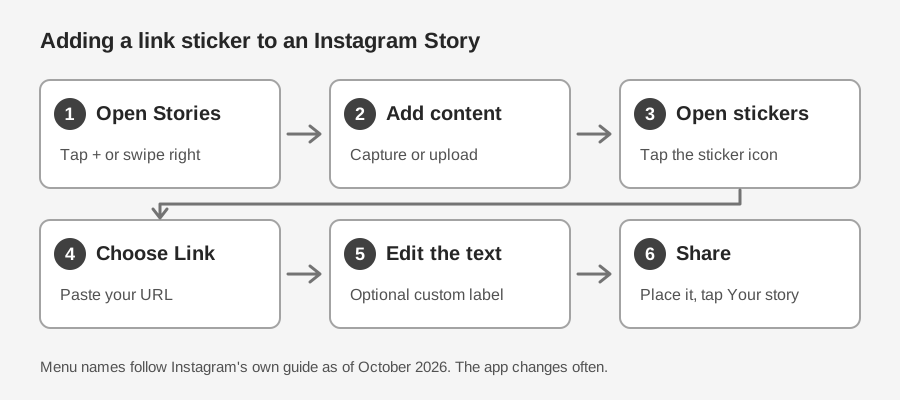
- Open the Stories camera. Tap the + in the top-right corner of Instagram, or swipe right from your feed.
- Add your photo or video. Capture something with the camera, or tap the gallery icon in the bottom-left to upload from your camera roll.
- Open the sticker tray. Tap the sticker icon in the top toolbar. Instagram's help page describes this as tapping Stickers at the top.
- Choose Link and paste your URL. Tap Link, then paste the address of the page you want to send people to. Instagram's original announcement says to tap Done when you have added it.
- Edit the text and place the sticker. You can change the sticker text to something like "shop the look" or "read the recipe." Drag the sticker where you want it, as you would any other sticker, and tap it to see color options.
- Share the Story. Tap Your story at the bottom to share with everyone who follows you, or Close friends to share with that list only.
Paste the address instead of typing it, and open the same address in a browser first to make sure the page loads.
What to check before you share
A link sticker only works if people notice it and trust it. A few quick checks help.
- Say what happens on tap. Instagram's guide suggests sticker text such as "shop the look," "read the recipe" or "watch the trailer." Text like that tells viewers what they will get.
- Leave room for it. Place the sticker where it is not covered by text or other stickers, so viewers can tap it.
- Mind the clock. A Story lasts 24 hours, so plan for the link to earn its taps in that window.
- Decide how you will measure it. If you want your own click count, make the link before you open Instagram. The TrackMedia section below shows how.
Can you add a link to a Story from a computer?
Instagram says you can create a Story at instagram.com, but that some features, such as certain stickers, are only available on mobile. Its guide does not say whether the Link sticker is one of them.
If you cannot find Link on the computer version, use the phone app instead.
Why you can't see the Link sticker
If you want to add a link on an Instagram Story and the Link option is not in the sticker tray, check these causes first.
- Your app is out of date. Instagram's help page on stickers says to update to the latest version from the App Store or Google Play Store if you are not seeing certain stickers.
- Not every sticker is available to everyone. The same page says not all stickers are available to everyone, or available for Reels. Make sure you are building a Story, not a Reel.
- Your account is new or has broken the rules. When Instagram opened Story links to all accounts on October 27, 2021, it said new accounts, and accounts that repeatedly share content that violates its Community Guidelines, would not have access to the Link sticker. That announcement does not say how long an account counts as new.
- Your region. The help page for stickers carries a notice that the feature may be unavailable in Japan and in countries in Europe. It does not say which stickers are affected.
- You are on a computer. See the section above.
If none of these explains it, Instagram's Help Center is the place to ask. Its page on using stickers lists Link among the stickers and offers a support chat.
Do you need a certain number of followers?
No. Before October 2021, Instagram limited Story links to verified accounts and accounts with a certain number of followers. In its announcement, Instagram said it was expanding the ability to add links in Stories to all accounts, regardless of account size.
How to see who tapped your Story link
Instagram counts the taps for you. Its help page on viewing insights on Stories lists link taps under Interactions, along with replies, shares and sticker taps. It also lists Accounts engaged, the number of unique accounts that interacted with your Story.
A few details from that page:
- You need a public account, personal or professional, to view insights.
- A Story disappears after 24 hours, but you can still see its insights for up to two years.
- The page lists numbers. It does not say that you can see the names of the people who tapped.
The page gives separate steps for each device, so open it and pick yours. For a closer look at what counts as a click and where the numbers come from, see our guide on how to see who clicked your Instagram link.
Track your Story link with a TrackMedia short link
Instagram tells you how many people tapped the sticker. It does not tell you what they did on your site, and it only covers Instagram. A tracked short link gives you a second count that you own, on the link itself.
TrackMedia can make a standalone short link for any URL. Here is how to use it for a Story:
- In TrackMedia, open Links and click Shorten a link.
- Paste your destination URL. If you want your analytics tool to see where visitors came from, add UTM tags to the URL first. For example:
https://example.com/offer?utm_source=instagram&utm_medium=social&utm_campaign=story. Tags you write into the URL stay in it. - Click Shorten, then copy the short link.
- Paste that short link into the Link sticker in Instagram, as in step 4 above.
After the Story goes live, the Links list shows the clicks and visitors counted for that short link. Links → Analytics shows clicks per day across your tracked links, plus the countries, referrers, devices and browsers behind them. See how link tracking works.
Expect the two counts to differ a little. Instagram counts taps on the sticker, while a short link counts visits to the link itself, so they measure slightly different things.
What about links in your regular posts?
We found no Instagram help page that says a web address in a caption is tappable, so TrackMedia treats caption text as plain text. For the posts you publish through TrackMedia, links are turned into tracked short links where the network makes them clickable, and left as you wrote them in Instagram captions. For the links Instagram lets you put on your profile (up to five, per its Help Center), see our guide to link in bio tools.
Quick answers
How do you add a link on Instagram Story?
Open the Stories camera, add your photo or video, tap the sticker icon, tap Link and paste your URL. Then place the sticker and share the Story.
How do I add a link to a story in Instagram if I do not see Link?
Update the app, check that you are in Stories rather than Reels, and try the phone app instead of a computer. If it is still missing, the account restrictions and regional notes above may apply.
Next step
If you want clicks counted on every link you share, you can start free with TrackMedia.