Here is how to see who clicked on your Instagram link: you can find out how many people clicked, which link they used and where they came from. You can't find out their names. Instagram's Insights count taps, and a tracked link with UTM tags tells you what those visitors did next.
This guide covers what Instagram reports on its own, how to track Instagram link clicks one placement at a time, how to read the result in Google Analytics 4, and what no tool can show you.
What Instagram tells you on its own
Instagram's Insights are the first place to look, and they cost nothing. As of October 2026, Instagram's Help Center describes these Story metrics:
- Interactions, which it says includes actions like replies, shares, sticker taps and link taps.
- Profile activity, which it describes as actions taken from your story, such as profile visits, follows or website clicks.
Instagram's Help Center also says you can open insights for a story for up to two years after it expires, and that account and content insights cover any period within the last 90 days. Read the details in Instagram's own pages on story insights and account and content insights.
Where Instagram's numbers stop
Insights are useful, but they stay inside Instagram:
- They count taps. They don't say what the person did after the page opened.
- Link taps are listed as one part of the Interactions total on the Stories page, so you may not get a clean per-link count. Check what your own app version shows, because menus and metric names change.
- They don't carry UTM tags, so your website analytics can't match them to a link.
- As of October 2026, Meta's developer documentation for the Instagram API describes a metric called
profile_links_tapsas taps on your business address, call, email and text buttons. A tool that reads Instagram's API may therefore not report taps on your website link at all. Ask what a tool actually measures before you trust its click count.
One more limit sits in the product itself. We found no Instagram help page saying that a link pasted into a caption is tappable, so we treat it as plain text. Clickable links live in your bio and in the Story link sticker, which Instagram documents, so those are the places to track.
How to see who clicked on your Instagram link, step by step
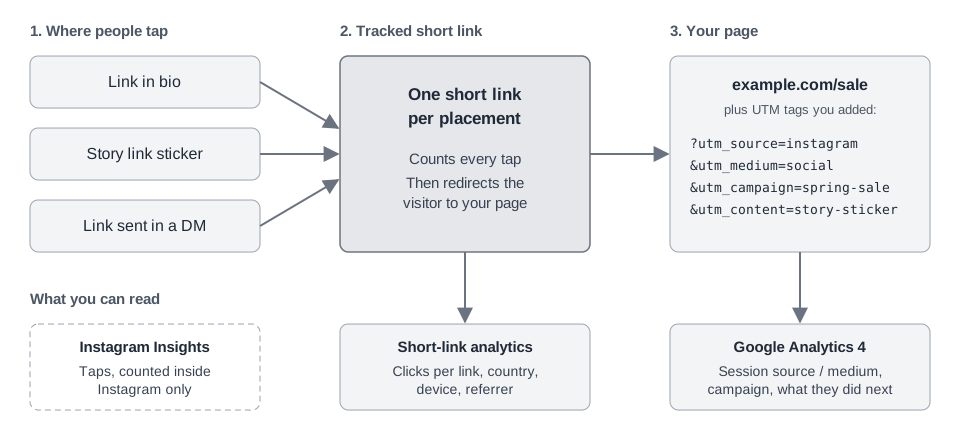
To track clicks on an Instagram link, use two layers. A short link counts the tap itself. UTM tags on the destination tell your analytics where the visit came from. Together they give you a small link campaign you can read at a glance.
- List your placements. Typical ones are the link in your bio, a Story link sticker for each campaign, and links you send in direct messages. Each gets its own link, so you can tell them apart later.
- Add UTM tags to the destination. Start from the page you want people on and add the tags. Use lowercase, because Google says parameter values are case sensitive.
- Turn it into a short link. Paste the tagged URL into a link tracker and create one short link per placement.
- Put each short link in its place. Bio link, Story sticker, DM. If you need the sticker steps, see how to add a link to an Instagram Story.
- Check both reports. Compare the short link's click count with the sessions in your analytics, as described below.
UTM for Instagram: an example link for a Story sticker
https://example.com/sale?utm_source=instagram&utm_medium=social&utm_campaign=spring-sale&utm_content=story-stickerChange utm_content to bio-link for the bio and dm for messages. Google's documentation says utm_content can be used to tell apart links that share a campaign, so it is the natural place for the placement. The other three tags are explained in Google's page on collecting campaign data with custom URLs, which advises always using utm_source, utm_medium and utm_campaign.
Why use both a short link and UTM tags
The two numbers answer different questions. The short link counts a tap when it happens, before your page loads. Your analytics counts visits after the page has loaded and its tracking script has run.
Expect the two counts to be close but rarely identical. If one is far lower, the gap can be people who left before the page finished loading or who block analytics scripts.
Reading the results in Google Analytics 4
Google says custom campaign data fills the Session source / medium, Session source, Session medium and Session campaign dimensions in the Traffic acquisition report. To find your Instagram visits:
- Open Reports, then Acquisition, then Traffic acquisition.
- Look for the Session source / medium dimension. With the tags above, your row reads
instagram / social. - Use the search bar above the table to filter for
instagram, or search for your campaign name. - Compare that row's sessions with the clicks on your short links.
The details are in Google's help pages: the Traffic acquisition report and the URL builder page linked above. Menus in Google Analytics change, so go by the dimension names if a label looks different.
A typo splits your data. Instagram and instagram count as two sources, which is why the tags should be written once and reused.
What you can't see, and why
"Who" can only mean counts and sources. It never means named people, for a plain reason: a tap on a link sends the person to a website outside Instagram, and there they are an anonymous visitor. Nothing in the click carries a name, and the Help Center pages above describe counts, not lists of accounts.
Be wary of any app or site that claims to show you the names of people who clicked a link. It has no source for them.
What you can legitimately learn from a tracked link:
- How many clicks each link got, and when.
- Which placement and which campaign sent them.
- Rough location by country, plus device type and browser.
- The referrer the browser reported, or "Direct" when it reported none.
- What visitors did on your site, if your analytics is set up for it.
If a visitor fills in a form or buys something on your site, your own records will know who they are. That is information they gave you on your site. It isn't something a click reveals.
How TrackMedia tracks your Instagram links
TrackMedia's Links page turns a URL into a tracked short link and counts the clicks on it. For the method above:
- Make one by hand. Choose Shorten a link, paste the tagged URL and copy the short link. TrackMedia doesn't add UTM tags to a link you shorten by hand, so write them in first.
- Read the Analytics tab. Pick 7, 30 or 90 days. You get clicks, visitors, clicks per day, your top links, and breakdowns by country, referrer, device and browser. Each top link shows its full destination, so a UTM-tagged URL tells you which placement it was.
- Bots are left out of the daily chart and the breakdowns, so those show people only.
Links you create by hand are labeled "By hand" in the top-links list rather than as an Instagram link. So your UTM tags, read in Google Analytics, remain the record of which network sent a visit.
When you publish through TrackMedia, links in clickable fields are swapped for tracked short links automatically, with the network name and social added as UTM source and medium by default. TrackMedia leaves links in an Instagram caption as you wrote them, because TrackMedia treats captions as text where links are not tappable. For Instagram, use the hand-made method above. For the other networks you publish to, see how publishing works and how click analytics work.
If your main link is the one in your bio, our guide to link in bio tools covers the options for the page it points to.
What to do next
Pick one placement, tag its link, shorten it and check both reports after a few days. You will know more about where your clicks come from than Insights alone can tell you.
When you're ready to track all of it in one place, start for free with TrackMedia.
How we checked this
We read each page below on October 6, 2026, and wrote only what it says. We did not test every click path in a live Instagram account, so menu names may differ from what you see. TrackMedia's behavior comes from its own product code.
- Instagram Help, Viewing insights on Stories (interactions, link taps, profile activity, two-year availability).
- Instagram Help, Account and content insights (the 90-day period).
- Meta for Developers, Instagram User Insights (the profile_links_taps metric definition).
- Google Analytics Help, Collect campaign data with custom URLs (UTM parameters, case sensitivity, utm_content).
- Google Analytics Help, The Traffic acquisition report (Session source / medium).