Social media automation software stays on the documented route when it publishes or reads through a network's official API with the account owner's consent, and even then the frequency and duplicate-content rules still apply. It risks enforcement when it scripts the website, collects your login credentials, or acts toward other people without their opt-in. X, Meta and LinkedIn each document that line, in different words and with different detail. We read their pages on October 6, 2026 and report what they say and where they are silent.
This guide gives the cross-network view, adds the LinkedIn rules, and covers what TrackMedia's API, SDK, CLI, webhooks and MCP server do. For network detail, see our guides to auto posting tweets within X's rules and Instagram automation tools.
What can be automated officially, and what risks enforcement?
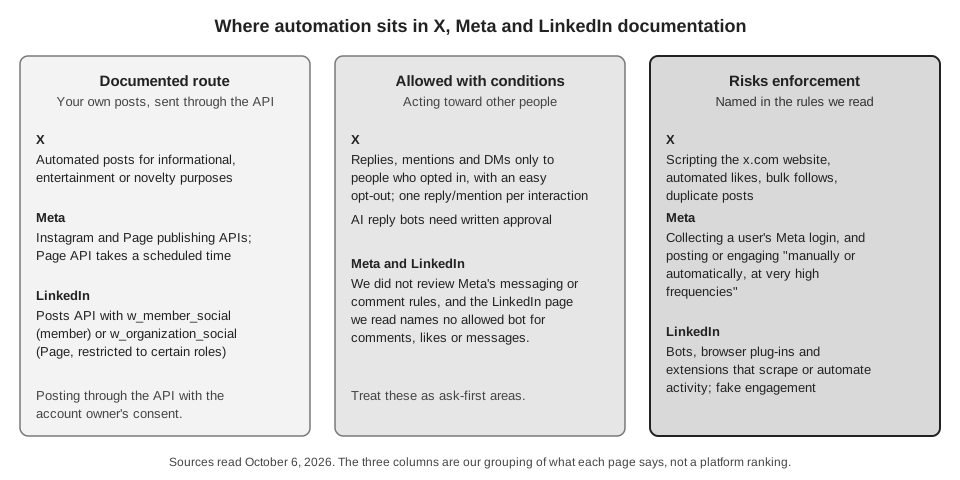
X's Automation rules page defines automation as accounts or apps that take repeated actions without a person actively performing them. We group the activity three ways, which is our split and not the networks': publishing your own content, reading and reporting, and acting toward other people (replying, liking, following, commenting, messaging). The documented routes serve the first two, and almost every restriction below targets the third.
What does X allow?
X's page (updated April 2026) allows automated posts based on outside information such as an RSS feed, and other automated posts for entertainment, informational or novelty purposes. It does not allow automated likes or hiding replies, or following and unfollowing in a bulk, aggressive or indiscriminate manner.
Replies and mentions are treated separately. X allows automated replies or mentions only to people who opted in, for example by replying to your post or sending a Direct Message, with a clear way to opt out and one automated reply or mention per user interaction. Automated Direct Messages also need the recipient's prior request and an opt-out. X says that following you, on its own, is not enough to count as opting in to replies, and that an AI reply bot needs X's prior written and explicit approval.
Two rules matter most for software you connect. Non-API automation, such as scripting the X website, may result in permanent suspension. And authorizing an app through OAuth does not by itself count as consent, so the app must describe its automated actions, get your express consent and honor an opt-out. Our guide to Twitter management tools turns this into questions to ask a vendor.
What does Meta allow?
Meta's Platform Terms (last updated February 3, 2026) say in section 6.a.iii that an app may use Meta products to authenticate users but must not separately request or collect a Meta user's login credentials. Section 7.e.ii says enforcement can be automated or manual, and can include suspending or permanently removing the app and account. Section 7.e.iii says Meta may suspend or end access to API permissions or features an app has not used within a 28-day period.
On frequency, the Community Standards Spam page bars posting, sharing or engaging "manually or automatically, at very high frequencies". It gives no number, and says accounts acting at lower frequencies can be restricted when other spam signals, such as repetitive content, are present.
For publishing, Meta's Content Publishing guide (updated June 30, 2026) covers Instagram professional accounts and states a limit of 100 API-published posts in a 24-hour moving period. Its Carousel limitations list says accounts are limited to 50 published posts within a 24-hour period, and both passages say a carousel counts as a single post. The page does not reconcile the two figures, so we cannot say which is current. Meta's Pages API Posts guide (updated April 17, 2026) lets an app set published to false with a scheduled_publish_time between 10 minutes and 30 days after the request.
What does LinkedIn allow?
LinkedIn's Help page Prohibited software and extensions says it does not permit third-party software, including crawlers, bots, browser plug-ins or extensions, that scrape, modify the appearance of, or automate activity on its website. It also names fake accounts and fake engagement. The page cites User Agreement section 8.2, which bars bots or other unauthorized automated methods to send messages or to create, comment on, like or share posts.
The page says members using such tools risk having their accounts restricted or shut down, and the tools may stop working without notice. It was last updated two years before we read it, so check the live version.
The documented developer route is the Posts API. The permission w_member_social covers posting for an authenticated member, and w_organization_social covers an organization and is restricted to certain Page roles. The page shows no scheduling field and lists PUBLISHED as the only lifecycle state accepted at creation, so, as far as this page shows, a tool that schedules to LinkedIn holds the post itself until the time arrives. It also says Marketing version 202510 sunsets on October 15, 2026, so integrations need upkeep. Our free LinkedIn scheduling tool guide covers LinkedIn's own scheduler.
How do you judge social media automation software?
Four questions sort most tools, and none needs a number the networks do not publish.
- How does it connect? Signing in through the network's own OAuth or login flow is the route these pages assume: X names OAuth, and Meta lets apps use its products to authenticate users. A form for your password, or an extension that clicks through the website, is what the Meta and LinkedIn pages bar and what X says may lead to permanent suspension.
- Whose content does it touch? Publishing your own posts fits the documented route. Liking, following, commenting or messaging as you is where the X conditions and the LinkedIn bot rules apply.
- Who approves each action? X says you remain responsible for actions taken by apps connected to your account. The X page puts responsibility on you either way, so know which actions the software takes with no person present.
- What does it do at volume? X names duplicate text across accounts and Meta names very high frequency. Vary the text, as in our guide to managing multiple social media accounts.
What automation does TrackMedia offer?
TrackMedia automates publishing and reporting on your own content through each network's official connection. These facts come from its code and docs/API_SURFACE.md, read October 6, 2026.
- REST API.
POST /v1/postscreates a draft or scheduled post, andPOST /v1/posts/validateruns a per-platform dry run. The server holds the schedule, so nothing has to stay running on your machine. - Typed SDK and CLI. For example
trackmedia post "text" --to x --at "tomorrow 9am". The--dry-runflag validates the post against each target account's platform and creates nothing. - Idempotency keys. When creating a post, send an
Idempotency-Keyheader and the same key with the same body replays the stored response. The same key with a different body returns a 409, so a retried request does not create a second post. - Signed webhooks. Events include
post.published,post.failed,account.token_expiring(a token expires within seven days) andaccount.needs_reconnect. Each delivery carries anX-TrackMedia-Signatureheader, an HMAC-SHA256 of the raw body, and the SDK includes a verifier. - MCP server. Its
create_posttool defaults todraft, and its description tells an agent to usescheduleorpublish_nowonly when a human asked for it.
The API key approval policy
Each API key has an approval policy of auto, require_human or draft_only, and draft_only is the default. With draft_only or require_human, a post the key creates comes back as a draft, and the publish-now and retry endpoints answer with a 403 saying a human must publish. The dashboard describes auto as letting anything holding the key publish straight to your connected accounts, for automation you wrote and trust. So a draft-only key cannot create a live post, and it cannot publish or retry one through those two endpoints. We traced only the create, publish-now and retry paths, not every endpoint, so treat the policy as a safeguard to check and not as a complete lock.
What TrackMedia does not automate
In the Instagram, Facebook, X and LinkedIn connectors we read, we found no calls that like, follow or message as you. The comment calls post an optional first comment on your own new Instagram or Facebook post, and LinkedIn's socialActions endpoint is read for counts. Crosspost rules start switched off and in review mode, and today only Bluesky can be a source.
TrackMedia's validation is a per-platform dry run of the post, and we do not claim it checks your content against the network rules above, so those stay with you. The key schema also has a dailyCap field, but we did not trace code that enforces it, so we do not rely on it. To try one publishing layer for several networks, start free with TrackMedia.
How we checked this
The TrackMedia Team opened each page below in a browser on October 6, 2026 and took dates, limits and quoted words from it. We did not test any tool, run any API on a live account, or contact a network. Statements about TrackMedia come from its repository code and API docs, read the same day.
- Automation rules (X Help Center, updated April 2026): definition, allowed and prohibited activity, consent, scripting the website.
- Meta Platform Terms (last updated February 3, 2026): sections 6.a.iii, 7.e.ii and 7.e.iii.
- Spam (Community Standards, Meta Transparency Center): frequency wording.
- Content Publishing (Meta for Developers, updated June 30, 2026): account types and the 100 and 50 post limits.
- Posts (Pages API, Meta for Developers, updated April 17, 2026): scheduled publishing window.
- Prohibited software and extensions (LinkedIn Help): software and bot rules, section 8.2 list.
- Posts API (LinkedIn on Microsoft Learn, last updated May 13, 2026): permissions, lifecycle state, version sunset.
- TrackMedia's own code and
docs/API_SURFACE.md: API key approval policy, idempotency, webhook events, CLI and MCP behavior.
What we could not verify: any numeric threshold for "very high frequencies" on Meta, how any network treats a scheduled post in enforcement, Meta's messaging and comment-reply automation rules, LinkedIn rules for comment or messaging tools beyond the page above, which carousel limit on Meta's Content Publishing page is current, and whether TrackMedia endpoints other than create, publish-now and retry enforce an API key's approval policy. We did not review TikTok, YouTube or other networks for this guide.