Instagram automation tools are allowed when they act through Meta's official Instagram API, which you approve in a Meta or Instagram login window. They are risky when they ask for your Instagram password, or when they like, follow, comment or collect data as you. Meta documents the first route and restricts the second (password collection, unauthorized scraping, very high-frequency activity), so judge a tool by how it connects to your account and what it does once connected.
This guide is about choosing and judging tools. For the scheduling and auto-posting steps themselves, see how to automate Instagram posts. We read the Meta and Instagram pages listed at the end on October 6, 2026, and we say plainly where they are silent.
What counts as allowed Instagram automation?
The documented route is Meta's Instagram Platform. Its Content Publishing guide (updated June 30, 2026) describes publishing single images, videos, reels and carousel posts to Instagram professional accounts. The Platform overview defines those as professional accounts including businesses and creators, and we found no mention of personal accounts there.
Instagram's Terms of Use (effective January 1, 2025) say in section 7.1 that your use of its API is subject to the Meta Platform Terms and Developer Policies. The pages in this table cover the main behaviors outside that route.
| Behavior | Meta page | What it says |
|---|---|---|
| Sharing your username and password | Terms of Use, section 4.2; Platform Terms, section 6.a.iii | The Terms bar requesting or collecting Instagram usernames and passwords and misappropriating access tokens. The Platform Terms say an app may use Meta to authenticate users but must not separately request or collect their login credentials. |
| Apps that supply likes or followers | Help Center | Instagram says you should not use these apps or let anyone else access your account. It may remove engagement they generated, limit parts of the account, or disable or terminate it. |
| Automated scraping | Terms of Use, section 4.2; Help Center on data scraping | The Terms bar creating accounts or accessing or collecting information in an automated way without Meta's express permission. Instagram says accounts it detects doing this may be restricted. |
| Very high-frequency activity | Spam Community Standards | Posting, sharing or engaging "manually or automatically, at very high frequencies" is not allowed. Meta may also restrict lower-frequency accounts when other spam signals appear. |
| Instagram Platform use beyond publishing | Developer Policies | Do not use the Instagram Platform to simply display User Content, import or back up content, or manage Instagram relationships without Meta's prior permission. Meta also documents comment-reply and messaging APIs, so this line is not a ban on every engagement tool. |
Two gaps matter. Meta gives no number for "very high frequencies", and we found no Instagram page that lists approved tools or says how many likes, follows or comments are safe. If a vendor quotes a safe daily limit for engagement actions, it is the vendor's estimate, not a published Meta rule.
How do you choose an Instagram automation tool?
Work through these checks in order. The figure turns the four that decide most cases into a flow.
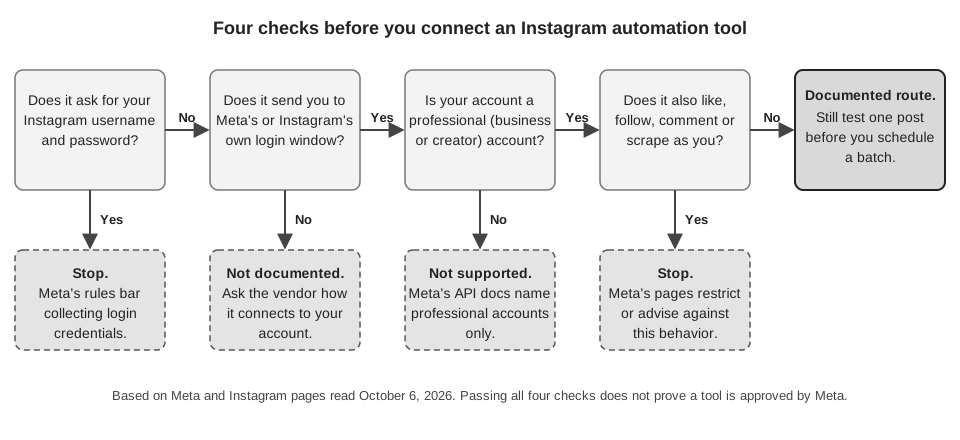
- How does it sign in? It should send you to Meta's own authorization window. Instagram's help page on third-party app access says such a request lists the information the app is asking for, and you can tap Cancel or Authorize. A form that asks you to type your Instagram password into the tool's own page is what the table above says Meta's rules bar.
- Is your account type supported? The documented API serves professional accounts. Confirm the tool's account requirements before you connect.
- What permissions does the consent screen request? Meta's Content Publishing guide names
instagram_business_content_publishfor the Instagram Login route andinstagram_content_publishfor the Facebook Login route. Extra permissions can be legitimate, for example for analytics or comments, but each should match a feature you want. Meta's pages do not say how many permissions are too many, so this is our suggestion, not a rule. - Does it only act on content you wrote? A tool that publishes your own posts fits the documented route. A tool that likes, follows or comments as you, grows followers, or collects data from other accounts falls under the rows above. Meta also documents separate API routes for replying to comments on your own posts and for chats, with their own rules (for example, the Developer Policies require opt-in before an app contacts people in Instagram Messaging). We did not review those rules in full, so we cannot judge reply or messaging tools here.
- Does it show you media rules and limits? The Content Publishing guide says JPEG is the only supported image format, and that an account is limited to 100 API-published posts in a 24-hour moving period, with a carousel counting as one. It recommends that apps enforce that limit themselves, especially if they let users schedule posts. Ask how a tool reports a rejected image or a hit limit.
- Does it publish the format you need? Meta's page is inconsistent here. Its opening paragraph lists reels as publishable and also says "Reels and stories are not supported", and its container parameters list REELS and STORIES media types. Ask the vendor which formats it publishes, and test one post of that format.
- Can you remove it later? Check that it has a disconnect option and a clear data-deletion path, then confirm the connection is gone in Instagram itself. The steps are in the next section.
One more question applies to teams and agencies. Ask who can connect or change accounts, because Meta's pages say nothing about roles inside a tool. Our guide to managing multiple social media accounts covers how to split that access.
How do you remove an Instagram automation tool?
Instagram's help page on managing apps and websites you have connected gives these steps, as shown for a computer:
- Click More in the bottom left, then click Settings.
- Below Your app and media, click Website permissions.
- Click Apps and Websites, then click Active.
- Click Remove next to the app.
Three details from that page are easy to miss. Removing an app only stops it from reaching your non-public information through Instagram, and it may have stored information while it was active. Apps with permissions used to monitor or manage business and creator account information are not expired after 90 days of inactivity, so a forgotten scheduler can stay connected until you remove it. And if you gave any app your username and password, Instagram's guidance is to change your password.
How does TrackMedia measure up against these checks?
TrackMedia is a publisher, not an engagement bot. Here is how it answers the checks above, based on its code as of October 6, 2026:
- Sign-in and storage. You connect through Meta's login: either an Instagram account linked to a Facebook Page, or the Instagram (no Facebook Page) option, which uses Instagram's own authorization. The Instagram connector has no password field. Stored credentials are encrypted with AES-256-GCM before they are saved.
- Account type. Professional accounts, through either route.
- Permissions. More than publishing alone. The connector also requests comment and insights permissions, which it needs for the first comment on a post and for analytics.
- What it does. It publishes posts you compose. We found no code for liking, following, replying to commenters or DMs, and it does not comment on other people's posts. The one comment it can post is an optional first comment on your own new post; if that comment fails, the failure is only logged.
- Media. Images and carousels of up to 10 items, captions up to 2,200 characters, JPEG only with no conversion. It does not publish Stories or delete a post once it is on Instagram. Reels are possible only through the API, not the web composer.
- Failures. A failed post shows its reason with Retry now, and a reconnect link when a connection expired. Webhooks cover
post.failed,account.token_expiring(within 7 days) andaccount.needs_reconnect. - Removal. On the Accounts page, the menu on an account card has a Disconnect action. It deletes the account record, which holds the encrypted credentials. The code asks a platform to revoke the token only for connectors that implement a revoke step, and we found none for Instagram, so also remove the app in Instagram's settings as described above.
Scheduled posts are held by TrackMedia and published at the chosen time, so they will not appear in Instagram's own list. See how to see scheduled posts on Instagram for where each kind lives, or how publishing works in TrackMedia.
What to do next
If you want a publishing tool that connects through Meta's own login and does nothing beyond posting what you write, you can start free with TrackMedia.
How we checked this
The TrackMedia Team read each page below on October 6, 2026, and took numbers, menu labels and policy wording from it. We did not test any tool, run the API on a live Instagram account, or contact Meta. We read the Platform overview, Platform Terms, Developer Policies and Spam pages as extracted text, and the Instagram Help Center and Content Publishing pages in a browser. Statements about TrackMedia come from its own code.
- Content Publishing (Meta for Developers, updated June 30, 2026): account types, permissions, JPEG, 100-post limit, the reels and stories inconsistency.
- Instagram Platform overview (Meta for Developers): professional accounts, the two login routes, access levels.
- Meta Platform Terms (last updated February 3, 2026): sections 6.a.iii and 6.a.iv on login credentials and tokens.
- Meta Developer Policies: the Instagram Platform line on managing relationships, and the opt-in rule for Instagram Messaging.
- Comment Moderation (Meta for Developers, updated June 2, 2025): opened only to confirm that a documented comment-reply API exists.
- Terms of Use (Instagram Help Center, effective January 1, 2025): sections 4.2 and 7.1.
- Why you should not use apps that offer likes and followers on Instagram and Why your account has been restricted for data scraping (Instagram Help Center).
- Manage the privacy settings for apps and websites that you have logged into or connected on Instagram and Why you may be asked if a third-party app can access your Instagram information (Instagram Help Center).
- Spam (Community Standards, Meta Transparency Center).
We could not verify: any list of Meta-approved tools, a way to look up an app's access level, a number for "very high frequencies", the policies for Meta's messaging APIs, or whether Instagram's Content Publishing page will keep its mixed statement on reels and stories.