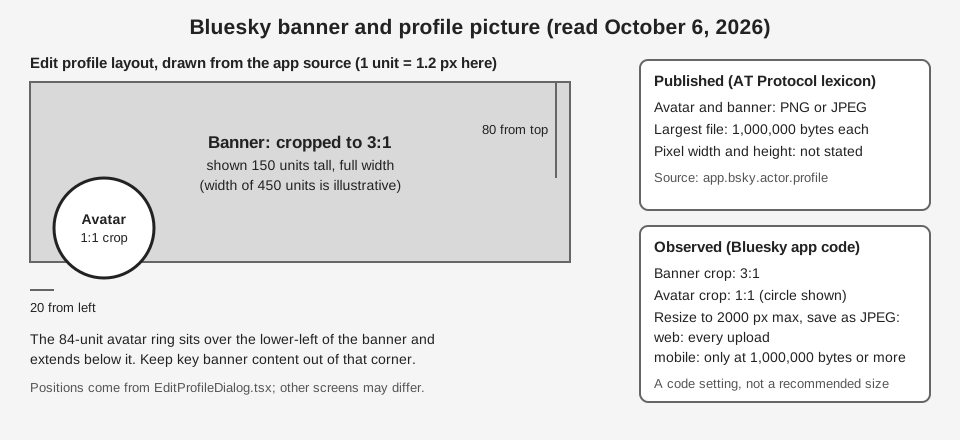
There is no official Bluesky banner size or profile picture size in pixels, because Bluesky does not publish one. What it does publish, in the schema for the app.bsky.actor.profile record, is a file limit that applies to both images: PNG or JPEG, no larger than 1,000,000 bytes.
The Bluesky app's own source code goes a little further. It crops a banner to 3:1 and a profile picture to 1:1. This guide labels each point as either something Bluesky states or an observation from the app's code, so you know which numbers are rules and which are working defaults. Everything here was read on October 6, 2026.
What size is a Bluesky banner?
There is no official banner size in pixels. The app.bsky.actor.profile lexicon describes the banner only as a "Larger horizontal image to display behind profile view." It gives a file type and a file size limit, and no width or height.
The app source gives a shape. In UserBanner.tsx, the banner picker opens the cropper with an aspect ratio of 3 to 1, and the camera option uses the same 3:1 aspect. The component that displays the banner is set to full width and a height of 150 layout units, and the profile view draws the image with a "cover" fit.
Observation: the banner is drawn as a wide, short strip with the image set to cover it, so a very wide or narrow screen can show a different crop. That last part is our inference from the code, not something Bluesky states, and we did not test how it looks on every phone or desktop window width. Check yours after you upload.
The same source shows a resize step. The app compresses the banner using a setting with a maximum dimension of 2000 and a maximum size of 1,000,000 bytes (IMAGE_SIZE_CONFIG_2K_1MB in constants.ts), but how it is applied depends on the platform. In manip.ts, the mobile function compressIfNeeded returns the image untouched when its file is under 1,000,000 bytes, and otherwise resizes it and re-saves it as a JPEG. In compress.ts, the web function compressImage always scales the longest side down to at most 2000 pixels (it never enlarges) and always saves a JPEG. A 3:1 image with a long side of 2000 pixels is 2000 by 667 pixels. That figure is our arithmetic from the app's setting, not a size Bluesky recommends.
What size is a Bluesky profile picture?
There is no official pixel size here either. The lexicon describes the avatar as the small image shown next to an account's posts, also called the profile picture, and again lists only a file type and a size limit.
In UserAvatar.tsx, the editable avatar opens the cropper with an aspect ratio of 1, so the saved image is square. For a normal account the crop uses a circular shape, and the avatar is displayed as a circle with the image set to cover it. Anything in the corners of your square image can be cut off.
The avatar uses the same compression setting as the banner: a maximum dimension of 2000 and a maximum size of 1,000,000 bytes. On the web path, a square source above 2000 pixels on a side is scaled down, so the extra pixels gain you nothing there, and the result is saved as a JPEG, which cannot hold transparency. On mobile, a file under 1,000,000 bytes is passed through as it is. These are our readings of the code, not Bluesky statements.
The edit screen also shows how the two images fit together. In EditProfileDialog.tsx, the 84-unit avatar ring is placed 20 units from the left and 80 units from the top of the banner area, so it covers the lower-left of the banner and hangs below it. Other screens may lay it out differently, but it is a good reason to keep text and faces out of that corner of your banner.
What file types and file size does Bluesky allow?
The lexicon sets the same two limits for the avatar and the banner. These are the only hard numbers in Bluesky's published material for profile images:
| Item | What the lexicon says | Pixel size stated? |
|---|---|---|
| Avatar (profile picture) | image/png or image/jpeg, maxSize 1000000 | No |
| Banner | image/png or image/jpeg, maxSize 1000000 | No |
The AT Protocol's Lexicon specification defines maxSize for a blob as the maximum size in bytes, and accept as the list of acceptable MIME types. So the limit is 1,000,000 bytes, not 1 MiB. In the units some file managers show (1,024 bytes per KB), that is about 977 KB, so a file shown as 980 KB there is already over the limit.
The accepted list names PNG and JPEG only. GIF and WebP are not on it, so do not expect an animated or WebP avatar to be accepted. The specification says a server that knows a lexicon may validate records against it and that data failing validation should be treated as invalid, but we did not test what Bluesky's servers do with an oversized file. The app re-saves oversized images as JPEGs before uploading, so most people never hit the limit; custom tools that upload directly can.
One caution: the same constants file has a separate setting for images in posts, with a maximum dimension of 4000 and a maximum size of 2,000,000. Do not reuse the profile numbers for post images.
How do you change your Bluesky banner or profile picture?
The Bluesky app source shows an Edit profile dialog that holds both images. We could not open a signed-in app, so the steps below follow the code, and your app's wording may differ by version and language.
- Open the Edit profile dialog from your own profile. We did not verify where the button sits.
- Tap the camera icon at the corner of the banner or on the avatar to open a menu.
- Choose a source. The menu offers Upload from Library, which reads Upload from Files on the web. Mobile also offers Upload from Camera.
- Crop the image. The banner crops to 3:1 and the avatar to 1:1.
- Remove an image if you want. Remove Banner or Remove Avatar appears only when that image already exists.
- Tap Save. The code then shows a confirmation message. If you cancel with unsaved changes, the dialog asks whether to discard them.
Before you upload, a checklist built from the facts above: export a JPEG or PNG, make the avatar square and the banner 3:1, keep both under 1,000,000 bytes, and keep key content out of the avatar's corner. Then view your profile on a phone and in a desktop browser, since the banner may be trimmed differently at each width.
What about guides that quote one exact pixel size?
Bluesky's Help Center has no article on banner or profile picture dimensions: its search returned no articles for "banner" or "avatar", and the three articles it returned for "profile picture" do not mention banners, avatars or pixel sizes. Bluesky's developer docs have a Profiles guide that shows how to upload an avatar or banner through the API, and it gives no pixel size either. The support page lists a support email address and legal and policy links. Pages that quote one exact pixel size for Bluesky banners are not citing a Bluesky page we could find, so we do not repeat those numbers. If Bluesky later publishes official dimensions, they would replace our arithmetic here.
Can TrackMedia change your Bluesky banner or profile picture?
No. TrackMedia's Bluesky connector publishes posts, and its code has no feature for editing your banner, profile picture or other profile fields. You make those changes in Bluesky.
What TrackMedia does with your profile is read it. When you connect Bluesky with your handle and an app password, TrackMedia's code fetches your profile at that moment and stores your display name and profile picture link for the account. If you change your picture in Bluesky later, TrackMedia does not push anything back. You can schedule and publish your Bluesky posts alongside your other networks in TrackMedia, but profile art stays in Bluesky.
For limits on other networks, see our guides to YouTube Shorts length, size and aspect ratio, how long an Instagram Reel can be and the Twitter character limit. When you are ready to plan posts across networks instead of editing profiles, you can start free with TrackMedia.
How we checked this
We opened each source below in a browser on October 6, 2026. Source code was read from the main branch on that date, so the live app may differ.
- AT Protocol lexicon
app.bsky.actor.profile, github.com/bluesky-social/atproto, lexicons/app/bsky/actor/profile.json. Verified: avatar and banner accept PNG and JPEG, maxSize 1000000, no pixel size, and the banner description quoted above. - Lexicon specification, atproto.com/specs/lexicon. Verified: blob
maxSizeis in bytes,acceptlists MIME types, and the validation options. - Bluesky app source, github.com/bluesky-social/social-app:
UserBanner.tsx,UserAvatar.tsx,EditProfileDialog.tsx,lib/constants.ts,lib/media/manip.tsandlib/media/image/compress.ts. Verified: the crop aspect ratios, the 150-unit banner height, the avatar placement, the compression setting and how mobile and web apply it, and the menu labels. - Bluesky Help Center, blueskyweb.zendesk.com/hc/en-us, searches for "banner" (0 results), "avatar" (0 results) and "profile picture" (3 articles: Data Privacy, Moderation and Custom Feeds, and updating an account email address). Verified: none of the three articles mentions banners, avatars or pixel sizes.
- Bluesky support index, bsky.social/about/support. Verified: it lists a support email address and legal and policy links and no image guidance; we did not open each linked policy.
- Bluesky developer docs, Profiles (docs.bsky.app now redirects to bsky.network). Verified: it shows how to upload an avatar or banner and states no pixel size. We did not read every docs page or the HTTP API reference at endpoints.bsky.app.
- TrackMedia's own code for its Bluesky connector, for the statements about connecting and profile reading.
We could not verify: any official recommended pixel size, the exact button that opens Edit profile in a signed-in app, whether Bluesky's servers reject oversized profile images, how the banner is trimmed at different screen widths, and whether the code we read matches the app version you have installed.