Reddit's own Help pages describe a Reddit post scheduler for two groups: moderators with Manage Posts & Comments permissions, who can schedule and repeat posts in their communities, and Reddit Pro accounts, which can schedule posts on their profile and in communities they moderate. The pages we read describe no built-in scheduling for an ordinary account posting into a community it does not run.
This guide follows Reddit Help and Reddit's Responsible Builder Policy, read in a browser on October 6, 2026. It covers the steps for each route, what to check in any outside scheduler, and what TrackMedia's Reddit connector does today.
What is a Reddit post scheduler, and does Reddit have one?
Yes, but only for some accounts. Reddit Help's Scheduled and Recurring Posts page is a moderator article, and its Reddit Pro Feature: Profile page has a short "Scheduling Posts" section for Reddit Pro accounts. We found no Reddit Help page that offers scheduling to everyone.
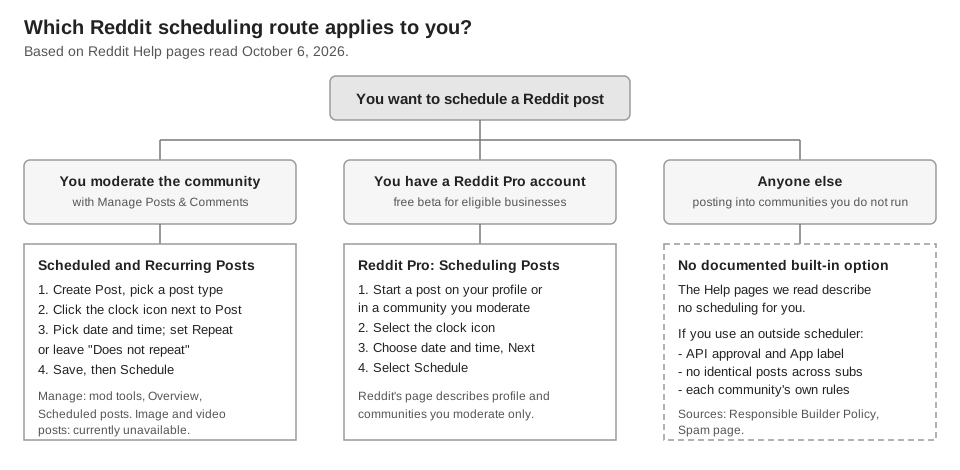
That is not proof that no other route exists, so treat it as "not documented in the pages we read". The figure below sorts the routes by who you are.
How do moderators schedule posts on Reddit?
Reddit Help says moderators with Manage Posts & Comments permissions can create, view, edit and delete scheduled posts. The steps from the Scheduled and Recurring Posts page:
- Start a post. Click Create Post and choose the post type. Reddit notes that scheduled posts for image and video posts are currently unavailable.
- Fill it in. Enter the title, body and any flair as you normally would.
- Open the schedule. Click the clock icon next to Post and select the date and time of submission.
- Choose a repeat. Leave Does not repeat for a one-off post, or pick Hourly, Daily, Weekly on a day of the week, Monthly on a day of the month, or Custom.
- Save and schedule. Check the settings, click Save, then click Schedule.
Under Advanced Options you can set how comments are sorted, pin the post in the first or second highlight slot, enable contest mode, and have the post submitted by AutoModerator. If you pick AutoModerator, Reddit says u/AutoModerator is added to your mod team with Manage Posts and Comments and Manage Flair permissions, and that posts it makes cannot be edited once posted.
Managing scheduled and recurring posts
Scheduled posts live in the mod tools, under Overview, then Scheduled posts. From there you can post now, edit or delete. Reddit says Post now keeps the post from being submitted again at its earlier time, and that it works for scheduled posts but not recurring ones. The title, body and submission time can be edited until the post has been submitted.
Three details from the page are easy to miss:
- Monthly dates. In the Custom repeat option's Months setting, Reddit warns that choosing the 29th, 30th or 31st means the post will not be posted in months that do not have that many days.
- Dynamic titles. Reddit says a placeholder such as
{{date %B %d, %Y}}in a title is replaced with the formatted date, uses Python's strftime() formatting, and only works for scheduled posts. - Where it works. Reddit says the feature is only fully available on reddit.com, though scheduled posts can be viewed in the official Reddit app.
Can Reddit Pro accounts schedule posts?
Yes. Reddit Help's Reddit Pro Feature: Profile page says Reddit Pro accounts can schedule posts to publish later on their profile and in communities they moderate. The listed steps are to begin creating a post on your profile or in a community you moderate, select the clock icon, choose the date and time, select Next, then select Schedule.
Reddit's What is Reddit Pro? page calls it a free suite of organic business tools, currently in beta and available for eligible businesses and organizations. The Pro scheduling section does not say whether it supports repeats or image and video posts, so we do not claim either. That page was last updated about six months before we read it.
What if you are not a moderator or a Reddit Pro user?
Then the pages we read give you no built-in way to schedule, and an outside tool is the usual answer. Reddit does not publish a list of approved schedulers on the pages we read, so judge a tool against Reddit's own rules. The table lists the checks that come from Reddit's pages.
| Check | What Reddit says | Source |
|---|---|---|
| Approved API access | You must request and get explicit approval before accessing Reddit data through the API; apps register to get an App profile label | Responsible Builder Policy |
| No duplicate blasting | Apps must not spam through automated posts, including identical or substantially similar content across subreddits | Responsible Builder Policy |
| Community rules | Moderators decide what counts as spam in their community, and a community can have rules beyond Reddit's | Spam |
| Posting frequency | There is a limit on how often users can post and comment in a community; new accounts with little karma may hit it | You're doing that too much |
The Responsible Builder Policy lists enforcement actions that include revoking access tokens and suspending an app or account. A scheduler does not make a post safe, so the content and the pattern still decide.
How should you schedule Reddit posts responsibly?
Write each post for the community it goes to. Reddit Help's Spam page says to post authentic content into communities where you have a personal interest, and to be thoughtful about frequency if your contributions are mostly links to a business you run or benefit from. Read the community's rules for flair, title format and link policy first, because those rules apply whenever the post is submitted.
Do not queue one post to many subreddits at once. Reddit's policy singles out identical or substantially similar content across subreddits for apps, and the Spam page lists mass-posting repetitive content for the purpose of exposure or financial gain among possible violations. If one idea suits several communities, rewrite it for each and space the posts out. Our guide to crossposting on Reddit covers Reddit's Repost button and the same spam rules.
Can TrackMedia schedule Reddit posts?
TrackMedia's code includes a Reddit connector (it works where Reddit is enabled on your account), and the composer's Schedule option works for it like for other networks: you pick a date, time and time zone, and TrackMedia publishes the post then. Our Reddit crosspost guide already lists what that connector sends (subreddit, title up to 300 characters, text or link), so we do not repeat it here. What matters for scheduling:
- The queue is TrackMedia's, not Reddit's. A scheduled post is held by TrackMedia and sent at its time. It will not appear in a moderator's Scheduled posts page in Reddit's mod tools.
- Missing pieces block the post. The preflight check marks a Reddit account as blocked until a subreddit and a title are set.
- Reddit's rejections show a reason. If Reddit refuses a post, the post page shows Reddit's own message with a plain-English explanation. A rate-limit refusal is retried automatically on a backoff. A duplicate-link refusal is not retried: TrackMedia tells you to change the wording and shows Edit the post next to Retry now.
- One schedule, many networks. You can draft once and schedule Reddit alongside your other accounts. See how publishing works and our guide to managing multiple social media accounts.
The limits are real. TrackMedia has no repeat setting: a scheduled post goes out once, so it does not replace a moderator's recurring posts. The web composer has no flair field, so if a community requires flair, check its rules before you schedule. Nothing in TrackMedia lets you bypass a community's rules or Reddit's limits.
If you want to draft once and schedule Reddit with your other networks, you can start free with TrackMedia.
How we checked this
We opened each Reddit Help page below in our own browser tab on October 6, 2026 and copied the labels and wording from it. We did not schedule a post on a live Reddit account, so we did not see the clock icon or the Scheduled posts page on screen. Reddit edits these pages often: on the day we read them, the moderator article, the Responsible Builder Policy and the Spam page showed "Updated" stamps of 13 to 20 hours earlier, so check the live page if a label differs.
- Scheduled and Recurring Posts (Reddit Help, Moderator Help): permissions, steps, repeat options, post now, edit, AutoModerator, monthly dates, date placeholder, web availability.
- Reddit Pro Feature: Profile (Reddit Help, Reddit Pro): the Scheduling Posts steps.
- What is Reddit Pro? (Reddit Help): free, beta, eligible businesses and organizations.
- Responsible Builder Policy (Reddit Help): approval, App label, spam by apps, enforcement.
- Spam (Reddit Help): examples of spam, how to avoid being labeled a spammer, moderators decide in their communities.
- Why am I being told, "You're doing that too much..."? (Reddit Help): posting limits and karma.
We could not verify whether an ordinary account can schedule posts in some other Reddit menu, whether Reddit Pro scheduling supports repeats or images and videos, or which outside schedulers Reddit approves. We left those out. TrackMedia's behavior comes from its Reddit connector, composer, retry and failure-message code, read the same day. We did not test it on a live Reddit account, and we did not verify that Reddit is enabled on any particular workspace.