Discord's help pages describe no way to schedule a message to send later, so something outside the app has to hold the time. The practical routes are Scheduled Events (which announce an event, not a message), a webhook that a tool calls at the right time, or a bot you run yourself.
This guide explains what each route can and cannot do, using Discord's Help Center and its developer documentation as read on October 6, 2026. It also covers message length, mentions, rate limits, and the <t:UNIX> timestamp format that shows an announcement time in each reader's own timezone.
Can you schedule a message on Discord?
We could not find a Discord Help Center article that describes scheduling a message to send later. What we did find, on Discord's support site, is an archived community post titled Send Later / Scheduled messages on Discord, where a member asks for the feature. That is a request, not documentation, and a missing page does not prove the feature does not exist, so check your own app's send button before relying on this.
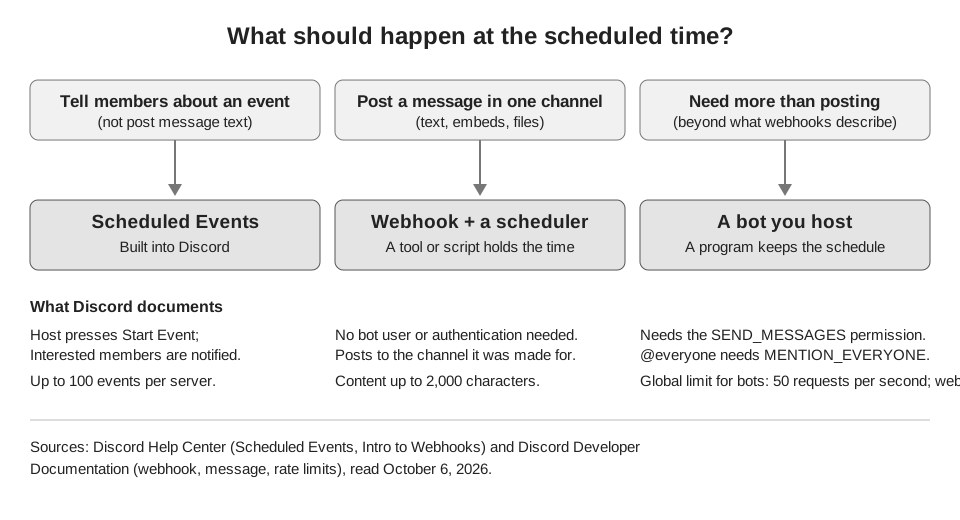
Until Discord documents one, scheduling a message means a second system holds the schedule and then posts for you. The figure below shows how the three routes differ.
How do Discord Scheduled Events work?
Scheduled Events let you announce something ahead of time so members can learn about it and be notified. They do not post a message at a set time. Discord's Scheduled Events article says to press the down arrow next to your server name, choose Create Event, pick Voice Channel, Stage Channel or Somewhere Else, fill in the details and finish with Create Event (the Stage Channel flow adds a couple of Next screens first).
The notification comes when the event starts. The article says that to start one you open Events in the channel list, press the ellipses under the event and choose Start Event, which "will send out a notification to all your server members who marked themselves as Interested". The page describes starting as something the host does, and it does not describe an automatic start.
- Permissions. Members need Create Events to make events and Manage Events to edit or cancel anyone's events.
- Limits. The article says a server can have up to 100 scheduled events at once, and voice-channel events are limited to 99 participants.
- Unstarted events disappear. The same article says both "within an hour" and "within 8 hours" of the scheduled time for when an unstarted event is removed. We cannot tell you which is current, so start your event on time.
If your goal is "remind everyone about Friday's stream", an event can do that. If your goal is "post this announcement text at 9 a.m.", it cannot.
How to schedule a Discord message with a webhook
A webhook is a URL that posts into one channel. Discord's Intro to Webhooks page describes them as a way to get automated messages sent to a text channel, and Discord's developer documentation says they "do not require a bot user or authentication to use". A webhook has no clock of its own, so a scheduler has to call it at the chosen time.
- Create the webhook. Intro to Webhooks (last updated December 2020) says to open Server Settings, go to the Integrations tab and click Create Webhook. You can set its name, avatar and the channel it posts to. The button label and menu path may differ slightly in your current app, so follow what you see in Integrations.
- Copy the URL. Press Copy Webhook URL. Treat it as a password, because anyone who has it can post to that channel.
- Give it to a scheduler. That can be a tool you trust, or your own script that sends an HTTP POST at the right time.
What a webhook can and cannot do
The developer documentation's webhook resource says a webhook message can include content, embeds, components, files and polls. Its Execute Webhook section says you must send at least one of content, embeds, components, a file or a poll, and that you can override the display name for a message.
- It can: post text, embeds and files, post into a thread (a
thread_idin the query string), and start a new thread in a forum or media channel (athread_namein the body). - It cannot (from what the docs describe): pick a different channel, because the channel is set when the webhook is made. The pages we read describe only sending, so treat reading messages or reacting to members as a bot job.
Is a Discord bot for scheduled messages worth it?
A bot is worth it when posting is not enough. The webhook pages describe only sending, so anything beyond that, such as reading or responding to members, is bot territory. A bot is an application you or someone else hosts, and it holds the schedule itself, then calls the API to create the message at the chosen time. The message resource says that in a server channel the posting user "must have the SEND_MESSAGES permission".
Because anything that keeps time is something you must run, "discord schedule bot" really means "a program that is online at 9 a.m.". We are not naming specific third-party bots. We did not read any bot's own documentation this session, so we cannot say what they do or whether they are safe for your server.
How to write times in Discord announcements
For scheduled announcements, write the time as a Discord timestamp and each reader sees it in their own timezone. Discord's API reference says timestamps "are expressed in seconds and display the given timestamp in the user's timezone and locale". The syntax is <t:TIMESTAMP> or <t:TIMESTAMP:STYLE>.
Take 3:00 p.m. UTC on November 3, 2026, which is Unix time 1793718000 seconds. Writing Doors open <t:1793718000:F> shows that moment as a full date and time to everyone, adjusted to where they are. JavaScript's Date.now() returns milliseconds, so divide by 1000 first.
| Style | Shows | Discord's example |
|---|---|---|
| t | Short time | 16:20 |
| f (default) | Long date and short time | April 20, 2021 at 16:20 |
| F | Full date and short time | Tuesday, April 20, 2021 at 16:20 |
| R | Relative time | 4 years ago |
The reference lists more styles (T, d, D, s and S). We did not post a test message, so confirm the result in a private channel before you rely on it.
What are the limits on message length, mentions and rate?
A Discord message can hold up to 2,000 characters of content, per both the message resource and the Execute Webhook section, and an embed adds more space. The message resource says a message can carry up to 10 embeds with a combined limit of 6,000 characters across them. Individual embed fields have their own caps, such as 256 characters for a title and 4,096 for a description.
Mentions are controlled by allowed_mentions, which takes three parse types: roles, users and everyone. For webhooks, Discord's message documentation says only user mentions are parsed by default, and that a bot needs the MENTION_EVERYONE permission to notify @everyone and @here. It also tells developers to use allowed_mentions to prevent unexpected mentions, which matters for scheduled posts nobody is watching.
Discord's rate limits page says an over-limit request gets HTTP 429 with a retry_after value, and that limits for top-level resources, including webhooks, are counted separately. Its 50 requests per second is the global limit for bots, not a webhook figure, and Discord does not publish the per-webhook number: it tells developers to read the rate-limit headers instead. A scheduler that posts one announcement an hour is nowhere near any limit, but a script that sends many messages at once into one webhook should wait for retry_after and retry.
How TrackMedia posts to Discord
TrackMedia uses the webhook route. You connect a channel by pasting its webhook URL, and TrackMedia holds the schedule, then posts to that webhook at the time you chose. It is not a Discord bot, and it does not use Discord's Scheduled Events.
- One webhook is one channel. The connect form asks for the Webhook URL and an optional Post as name that replaces the webhook's display name. To post in several channels, connect one webhook per channel. The guide to managing multiple social accounts covers keeping many connections tidy.
- What goes out. Text up to 2,000 characters, and up to 10 attachments. A post needs text or an attachment, or TrackMedia refuses it before sending anything. The web composer has no embed title field: an embed title can only be set through the API.
- Mentions are limited on purpose. The connector sends
allowed_mentionswith onlyusers. This matches Discord's own default for webhooks. Under Discord's documented parse types, role and@everyoneor@herementions will therefore appear as text without notifying anyone. If your announcement depends on that ping, TrackMedia is not the right route today. - Pacing. Posts are paced per webhook, so a burst is spread out, and a rate-limit reply from Discord is retried after the delay Discord asks for.
The schedule sits in TrackMedia, so it will not appear in any Discord screen. The publishing overview shows how scheduling, the calendar and failed-post retries work, and the developer section covers the API if you want to drive posts from your own code. For tagging links in announcements, see the UTM naming conventions guide. You can start free with TrackMedia and paste in a webhook URL to try it.
How we checked this
We opened each page below on October 6, 2026 and took numbers and menu labels from it. We did not test scheduling on a live Discord server or post a timestamp. Discord's developer documentation has moved from discord.com/developers/docs to docs.discord.com/developers, so the links point to the new address. TrackMedia's behavior comes from its Discord connector code, read the same day.
- Scheduled Events (Discord Help Center): creation steps, Start Event, permissions, 100-event and 99-participant limits, the 1-hour and 8-hour wording.
- Intro to Webhooks (Discord Help Center, last updated December 2020): creating a webhook and copying its URL.
- Send Later / Scheduled messages on Discord (Discord community feedback post, archived): evidence of a feature request only.
- Webhook resource (Discord Developer Documentation): what webhooks are, content types, 2,000 characters, thread parameters.
- Message resource (Discord Developer Documentation): 2,000 characters, embed limits,
allowed_mentions,SEND_MESSAGES,MENTION_EVERYONE. - API reference (Discord Developer Documentation): timestamp syntax and styles.
- Rate limits (Discord Developer Documentation): 429 behavior, per-resource buckets, global limit for bots.
We could not verify whether Discord has any scheduling feature outside its help pages, whether Discord's per-webhook rate limit has a published number, attachment size limits (the Execute Webhook page does not give one), or how third-party bots behave. We left those out.