UTM naming conventions are a written list of the exact values allowed in utm_source, utm_medium, utm_campaign and utm_content, all in lowercase and each with one fixed spelling. Google Analytics treats those values as case sensitive, so the list is what stops one network from showing up as three rows in your reports.
This guide gives you a convention you can copy for social media links, with the allowed values, how GA4's default channel group reads utm_medium, and a governance checklist. Every Google claim links to Google's own help pages, read on October 6, 2026.
What are UTMs, and which parameters does Google Analytics read?
UTMs are parameters added to the end of a URL, such as ?utm_source=linkedin, that tell your analytics tool which campaign sent a visitor. Google's page on collecting campaign data with custom URLs says to add them to the destination URLs you use in referral links and ad campaigns, and that the values appear in the Traffic acquisition report.
The table pairs Google's description of each parameter (paraphrased) with the rule this guide uses for social links.
| Parameter | What Google says it is | Our rule for social |
|---|---|---|
utm_source | The referrer, such as google, newsletter4 or billboard | The network, lowercase |
utm_medium | The marketing medium, such as cpc, banner or email | One value from a short list |
utm_campaign | Product, slogan or promo code, such as spring_sale | Start month plus campaign name |
utm_content | Tells apart creatives, such as two calls to action in one email | Placement or variant |
utm_term | A paid keyword | Left out for organic social |
utm_id | A campaign ID, matching the IDs in your uploaded campaign data | Optional register ID |
Google says you should always use utm_source, utm_medium and utm_campaign. It adds that if you set one UTM parameter you should set all the relevant ones, because missing parameters produce (not set) values in reports. Its note also names utm_source_platform, which we did not test for social links, so this convention leaves it out.
In reports, Google's page on manual tagging maps utm_content to Manual ad content and utm_term to Manual term. Each has Session versions, and the Traffic acquisition report shows the combined Session source / medium.
Are UTM parameters case sensitive in GA4?
Yes. Google's URL builder page says parameter values are case sensitive, so utm_source=google is different from utm_source=Google. Its best-practices table adds that Meta and meta are different values and so are SpringSale and Spring_Sale, and it advises you to "Use lowercase as a standard practice". A different separator splits a value just as a capital letter does, so a convention has to fix both.
Google's default channel group page says channel definitions are not case sensitive. Put the two statements together and Social and social both land in Organic Social, while the Session source / medium report lists them as separate rows. Your channel totals look right and your source and campaign reports are split.
Before and after: how inconsistent tags split a report
Four people tag links to the same Instagram campaign without a convention. Each link is reasonable on its own.
| Tag as written | Row in Session source / medium | Default channel group |
|---|---|---|
utm_source=Instagram&utm_medium=Social | Instagram / Social | Organic Social |
utm_source=instagram&utm_medium=social | instagram / social | Organic Social |
utm_source=ig&utm_medium=social | ig / social | Organic Social |
utm_source=instagram&utm_medium=social-media | instagram / social-media | Organic Social |
Per Google's definitions, all four land in Organic Social, because social and social-media are both on its medium list. But the source / medium report shows four rows for one network. After the convention, all four links use instagram and social, and the four rows become one: instagram / social. The row labels follow from Google's rule that values are case sensitive; we did not run these links through a property.
What are good UTM naming conventions for social media?
A good convention is short enough to remember and strict enough to check. These are the rules we recommend. They are our convention, built on Google's guidance, not a Google requirement.
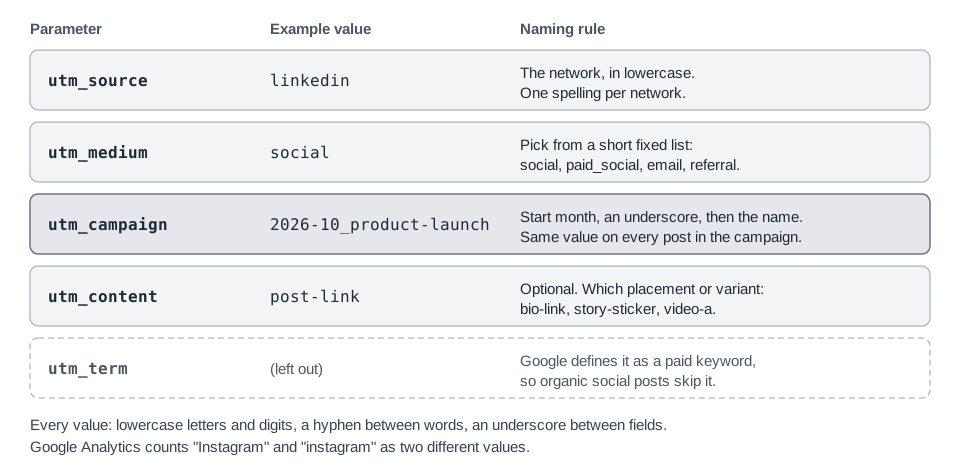
- Lowercase only. No capitals anywhere in a value.
- Letters, digits, hyphens and underscores only. No spaces, accents or symbols, so nothing needs URL encoding.
- A hyphen between words, an underscore between fields. That gives
product-launchinside a campaign name and2026-10_product-launchfor the whole value. - One list per parameter. A value is only valid if it is on the list, and the lists live in one place.
utm_source: one value per network
Use the network's name in lowercase, one spelling per network.
| Network | utm_source |
|---|---|
instagram | |
facebook | |
linkedin | |
| X (formerly Twitter) | x |
| TikTok | tiktok |
| YouTube | youtube |
| Threads, Pinterest, Reddit, Bluesky, Mastodon | threads, pinterest, reddit, bluesky, mastodon |
Google's best-practices table asks for one unique source per platform and uses fb and insta as examples, so short forms are fine if you use them everywhere. We prefer full names because anyone can read a report without a key. For X, choose x or twitter once, record the choice in your register, and do not mix them.
One caution for paid social. Google's Paid Social rule needs the source to be on its list of social sites, which Google publishes as a spreadsheet linked from the default channel group page. We searched that spreadsheet on October 6, 2026. It lists facebook, fb, instagram, ig, linkedin, pinterest, reddit, tiktok and twitter, but we found no row for x, threads, bluesky or mastodon, and it files youtube under video sources. Under Google's rules, a paid_social link with a source that is not on the list goes to Paid Other (or Paid Video for YouTube), not Paid Social. Organic links are not affected, because social as the medium is enough. If you need Paid Social for X, you would have to use twitter as the source or build a custom channel group; either way, write the choice into your register. The list changes, so recheck it.
What should utm_medium be? How GA4 groups it into channels
Use social for unpaid posts and paid_social for boosted posts and ads. Most of Google's channel rules for manual traffic test utm_medium, so this is the value to keep on a short, fixed list.
Google's default channel group page lists the rules. For manual traffic, Organic Social matches when the medium is one of social, social-network, social-media, sm, social network or social media (or when the source is on its social-site list). The paid channels need a medium that matches the pattern ^(.*cp.*|ppc|retargeting|paid.*)$, which in plain terms means it contains cp, equals ppc or retargeting, or starts with paid.
| utm_medium | GA4 default channel (Google's rules) | Use it for |
|---|---|---|
social | Organic Social | Unpaid posts on any network |
paid_social | Paid Social when the source is on Google's social-site list; otherwise Paid Other (Paid Video for video sources such as YouTube) | Boosted posts and social ads |
email | Links in newsletters | |
referral | Referral | Links on other sites, such as a partner's blog |
affiliate | Affiliates | Links on affiliate sites |
sms | SMS | Links in text messages |
Near misses are a common trap, and what they do depends on the source. social_media uses an underscore, but Google's medium list has the hyphenated and spaced forms. organic_social, boosted and promoted match neither the Organic Social medium list nor the paid pattern. Google's Organic Social rule also accepts a source from its social-site list, so one of these mediums paired with instagram or linkedin can still land in Organic Social, while the same medium paired with a source that is not on the list is left with no matching rule, and Google says Unassigned is the value Analytics uses in that case. That is our reading of the published rules, not a tested result. Google's best-practices table itself uses paid_social as an example medium, and Google says its channel definitions may evolve, so recheck the page now and then.
How do you name utm_campaign, utm_content and utm_term?
Name utm_campaign as the start month, an underscore, then a short hyphenated name, such as 2026-10_product-launch. Google's best-practices table says to use one unique name that matches the exact campaign name, so a single campaign never splits into several rows.
Use the month the campaign starts, not the month each post goes out, or one campaign splits across months.
- utm_id (optional). If you keep a campaign register with IDs, put the same ID here on every link, for example
c2610-01. The format is ours, not Google's. - utm_content. Google says this tells apart creatives or links in the same message. For social, use the placement or variant:
bio-link,story-sticker,post-link,video-a,video-b. Google asks that names stay consistent, so call the same thing the same name in every campaign. - utm_term. Google defines it as a paid keyword, so leave it out of organic social. If you do tag keywords, Google says to use one strict format, such as all lowercase with identical spelling.
What do UTM source, medium and campaign examples look like?
This set follows the convention for one product launch. The URLs use example.com, and no link in this guide was run through a live Google Analytics property.
| Placement | utm_source / utm_medium | utm_campaign / utm_content |
|---|---|---|
| LinkedIn post | linkedin / social | 2026-10_product-launch / post-link |
| Instagram bio link | instagram / social | 2026-10_product-launch / bio-link |
| Instagram Story sticker | instagram / social | 2026-10_product-launch / story-sticker |
| X post | x / social | 2026-10_product-launch / post-link |
| Boosted LinkedIn video | linkedin / paid_social | 2026-10_product-launch / video-a |
| Launch newsletter | newsletter / email | 2026-10_product-launch / top-link |
Written out, the Instagram Story sticker link is:
https://example.com/product-launch?utm_source=instagram&utm_medium=social&utm_campaign=2026-10_product-launch&utm_content=story-stickerFor the Instagram placements in particular, see our guide to counting Instagram link clicks.
What should never go in a UTM tag?
- Personal data. Google's page on avoiding personally identifiable information says no data should be passed to Google that it could use or recognize as PII, such as email addresses, personal mobile numbers and social security numbers. It names
utm_source,utm_medium,utm_term,utm_campaignandutm_contentspecifically. A personalized newsletter link that carries a subscriber's email breaks this rule. - Anything private. A UTM value is part of the URL, and Google's URL builder page notes that UTM information is captured in the Page location dimension. Keep out internal codenames, ticket numbers and client names you would not print on the link itself.
- Tags on links between your own pages. Google's page describes UTMs for referral links and ad campaigns. Google's page "Campaigns and traffic sources" says a new session does not start when Analytics sees a new campaign, and that values sent mid-session are used for event-based attribution. It does not recommend tagging internal links, and we did not test it. Our rule, not a measured effect: tag only links that bring people in from outside.
What are the UTM parameter validation rules?
Google publishes the syntax and the case rule, but the UTM pages we read list no allowed-character set and no limit on the length of a value, so your validation rules are your own. One ceiling does exist: Google's page on automatically collected events says the page_location parameter, which carries the full URL, must be 1,000 characters or fewer. Google's syntax is a question mark before the parameters, an equals sign between name and value, and an ampersand between pairs, with source, medium and campaign always present.
Add these checks on top. The pattern allows lowercase letters and digits with single hyphens or underscores between them:
^[a-z0-9]+([_-][a-z0-9]+)*$- Every value matches the pattern.
utm_sourceandutm_mediumare on your allowed lists.utm_campaignis in your campaign register.- All three required tags are present on the link.
- No value contains personal data.
The pattern accepts 2026-10_product-launch and paid_social and rejects Instagram, spring sale and social_. To confirm that a finished link survives redirects and shows up in GA4, follow our guide to checking UTM links in GA4.
What are the UTM best practices for keeping reports clean?
Google's UTM best-practices table asks for one unique source per platform, one unique medium per channel, one name per campaign, consistent content names and dynamic UTMs where a platform supports them. Turn that into a checklist someone owns:
- Keep one source of truth. One shared sheet or doc with three lists: allowed sources, allowed mediums, and a campaign register with name, optional ID, start month and owner.
- Use only values from the lists. Add a new value to the register first, with the date.
- Build links with a tool, not by hand. Google points to its Campaign URL Builder for website links, and recommends dynamic parameters where an ad platform supports them. In TrackMedia, the template below does the repeating part for you.
- Validate before publishing. Run the pattern above, then click the link once.
- Never rename in place. Because a new spelling is a new value, renaming mid-campaign starts a second row. Finish the campaign under the old name and use the new name for the next one.
- Review the report monthly. Open Reports, then Acquisition, then Traffic acquisition, as Google's Traffic acquisition report page describes. Look for capitals, near-duplicates and
(not set).
How does TrackMedia apply a UTM convention?
When link tracking is on, which is the default, TrackMedia adds UTM tags to each link it turns into a tracked short link, using a template under Settings, then Links, in the UTM tags section. A link is left as you wrote it, with no tags, if tracking is switched off, its domain is on your excluded list, it is on a network where links are left raw (Pinterest, by default), or the link service does not answer in time. This is what the code does as of October 6, 2026. Crosspost rules have their own optional UTM setting, which this guide does not cover:
- Three fields. The template has
utm_source,utm_mediumandutm_campaign. The defaults are{network}for source andsocialfor medium, and the campaign is left off until you fill it in. - Two variables.
{network}becomes the ID of the network the link goes out on, such aslinkedinorx.{post}becomes the post's TrackMedia ID, which means little in a report, so we do not recommend it forutm_campaign. - Your tags win. A UTM parameter already in the link is never overwritten, so you can write
utm_campaignandutm_contentinto a link yourself. TrackMedia has no template field forutm_content,utm_termorutm_id, so add those by hand. TrackMedia rebuilds the query string when it adds a tag, so the values you wrote keep their meaning, but a space written as%20comes back as+. - No validation. The fields trim spaces and cap each value at 100 characters. They do not lowercase what you type or check it against a list, so enter lowercase values yourself.
- Some IDs are not the plain network name (as of October 6, 2026).
{network}is TrackMedia's internal ID for the account, so a LinkedIn company Page writeslinkedin-pageand Instagram connected without a Facebook Page writesinstagram-business. Neither is on Google's social-site list, and each gets its own source row next tolinkedinorinstagram. To keep one row, writeutm_source=linkedin(orinstagram) into the link yourself; TrackMedia never overwrites it. If other networks share that link text, they will get the same source, so keep the written tag to the network it is for. - Hand-made links are not tagged. A link you shorten with Shorten a link keeps its destination exactly as pasted, so tag it first.
The settings page shows a preview URL as you type. Links are rewritten only where people can click them, never in an Instagram or TikTok caption. For the full flow, see how publishing works and how click analytics work.
What to do next
Write the three lists, set the template, and tag your next post with them. Start for free with TrackMedia to apply the template to the links it tracks for you.
How we checked this
We read each page below on October 6, 2026 and describe only what it says. The convention itself (lowercase values, separators, the YYYY-MM_name pattern, the allowed lists and the validation pattern) is our recommendation, not a Google rule. TrackMedia's behavior comes from reading its own source code that day. We did not run these links through a live Google Analytics property.
- Analytics Help, "URL builders: Collect campaign data with custom URLs": https://support.google.com/analytics/answer/10917952. Used for definitions, case sensitivity, best practices and
(not set). - Analytics Help, "Default channel group": https://support.google.com/analytics/answer/9756891. Used for channel rules.
- Analytics Help, "Traffic-source dimensions, manual tagging, and auto-tagging": https://support.google.com/analytics/answer/11242870. Used for dimension names.
- Analytics Help, "Best practices to avoid sending Personally Identifiable Information (PII)": https://support.google.com/analytics/answer/6366371. Used for the personal-data rule.
- Analytics Help, "[GA4] Traffic acquisition report": https://support.google.com/analytics/answer/12923437. Used for where the data appears.
- Google Analytics Campaign URL Builder: https://ga-dev-tools.web.app/ga4/campaign-url-builder/. Linked from Google's page; we confirmed it loads, not tested.
- Google Analytics Help, Automatically collected events (the page_location length limit).
- Google Analytics Help, Campaigns and traffic sources (mid-session campaign values).
- Google, "GA4 Source Categories" spreadsheet, linked from the Default channel group page: https://storage.googleapis.com/support-kms-prod/qn1xhBu8MVcZPIZ2WZMNdI40FtZXFPGYxj2K (which sources count as social or video).
We opened Google's source-category spreadsheet and searched it for the networks in this guide. Not checked: how Google Analytics treats UTM tags on internal links, and whether the list has changed since October 6, 2026.