The link in bio on Instagram is the website link list on your profile, set under Edit profile, then Links. Instagram's Help Center says you can add up to 5 links there, and anyone, on or off Instagram, can see them.
This guide uses Instagram's own help pages, read on October 6, 2026. It covers where the bio is, how to add or edit your links, what "link in bio" means, how to find the link on someone else's profile, and when a link-in-bio page tool is worth using.
Where is bio in Instagram?
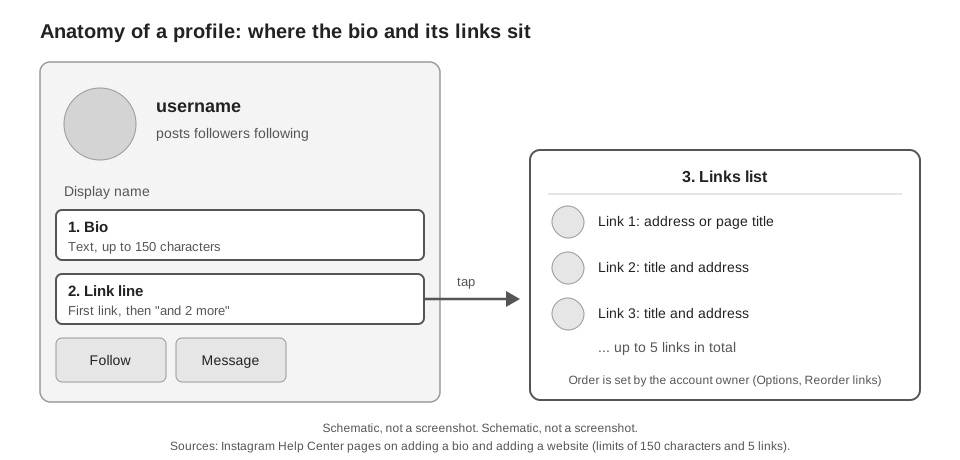
The bio is part of your profile page. Instagram's Help Center says your profile shows your bio and your Instagram posts, and it is also where you edit your profile info. In the app, tap Profile or your profile picture in the bottom right to get there.
Instagram's help pages do not describe the layout of a profile, so the figure below is a schematic, not a screenshot. The app can arrange things differently from a desktop browser.
How long can a bio be?
Instagram's page on adding a bio says you can write a bio of up to 150 characters. The same page notes that anyone can see your bio.
Separately, Instagram's 2018 announcement of hashtag and profile links in bio says a # or @ in your bio becomes a live link to a hashtag page or a profile. Those links are not the website links covered below.
How to add a link to your Instagram bio
To put a website link on your Instagram bio, open Edit profile, tap Links, and add the URL. Instagram's Help Center page Add a website to your Instagram profile gives these steps for the iPhone app:
- Tap Profile or your profile picture in the bottom right.
- Tap Edit profile at the top of the screen.
- Tap Links, then tap Add external link and enter the URL.
- Tap Done, then tap Back.
The Android version of the page uses slightly different labels: you tap Add link instead of Add external link. Menus change between app versions, so go by the label names on your screen.
Instagram's page says this feature "isn't available on computers" and offers only Android and iPhone app versions, so we do not describe a desktop route for adding links.
How to add multiple links to your Instagram bio
Repeat the same steps. The page says you can add up to 5 websites to your profile, and it has a separate section for reordering them: open Edit profile, tap Links, tap Options, then Reorder links, and tap and hold a link to drag it up or down. The last tap is Done on iPhone and Accept on Android.
To remove a link, the page says to tap it and then tap Remove link.
What Instagram says about link rules and account types
- Facebook link. Instagram's page on adding a link to your Facebook profile says your Instagram account must be in Accounts Center first (the page notes you may see Meta Account settings instead). That link becomes the first website people see in your bio.
- Teens. Instagram says teens under 18 can't include links to certain websites in their bios, and that it may remove an existing one.
- Account types. The pages above describe the same steps without separating personal, creator and business accounts. We found no account-type difference in them, but a feature can still roll out unevenly, so check your own Edit profile screen.
- URL format. We found no Instagram help page that sets a character limit or a format for a bio link. If Instagram rejects one, try a shorter address.
What does link in bio mean, and can you say it in a caption?
"Link in bio" is a pointer: it tells people the clickable link is on your profile, not in the post. You can write the phrase in any caption, because it is ordinary text, and we found no Instagram help page that restricts it. It only helps if a link is actually set on your profile.
Instagram's help pages we read do not say whether a web address in a caption is clickable, so we do not state it as Instagram's rule. The phrase points people to the links set on your profile, which Instagram does document.
Instagram does document link tools in other places, such as the link sticker for Stories. Our guide on adding a link to an Instagram Story covers that.
How to find the link in bio on someone else's profile
Open the profile and look under the bio text. Instagram's help pages do not say how another person's links are displayed, so we do not describe that screen. The owner's links are the ones they set under Edit profile, then Links.
If you tapped a link inside the app and want it back, Instagram has a second route. Its page on link history says links you visited in Instagram's in-app browser are saved for 30 days, under Menu, Your activity, Link history in the iPhone app. It adds that links opened in chats are not saved, and that you can only see link history when enhanced browsing is turned on.
If you only need a link to your own profile or a post to share, those are separate. Instagram's page on getting a link to a post says to tap Send below the post, then Copy Link (iPhone version). For a profile, Instagram's profile card page lists Copy link under Share profile, and says the feature is not available to everyone.
Do you need a link in bio tool such as Linktree?
If five links is enough, you may not need one. As of October 6, 2026, Instagram's Help Center says you can list up to 5 links on a profile, so a link-in-bio tool matters when you want one address that opens a page of buttons, or when you need more than 5 destinations. Our guide to choosing a link in bio tool compares what to look for, including Linktree.
The other question is tracking. Instagram's native links give you the list but not a click report we can point to, so counting clicks needs a layer outside Instagram. Our guide on how to see who clicked your Instagram link walks through what Instagram reports and what it does not.
Where TrackMedia fits, and where it does not
TrackMedia is not a link-in-bio page builder, so it will not make the page of buttons for you. What it can do is make a tracked short link that you paste into one of the link fields above.
- Make the link. Use Shorten a link on the Links page. The short link goes to exactly the URL you pasted.
- Add tags by hand. That manual short link gets no UTM tags automatically. Write them into the destination yourself before you shorten it, using our UTM naming conventions.
- Read the clicks. Where link tracking is switched on for your workspace, TrackMedia's click analytics show clicks and visitors per link over 7, 30 or 90 days, with countries, referrers and devices, and exclude bots from the chart and breakdowns.
Two limits. We did not test whether Instagram accepts a TrackMedia short link in the Links field, and Instagram documents no rule that would tell us. Also, links in an Instagram caption are left as written by TrackMedia, because TrackMedia treats captions as text where links are not tappable. If you would like a place to count clicks and schedule posts, you can start free with TrackMedia.
How we checked this
We opened each page below on October 6, 2026. Instagram's help pages for adding a website and a bio are device-gated, so we read the iPhone app, Android app and Computer versions as listed. We did not edit any Instagram account. The layout description comes from viewing one public profile in a desktop browser.
- Add a website to your Instagram profile (Instagram Help Center), iPhone and Android versions: the 5-link limit, steps, reordering, removing links, no computer version.
- Add a bio to your Instagram profile (Instagram Help Center), iPhone and Computer versions: the 150-character limit.
- Profile (Instagram Help Center): what a profile shows.
- Add a link to your Facebook profile in your Instagram profile (Instagram Help Center): Accounts Center requirement, link order.
- Why a link may have been removed from your Instagram profile (Instagram Help Center): the teen restriction.
- See your link history on Instagram (Instagram Help Center): the 30-day history.
- Edit and share your Instagram profile card and Get a link (URL) to a photo or video on Instagram or Threads (Instagram Help Center): sharing a profile or post link.
- Introducing Hashtag and Profile Links in Bio (About Instagram, March 21, 2018): # and @ links in bio.
What we could not verify: any Instagram page stating that caption links are not clickable, any page on link character or format limits, how many links older app versions allow, and whether personal, creator and business accounts see identical Links options. We also did not test a TrackMedia short link in Instagram's Links field. TrackMedia's own behavior comes from its product and Instagram connector code, read the same day.