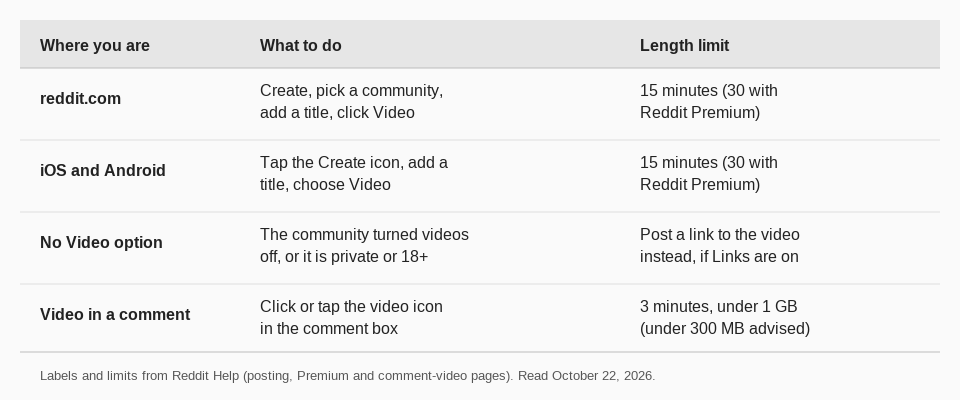
To upload a video to Reddit, tap or click Create, choose a community, add a title, then choose the Video option in the post editor and select your file. Reddit's Help Center says the video upload length is 15 minutes, or 30 minutes with a Reddit Premium subscription.
This guide uses Reddit Help pages on posting, Reddit Premium, community settings and videos in comments, all read on October 22, 2026. It covers the steps, the limits Reddit publishes, and what to do when there is no Video option.
Sources: posting · Reddit Premium · community settings · videos in comments
How to upload a video to Reddit
Reddit's "How do I post and comment on Reddit?" page lists Video as one of the options in the post editor. Its steps for a post are:
On reddit.com
- Click Create in the top right corner. From inside a community, you can also use the create-a-post button next to the community name.
- If you start from the home page, choose the community from the dropdown menu.
- Add a title. Reddit says it should describe your content accurately.
- In the editor, choose the Video option and select your file.
- Click Post.
On iPhone and Android
- Tap the Create icon: top right corner on iOS, bottom of the screen on Android, or inside a community.
- Add a title and choose Video from the options, which on mobile are Link, Image, Video, Poll and AMA.
- Add tags or flair if the community uses them.
- Tap Post.
The page does not describe the file picker itself, so go by what your device shows. Reddit also notes that not all communities allow all options, so you may see only some of them.
What are Reddit's video length and file size limits?
For posts, Reddit publishes the length but not a file size on the pages we read. Its Reddit Premium page lists a "video upload length of 30 minutes (up from 15 for non-premium users)." So 15 minutes is the free limit.
Comments are different. Reddit's page on videos in comments gives 3 minutes as the maximum length, a file size under 1 GB (recommended under 300 MB), a minimum length of 2 seconds and a minimum of 50x50 pixels. Those specs are for comments only, so do not assume they apply to posts.
We found no page listing accepted video formats or aspect ratios. If an upload fails, trimming the clip or exporting a smaller file are the sensible first moves, but Reddit does not document them as fixes.
Why can't I upload a video on Reddit?
The documented reason is the community. Reddit's community settings page says moderators can turn Videos on or off, and that "videos aren't allowed in private or mature (18+) communities." If Video is not in your editor, that community has it switched off or is one of those types.
Other things to check:
- Pick the community first. On the home page, the options you see depend on the community you select.
- Your video is too long. Over 15 minutes needs Reddit Premium, per its subscription page.
- New or low-karma account. Reddit says brand-new accounts can hit the "You're doing that too much" spam filter, and that commenting to earn a little karma can help.
If videos are off, check whether Link posts are on. Reddit says moderators toggle text, links, images, videos, polls and reposts individually, so a community may accept a link to a video hosted elsewhere. Read the community's rules before you try it.
How to add a video to a Reddit comment
On reddit.com, click the video icon in the comment box, select or record a video, then click Comment. In the app, tap the Add a Comment box, tap the video icon, choose the video, then tap the send icon.
Reddit says videos in comments are only available in Safe for Work communities, and that NSFW videos are not allowed.
Can viewers turn on captions?
Reddit's Help Center says automatically generated closed captions are available for certain videos on its mobile apps. A viewer opens a video post, taps the overflow menu in the top right corner and selects Turn On Captions. It also warns that availability can be limited by video length, post type and audio quality.
Sharing a video on Reddit with TrackMedia
TrackMedia schedules Reddit text posts and link posts to the subreddit you choose, with a title, flair and NSFW or spoiler flags. For a video you made, a good pattern is to publish it where it lives (for example on YouTube), then have TrackMedia post the link to the community at the time you pick.
Every link gets UTM tags, so TrackMedia shows clicks, visitors and referrers per post, and upvotes and comments from Reddit sit beside your other networks in one analytics view. The same composer also publishes to the other 20 networks on every plan. To upload the video file to Reddit itself, use the Reddit app or site as described above.
Related reading: what a subreddit is, the Reddit post scheduler guide and how to crosspost on Reddit. You can try TrackMedia free for 14 days.
Questions people also ask
How do I upload a video on Reddit from my phone?
Tap the Create icon, add a title, choose Video, pick the clip and tap Post. The community must allow videos, and the clip must be within 15 minutes unless you have Reddit Premium.
How long can a Reddit video be?
Reddit's Premium page gives 15 minutes for non-Premium users and 30 minutes for Premium. Videos in comments are limited to 3 minutes.
Can I upload a video to any subreddit?
No. Moderators choose whether their community allows video posts, and videos are not allowed in private or mature communities.
What is the file size limit for a Reddit video post?
The pages we read do not publish one for posts. They do give under 1 GB for comment videos.
How we checked this
We opened these Reddit Help Center pages on October 22, 2026. TrackMedia's Reddit behavior comes from its Reddit connector code the same day.
- How do I post and comment on Reddit?: post steps, options by device, spam filter note.
- What is a Reddit Premium subscription?: 15 versus 30 minute video length.
- Community settings: moderators toggle video posts; not in private or mature communities.
- How do I add video in comments?: comment video steps and specs.
- Closed Captions on mobile: how viewers turn captions on.