Meta documents no single best time to post on Facebook. What it does document is where to see when your own followers are active: Active times when you schedule a post in Meta Business Suite, and the Audience tab in Insights.
This guide shows where those readouts are, how to test two posting times against each other, and how TrackMedia's Best times view reads your own post history. We read the Meta pages listed at the end on November 4, 2026, and use no third-party studies, because they describe other people's audiences.
Is there a best time to post on Facebook?
We found no best day or hour named by Meta. We searched Facebook's Help Center for "best time to post" on November 4, 2026. The 48 results included how to schedule a post in a group, how to schedule a Page post, how Feed ranking works, and Time on Facebook; none gave a time to post. A search cannot prove no such page exists, so this covers only what we opened.
The nearest thing Meta gives you is data about your own audience. For how Feed ranking works, our guide to how the Facebook algorithm works covers what Meta says.
Where do you see when your Facebook audience is active?
Two places, both for a Facebook Page. Which one you see depends on where you work.
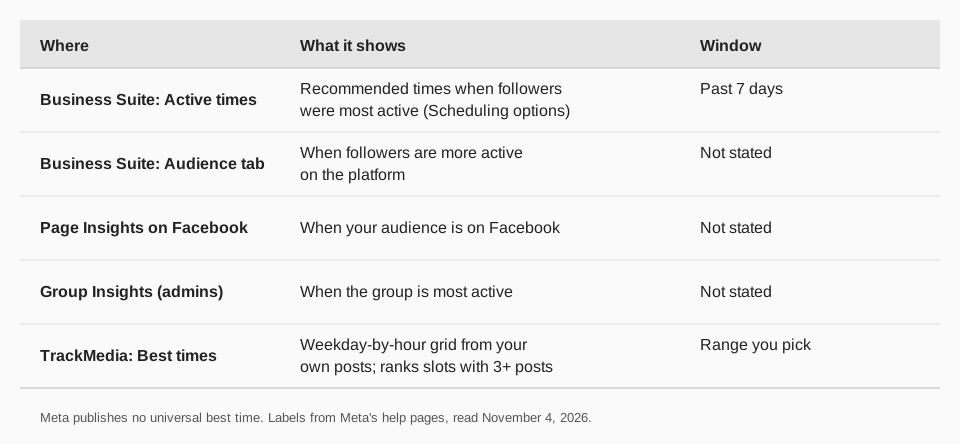
- Active times, when scheduling. Meta's Create and manage posts in Meta Business Suite page says that under Scheduling options you click Active times "to select recommended times based on when followers were most active on Facebook and Instagram over the past 7 days".
- The Audience tab. Meta's page About Insights in Meta Business Suite on desktop describes the Audience tab as showing demographics and interests, trends in new followers and "when followers are more active on the platform".
- Page Insights on Facebook. Facebook's See Page Insights page says you can use Insights to "learn which posts have the most engagement and see when your audience is on Facebook".
Meta's pages give no more detail than that. They don't say how many followers a Page needs for the readout, or whether posting at an active time raises reach.
Sources: Create and manage posts in Meta Business Suite · About Insights in Meta Business Suite on desktop · See Page Insights
How to open Page Insights
Facebook's See Page Insights page lists these steps on a computer:
- Log into Facebook, then click your profile photo in the top right.
- Click See all profiles, then select the Page you want to switch into.
- Click Professional dashboard in the left menu. (The page notes that it has changed, and you will now see Creator Dashboard or Business Dashboard.)
- Click Insights in the left menu.
In Meta Business Suite, pick your Page at the top left and click Insights, then Audience. Our guide to checking Facebook Page insights covers the rest of the reports.
How do you test your best time to post on Facebook?
Pick two slots from those readouts, post comparable content at each, and compare after the same wait. This is our method, built from reports Meta documents.
- Choose two slots. A slot is a weekday plus an hour, such as Tuesday at 9 a.m. Use Active times or the Audience tab to choose.
- Keep posts alike. Compare a photo post with a photo post. A link post and a video are not a fair match.
- Alternate and repeat. Rotate the slots over several posts each. One post proves little.
- Compare at the same age. Meta's post insights list Views, Reach, Reactions, Comments, Shares, Saves and Total clicks. Read the same metric after the same wait, such as 48 hours.
- Use the median. One post that spreads can lift an average and hide an ordinary slot.
A small example with invented numbers, not Facebook data: four posts at 8 a.m. get 410, 380, 520 and 450 views (median 430). Four posts at 7 p.m. get 300, 610, 280 and 330 (median 315). The average gap looks small because of the 610 post, and the medians show the morning slot ahead.
Keep a slot that wins more than once and test it against a new one. Scheduling a test is covered in how to schedule a Facebook post.
What about the best day to post?
The same rule holds for the day. We found no best day on the Meta pages we read. Treat the weekday as part of the slot you test, and let your own Insights decide.
Finding your best time with TrackMedia
TrackMedia publishes to Facebook Pages, and its Best times tab on the Analytics page averages engagement by publish hour from your own posts. Here is what the view does, read from the code on November 4, 2026:
- Shows a weekday-by-hour grid titled "When your posts land best", in your workspace's time zone. Network and account filters narrow it to Facebook.
- Ranks only slots with enough posts. "Your strongest slots" lists slots with at least 3 posts behind them. Slots with fewer are shown greyed and labelled as too few to rank.
- Suggests times in the composer. When you schedule in TrackMedia's composer, slots that passed that bar, from the last 90 days, appear as quick picks labelled "Best". These use every network in your workspace.
TrackMedia reads reactions, comments, shares, views, reach and clicks for Facebook posts, including Page posts you did not publish with it. Use Meta's Active times to choose candidate slots, then use the grid to see which ones worked for you. Together they cover both the forecast and the result.
To plan Facebook alongside your other networks, start free with TrackMedia.
Troubleshooting timing data
- You don't see Active times. It sits under Scheduling options in Meta Business Suite when you create a post. A computer view is the one Meta's page describes.
- No Audience data. Meta's Page Insights page says demographic data needs data for 100 or more people, and Community Pages don't have Insights.
- The Best times grid is grey. A slot needs 3 posts before it is ranked.
- Results swing wildly. Compare medians over several posts, not single posts.
Questions people also ask
What is the best time to post on Facebook?
Meta names none. Use Active times and the Audience tab to find when your followers are active, then test two slots.
What is the best day to post on Facebook?
Meta names none either. Treat the day as part of the slot you test.
How do I see when my followers are online?
Open Meta Business Suite, choose Insights, then Audience, or use Active times under Scheduling options.
Does the best time differ for groups?
Meta says group admins can use the Insights tool to see when the group is most active. See how to schedule a Facebook group post.
How we checked this
We opened each page below in a browser on November 4, 2026, and copied labels and wording. We did not test these screens on a live Page, so the testing steps are our method, not Meta's.
- Create and manage posts in Meta Business Suite (Meta Business Help Center): Scheduling options and Active times.
- About Insights in Meta Business Suite on desktop (Meta Business Help Center): the Audience tab.
- See Page Insights on Facebook (Facebook Help Center): the steps, the 100-person demographic rule, Community Pages.
- Insights on your Facebook Page (Meta Business Help Center): post insight metric names.
- Schedule a post or set up recurring posts in a Facebook group you manage (Facebook Help Center): group Insights.
- Facebook Help Center search for "best time to post": 48 results, none naming a time.
TrackMedia's behavior comes from its analytics, composer and Facebook connector code, read the same day.