Instagram does not publish a list of the best hashtags for Reels, and none of its help pages we read says any hashtag raises a reel's reach. What it does document is how hashtags work and a limit on how many you can use, which is where choosing good ones starts.
This guide sticks to Instagram's Help Center and Meta's developer documentation, read on October 6, 2026. Where they disagree or say nothing, we say so, then show how to choose hashtags and test them on your own reels.
Are there best hashtags for Instagram Reels?
Not in any list we can source. Instagram's Use hashtags on Instagram page explains how to add a hashtag and what it does, but it names no recommended tags and gives no advice on choosing them. It also does not mention Reels by name: it talks about photos, videos and posts, so we are reading it as covering a reel's caption as well.
Lists of "best" tags found elsewhere cannot be checked against anything Instagram publishes, so we repeat none. The useful question is which tags fit your reel, and how you would know if they helped.
How many hashtags can you use on a reel?
Instagram's Help Center says up to 5 tags on a post, and that a comment with more than 5 tags on a single photo or video will not post. Meta's developer documentation gives a different figure, 30, for captions sent through the API. We found no page that reconciles the two.
| Source | What it says | Applies to |
|---|---|---|
| Instagram Help Center | Up to 5 tags on a post | Tagging a photo or video in the app |
| IG User Media (Meta for Developers) | Caption maximum of 2200 characters, 30 hashtags and 20 @ tags | The caption field when an app creates a post |
Our reading is that the Help Center states the rule for people using the app and the developer page states a field limit for software. Neither page says which limit wins in a given case, so staying at 5 or fewer is the choice that fits both. The developer page shows an update date of September 28, 2026; the Help Center page shows none.
How do hashtags work on Instagram?
A hashtag in a public account's caption or comment links the post to that tag's page. The rules below come straight from the Help Center pages named in each item.
- Where to put them. In the caption or in a comment. Use hashtags on Instagram says you can also edit the caption of a post you already shared, or add the tag in a comment.
- Public accounts only. When people with private profiles tag posts, the posts do not appear publicly on hashtag pages.
- What counts as a tag. Numbers are allowed. Spaces and special characters such as $ or % will not work, so a multi-word tag is one unbroken string.
- Your own posts only. You cannot tag other people's photos or videos.
- Some tags are not searchable. Per Why you can't search for certain hashtags, a hashtag may not be searchable if its text or the content under it consistently breaks Instagram's Terms of Use or Community Standards. Instagram says it reviews these periodically and may make a tag searchable again.
How do tagged posts get ordered? Instagram's page on search results lists the factors that may apply: when the post was shared, how others engage with it, and whether it meets Instagram's Recommendation Guidelines. It adds that posts can be removed from results when a tag is used for content that goes against the Community Standards. The page does not say how much each factor counts.
How to choose hashtags for a reel
Instagram gives no selection method, so this part is our suggestion, built only on the documented rules above. It is a way to make a defensible choice, not a way to guarantee reach.
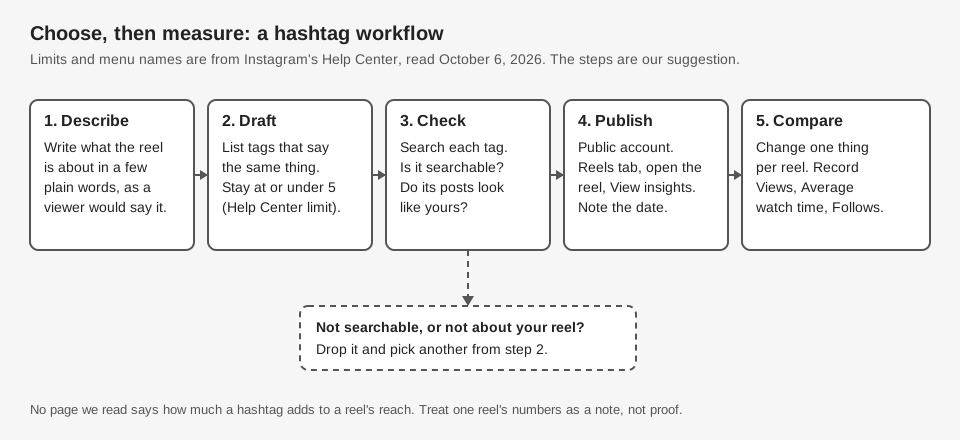
- Describe the reel in plain words. What would a viewer type or say to find it? Start from the subject, not from a tag you saw on someone else's post.
- Draft a short list. Keep it at or under 5, the Help Center limit. A shorter list also makes the test below readable.
- Search each tag before you use it. If it is not searchable, or the page shows posts unrelated to yours, drop it. Instagram says a tag may be unsearchable when its text or the content under it consistently breaks its Terms of Use or Community Standards, so we suggest avoiding one in that state.
How to tell if your hashtags worked
Instagram's insights show how a reel performed, but the pages we read do not describe a number that credits views to a particular hashtag. So you cannot read the answer off one screen. You can compare reels over time.
To open a reel's numbers, View insights on your Instagram reels says to go to the Reels tab on your profile, select the reel and click View insights. You need a public personal or professional account. The page lists these reel metrics:
- Views: times the reel starts to play or replay.
- Watch time: total time played, including replays.
- Viewers: unique accounts that saw it on screen. Instagram labels this metric estimated and in development.
- Average watch time: watch time divided by initial views.
- Follows: accounts that started following you as a result of viewing the reel.
Write the tags, date and these numbers down for each reel, and change one thing at a time, such as swapping a single tag. Topic, hook and timing also move a reel's numbers, so one reel proves little. Our guide to what Instagram insights mean covers what the metrics measure, and the analytics view in TrackMedia puts per-post numbers next to each other.
How TrackMedia handles hashtags
When you schedule an Instagram post in TrackMedia, hashtags are just caption text. TrackMedia sends the caption to Instagram as you wrote it, and it does not count or trim your tags. Its live counter tracks length against Instagram's 2,200-character caption limit, not the number of hashtags, so staying at 5 or fewer is up to you.
Crosspost rules have a Hashtags setting with four choices: Keep the ones in the post, Remove them all, Keep the first few and Use my own set instead. By default a rule keeps the tags in the post, and the code then applies a ceiling of 30 tags to any destination that supports tags, Instagram included. That is the developer-page figure, not the Help Center's 5. We found no field in the web screen for how many to keep or for your own set. For a copy headed to Instagram, Remove them all and then add your tags when you review the draft is the choice that keeps you under 5.
Two limits to know. Only Bluesky can be a crosspost source today, and while a rule is in its default review mode, copies wait as drafts until you approve them. The web composer has no Reel option, so Reels need the API. See how publishing works in TrackMedia, and our guide to how long an Instagram Reel can be for the reel basics. TrackMedia does not report results by hashtag.
If you want your captions, schedule and per-post numbers in one place, you can start free with TrackMedia.
How we checked this
We opened each page below in a browser on October 6, 2026 and took limits, labels and wording from it. We did not test hashtags on a live Instagram account, and we did not measure any effect of any hashtag. The Help Center pages were read in their default desktop-browser view; Instagram can show different text by device. A second read of the hashtag page in the iPhone view showed the same 5-tag sentence, but we did not compare the other pages across devices.
- Use hashtags on Instagram (Instagram Help Center): how to add tags, the 5-tag limit, public versus private, allowed characters.
- How posts appear on Instagram hashtag search results (Instagram Help Center): ordering factors and removal.
- Why you can't search for certain hashtags on Instagram (Instagram Help Center): unsearchable tags.
- View insights on your Instagram reels (Instagram Help Center): reel metrics and where to find them.
- IG User Media (Meta for Developers, updated Sep 28, 2026): the caption limits of 2200 characters, 30 hashtags and 20 @ tags.
We could not verify which of the 5-tag and 30-tag figures applies to a reel published by a scheduling tool, whether hashtags change a reel's reach, or whether Instagram's Help Center page covers Reels specifically. We left out any claim about those. TrackMedia's own behavior comes from our product code, read the same day.