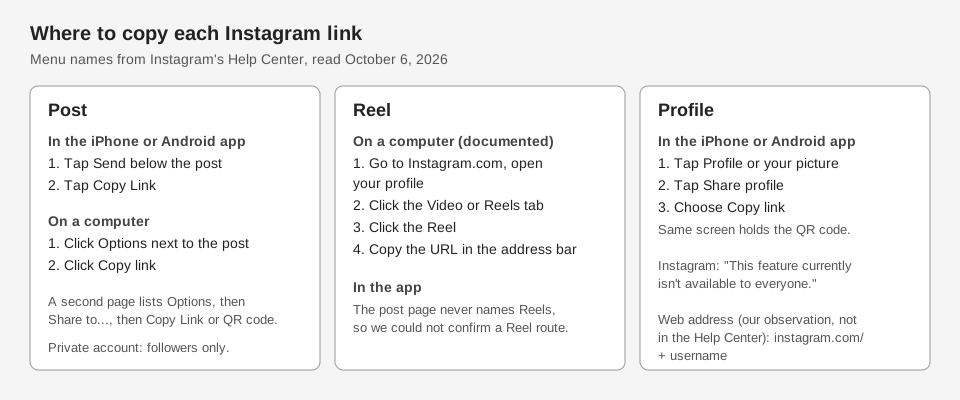
To get your Instagram profile link, tap Share profile on your profile in the iPhone or Android app and choose Copy link. Instagram says this feature "currently isn't available to everyone," so the fallback on a computer is the address in your browser, which Instagram does not document (see below). To get a link to a post, tap Send below it in the app and choose Copy Link, or click Options next to it on a computer and then Copy link.
This guide uses the wording on Instagram's Help Center pages, read on October 6, 2026. It also says plainly where those pages are silent, which includes the plain instagram.com/username profile link.
How do you get a link to an Instagram post?
Instagram's page Get a link (URL) to a photo or video on Instagram or Threads gives different steps for the app and the web. The two sets are below.
In the iPhone or Android app:
- Open the post. Go to the profile or feed where it appears.
- Tap Send below the post.
- Tap Copy Link at the bottom.
On instagram.com or in a mobile browser, the same page says to click Options next to the post, then Copy link.
A second Help Center page, Share existing Instagram posts to another site, gives a slightly different computer route. It says to open the post, click Options, click Share to..., and then pick from the choices, which include Copy Link and QR code. If your screen matches neither page, go by the labels, because Instagram moves menus between versions.
How do you copy an Instagram Reel link?
The Reel-specific route Instagram documents is from a computer. In its page Create ads that link to Instagram videos or Reels, Instagram says to go to Instagram.com, open your profile, click the Video or Reels tab, click the Reel, and copy the URL from the address bar.
That page is written for advertisers building ads, so it is not a general guide to sharing a Reel. In the app, the post page above is titled for "a photo or video" and never names Reels, so we cannot say from Instagram's text that Send then Copy Link is documented for a Reel. Check what your own screen offers on a Reel.
How do you get a link to your Instagram profile?
In the iPhone or Android app, Edit and share your Instagram profile card documents the route:
- Open your profile. Tap Profile or your profile picture in the bottom right.
- Tap Share profile.
- Choose Copy link below your profile card. The other options are Share (or Share to... on iPhone), Download and Add to story.
Instagram's page carries two caveats. It says "This feature currently isn't available to everyone," and that profile cards are only available in the iPhone and Android apps. Instagram does not say who has it, so if your Share profile screen has no card, the computer route below is the fallback.
The username link on the web
On a computer you can also open your profile in a browser and copy the address bar. The address has the form instagram.com/ followed by the username, with no @ sign. When we opened instagram.com/instagram/ in a browser on October 6, 2026, it loaded the profile of the account named @instagram. That is one example, and none of the Help Center pages we read describes the pattern, so treat it as our observation and not as an Instagram statement. Check that your own link opens your profile before you share it.
Because the link contains your username, a rename changes it. Instagram's page on changing your profile information says your followers may be notified of a username change. It does not say what happens to links that use the old name, so re-check any profile link you saved before the change.
How do you share your profile as a QR code?
The same Share profile screen holds your QR code. Find and customize the QR code of your Instagram profile says to tap your profile picture, then Share profile below your bio. To customize it, touch the screen or tap the button at the top, and use Color, Emoji or Selfie.
To save the code as an image or video, the profile card page lists Download, which saves the card as a profile card video or a QR code. To scan someone else's, Scan a QR code to find someone's profile says to open Share profile, tap the scan icon in the top right, and point your camera at the code. Instagram notes that you can't log in with a QR code.
Who can open the link you copy?
Instagram's page on getting a post link says that if the account that posted is set to private, any links you share can only be seen by followers of that account. So a private account's link works for followers but not for everyone else.
How TrackMedia helps with Instagram links
When TrackMedia publishes to Instagram, it asks Instagram for the post's link after publishing and saves it. The post's page then shows a View on Instagram button with the link (the label reads View on Instagram (no Facebook Page) for an account connected without a Facebook Page), so you do not need to hunt for it in the app. If Instagram does not return a link, the card says so instead of showing one.
For the profile link, the Shorten a link action on the Links page turns any URL into a tracked short link, and the destination is exactly the URL you paste. Paste your profile link there and the Analytics tab counts clicks by day, country, referrer and device, with bots excluded. No UTM tags are added to a manual short link, so see our UTM naming conventions if you want them on the destination yourself.
TrackMedia is not a link-in-bio page builder, and it cannot publish Stories or delete an Instagram post once it is live. For the clickable link on your profile, see where to find the link in bio on Instagram, and for what happens after people click, how to see who clicked your Instagram link. You can start free with TrackMedia to try it.
How we checked this
We opened each page below in a browser on October 6, 2026 and copied menu names from it. We did not run these steps on a live Instagram account, so we cannot say how your screen will look. Where the iPhone and Android views differ (for example Share versus Share to...), we say so. We could not verify that the app's Send then Copy Link route works the same on a Reel, how Instagram decides who gets profile cards, what happens to old links after a username change, or any official statement of the instagram.com/username pattern, so those are stated as unverified or left out.
- Get a link (URL) to a photo or video on Instagram or Threads (Instagram Help Center): Send then Copy Link in the app, Options then Copy link on the web, private-account note. Read on the Android, iPhone and computer views.
- Share existing Instagram posts to another site (Instagram Help Center): the Options, Share to... route with Copy Link and QR code.
- Create ads that link to Instagram videos or Reels (Instagram Help Center): copying a Reel URL from the address bar on a computer.
- Edit and share your Instagram profile card (Instagram Help Center): Share profile, Copy link, availability caveat. Read on the iPhone and Android views.
- Find and customize the QR code of your Instagram profile and Scan a QR code to find someone's profile on Instagram (Instagram Help Center): QR steps, Color, Emoji and Selfie options. Read on the iPhone view.
- How to change your Instagram profile information (Instagram Help Center): followers may be notified of a username change.
TrackMedia's behavior comes from our product code: the Instagram connector saves the post link after publishing, and the post card shows it. The profile and Reel sections reflect what Instagram's pages say, not a test of the Instagram app.