To check analytics on TikTok, open your profile in the app, tap the Menu, choose TikTok Studio, then tap Analytics. On a computer, go to tiktok.com/tiktokstudio and pick Analytics in the sidebar.
This guide follows TikTok's Help Center, Creator Academy and Business Resource Center pages, read on October 6, 2026. It covers the exact path, what each section shows, how to read one video's numbers, the traffic-source labels, timing, and what TikTok does not show you.
How to check analytics on TikTok
TikTok's Creator Academy lists three ways in: the TikTok app, TikTok Studio on the web, and the separate TikTok Studio app, where it says to tap the Analytics tab in the bar at the bottom of the screen. Another TikTok page adds a route for Business Accounts on the web. The figure below shows the app, the web and the Business Account route.
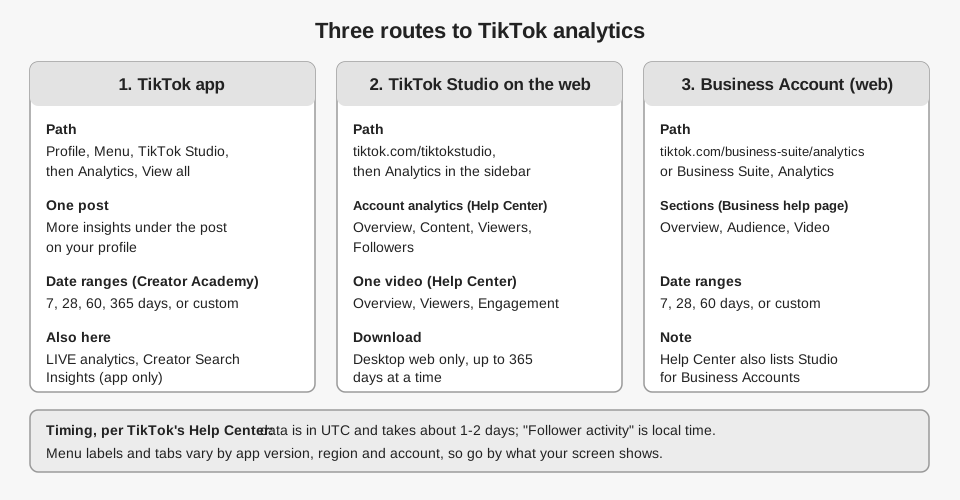
How to get to your analytics on TikTok in the app
TikTok's Help Center page How to use TikTok Analytics gives these steps:
- Open your profile. Tap Profile at the bottom of the TikTok app.
- Open the menu. Tap the Menu button at the top, then select TikTok Studio.
- Tap Analytics. The Help Center says to tap Analytics within the Posts tab. The Creator Academy article Introducing TikTok analytics (last updated October 1, 2026) says to find Analytics and tap View all.
The Help Center adds a warning. If the Analytics option is not visible, it says "This feature is currently not available to everyone." TikTok's page on tools for creators says some features are not available in every region and some require you to meet specific criteria.
How to find analytics on a computer
The same Help Center page on tools for creators says to go to www.tiktok.com/tiktokstudio and log in. From the TikTok homepage, it says to click Upload, then select Analytics from the sidebar menu. The Creator Academy article says to head to the Analytics tab on the left side of the screen.
The Help Center also says some features, "such as content management and analytics", are best accessed from a web browser. It adds that you may have to turn on analytics to see certain metrics. TikTok's older page How to view Analytics says that without any public videos you need to publish one first, and that the first time you use it, you tap Turn on on the Analytics page in the mobile app. It also says the feature is not available on TikTok mobile web.
Where are analytics for a Business Account?
The older How to view Analytics page gives a separate route for Business Accounts: visit tiktok.com/business-suite/analytics, or click your profile picture, then Business Suite, then Analytics. TikTok's Business Resource Center page About Web Business Suite (last updated May 2026) lists three Analytics sections there: Overview, Audience and Video. The page says Overview covers Reach, Engagement, Conversion and Followers data, Audience covers New followers, Gender, Age, Top countries, Top cities and Activity, and Video lists your videos sorted by Newest or Most viewed.
That does not mean Business Accounts lose TikTok Studio. The tools-for-creators page says "Creator tools are available for both Personal and Business Accounts." Neither page says which route shows more data, so open both if you have a Business Account.
What does TikTok account analytics show?
Account analytics summarize all your posts over a date range you choose. TikTok's Help Center page TikTok Studio lists four sections, and the Creator Academy article describes what each holds.
| Section | What TikTok says it holds | Source |
|---|---|---|
| Overview | Post views, profile views, likes, comments, shares and estimated rewards, plus Traffic source and Search queries | Creator Academy |
| Content | Metrics for all your posts, and a "Your top posts" list of your 10 top-performing videos, ranked by views, likes, new viewers and new followers | Help Center, Creator Academy |
| Viewers | Unique and returning viewers, inferred gender, age and location, most active times in the last 7 days, and what else your viewers follow and watch | Creator Academy |
| Followers | Demographics (gender, age, top locations) and when your followers are most active, by hour and day | Creator Academy |
Two details are easy to miss. The Creator Academy says the viewer gender, age and location statistics "are based on predictive models rather than confirmed user data". The tools-for-creators page lists the web categories as key metrics, content and followers, while the TikTok Studio page lists Overview, Content, Viewers and Followers, so tab names can differ by version.
Which date ranges can you use?
The Creator Academy says you can select the last 7 days, last 28 days, last 60 days, last 365 days, or a custom report. On the web, a custom window only goes back to July 17, 2022, and you can download analytics data for up to 365 days at a time. TikTok's Help Center says downloading is "only available for TikTok Desktop Web", through a Download Data option on the right side of the analytics page.
Business Suite on the web lists last 7 days, last 28 days, last 60 days or a custom range for its Analytics tabs. Its homepage tab uses last 7, 30 and 90 days instead.
How do you see analytics for one TikTok video?
For a single post, open it from the Content section and tap the video. The Creator Academy says this shows its retention rate, traffic sources and viewer information. In the app, the tools-for-creators page says you can tap More insights at the bottom of each post on your profile.
The TikTok Studio help page lists three sections for one video: Overview (a summary of the post's analytics), Viewers (key metrics, demographics and activity times) and Engagement (comment insights and inspiration for future posts). The Creator Academy names three numbers to watch, in TikTok's words:
- Retention rate: the percentage of your video that users watched, which helps you find drop-off points.
- Average watch time: the average duration viewers spent watching your content.
- Watched full video: your finish rate, the percentage of people who watched until the last few seconds. TikTok says it can vary with video length.
What do traffic source labels like "Other" and "Personal profile" mean?
TikTok's Creator Academy says Traffic source shows how viewers discovered your posts. Its article Using analytics as a tool to improve video performance (September 17, 2026) says you can see whether views arrive "on the For You feed, through your profile, or simply via Search."
We could not find a TikTok Help Center or Creator Academy page that defines the labels "Other" or "Personal profile". The tiktok.com/discover pages with similar titles are user-posted videos, not TikTok documentation, so we did not use them.
Our reading, which is not TikTok's wording: "Personal profile" likely counts views that began on your profile page, matching the Creator Academy's "through your profile". We do not know what "Other" contains, so treat it as "not attributed to a named source" and do not build a strategy on it. If you need a definition, ask TikTok support from the Help Center.
Where is TikTok LIVE analytics?
LIVE analytics sits in its own area. The tools-for-creators page says LIVE features "will only be available to creators with access to LIVE.". In TikTok Studio, the Creator Academy says to open the LIVE tab, which shows your number of LIVEs, total LIVE views, total LIVE time, new viewers, new followers, unique viewers and Diamonds collected, filtered by 7 to 28 days.
TikTok's LIVE Studio Help Center article Analyze your performance and understand your viewers (updated August 15, 2025) describes two tabs, Overview and Video analysis. It says Overview can show the last 7 days up to the last 60 days, a longer range than the 7 to 28 days the Creator Academy gives for the TikTok Studio LIVE tab, so the two may describe different screens. Metrics it defines include views, unique viewers, average watch time, peak and average concurrent viewers, new followers, gifters, Diamonds and LIVE duration. Its "Know your viewers" section lists traffic sources, country or region, age and gender.
When does TikTok analytics data update, and in which time zone?
TikTok's Help Center page Why "No data" or "N/A" appears in my Analytics gives three points. Data is only generated for videos posted after you apply for Analytics. The data "is displayed in UTC time zone and will need about 1-2 days to update." And "Follower activity" is "the only Analytics data that is written in your local time."
The newer How to use TikTok Analytics page adds that data might be delayed depending on the post, and suggests waiting a few days if numbers look wrong. The Business Suite page we read says nothing about time zone or delay, so do not assume the UTC rule applies there. This page is undated and uses older wording, and the TikTok Studio pages do not mention time zone, so check a recent post's time on your own chart before relying on it. Our suggestion, not TikTok's: if the chart uses UTC, convert your local posting time to UTC before you compare. For posting-time questions, see our guide on whether scheduling a post on TikTok affects views.
What are TikTok creator insights?
Creator insights covers features that show information beyond your own posts. TikTok's Help Center page Creator Search Insights says it gives personalized information on topics people search for on TikTok. You reach it in the app by searching "Creator Search Insights" and tapping View. Its Analytics view shows how your posts perform in search, split into All posts and Inspired posts.
The page says the Searches by followers filter needs more than 1000 followers. The TikTok Studio page also describes aggregated insights on other creators' posts in the Inspiration feed, which "depending on your location" may be available.
What do TikTok analytics not show you?
These limits come directly from the pages above:
- History before you turned analytics on. Data is only generated for videos posted after you apply.
- Some viewer insights under 100 followers. The Help Center says you receive more insights about your viewers and the content they engaged with once you have 100 followers. It does not list which ones are missing.
- Confirmed demographics. Viewer gender, age and location are predictions.
- Mobile web. The older Help Center page says analytics is not available on TikTok mobile web.
- Downloads from the app. Data download is desktop web only.
- A guaranteed menu. The Analytics option "is currently not available to everyone".
Do third-party TikTok analytics tools show the same numbers?
Not necessarily. Tools that connect to your account read data through TikTok's API, which TikTok controls, so a tool may show different fields than TikTok Studio. Check which metrics a tool lists before you rely on it for something TikTok Studio shows, such as retention rate.
What TikTok analytics does TrackMedia show?
TrackMedia reads from TikTok's Display API, and shows a smaller set than TikTok Studio. Per post, it takes views, likes, comments and shares, and computes an engagement rate as likes plus comments plus shares, divided by views. Per account, the dashboard shows followers when TikTok returns them.
On the Analytics page, TikTok views appear under Impressions, and you can view 7, 30 or 90 days or a custom range. A top-posts table lists posts with their impressions and engagement, and it includes posts you did not publish through TrackMedia, which are imported from the account's own history. A Refresh button reads your accounts and recent posts from the platforms on demand, with a short cooldown between refreshes.
TrackMedia does not show retention rate, average watch time, traffic sources, viewer demographics, follower activity or LIVE analytics for TikTok. We have not compared its counts with TikTok Studio, so do not expect them to match to the digit. Use TikTok Studio for those deeper reports.
What to do next
Open TikTok Studio, set the range to 28 days and check Content for your top posts. If you want TikTok post totals next to your other networks, you can start free with TrackMedia.
How we checked this
We opened each page below in a browser on October 6, 2026, and copied labels, numbers and quotes from it. We did not test these screens on a live TikTok account, so tab names, menu positions and availability may differ for you. Where TikTok's pages disagree, we say so. TikTok does not date its Help Center pages, so we give a date only where the page shows one.
- TikTok Help Center, "TikTok Studio": https://www.tiktok.com/support/faq_detail?id=7581820705491229240
- TikTok Help Center, "Tools for creators": https://www.tiktok.com/support/faq_detail?id=7581820704895703564
- TikTok Help Center, "How to use TikTok Analytics": https://www.tiktok.com/support/faq_detail?id=7639468340976785941
- TikTok Help Center, "How to view Analytics": https://www.tiktok.com/support/faq_detail?id=7133539120697350658
- TikTok Help Center, "Why 'No data' or 'N/A' appears in my Analytics": https://www.tiktok.com/support/faq_detail?id=7133059126174702081
- TikTok Help Center, "Analytics about my followers are not displayed": https://www.tiktok.com/support/faq_detail?id=7133058396747536897
- TikTok Help Center, "How to download Analytics data": https://www.tiktok.com/support/faq_detail?id=7133059126174718465
- TikTok Help Center, "Creator Search Insights": https://www.tiktok.com/support/faq_detail?id=7581820708318239243
- TikTok Creator Academy, "Introducing TikTok analytics" (last updated October 1, 2026): https://www.tiktok.com/creator-academy/en/article/tool-analytics-intro
- TikTok Creator Academy, "Using analytics as a tool to improve video performance" (last updated September 17, 2026): https://www.tiktok.com/creator-academy/en/article/analytics-tool-video-performance
- TikTok LIVE Studio Help Center, "Analyze your performance and understand your viewers" (updated August 15, 2025): https://www.tiktok.com/live/studio/help/article/Track-your-performance-and-grow/Analyze-your-performance-and-understand-viewers?lang=en
- TikTok Business Resource Center, "About Web Business Suite" (last updated May 2026): https://ads.tiktok.com/help/article/navigate-web-business-suite?lang=en
What we could not verify: a TikTok definition of the traffic-source labels "Other" and "Personal profile" (we found no TikTok page that defines them); the full list of labels shown for traffic sources; how Business Accounts and Personal Accounts differ in the data they see; and the time zone used in Business Suite. TrackMedia's own behavior comes from its product and TikTok connector code, read the same day.