To edit a Reddit post, click or tap the overflow menu (the three dots) on your post, choose Edit Post, make your changes and save. Reddit says you can edit a post's content but not its title, so a typo in the title means deleting the post and posting again.
This guide uses Reddit Help pages read on November 4, 2026. It covers editing, what the asterisk means, how to delete a post on the new site, old Reddit and the apps, and what to do when the edit option is missing.
How do you edit a Reddit post?
Reddit Help's Can I edit my posts and comments? gives one set of steps for reddit.com, iOS and Android:
- Open the post or comment you want to change.
- Click or tap the overflow menu on it, then choose Edit Post (or Edit Comment for a comment).
- Make your edits and save.
The page opens with: "Yes, on Reddit you can edit text posts and comments. However, you can only edit a post's content and not its title." It names text posts and does not say whether link, image or video posts offer the same option, so look for Edit Post on the post itself.
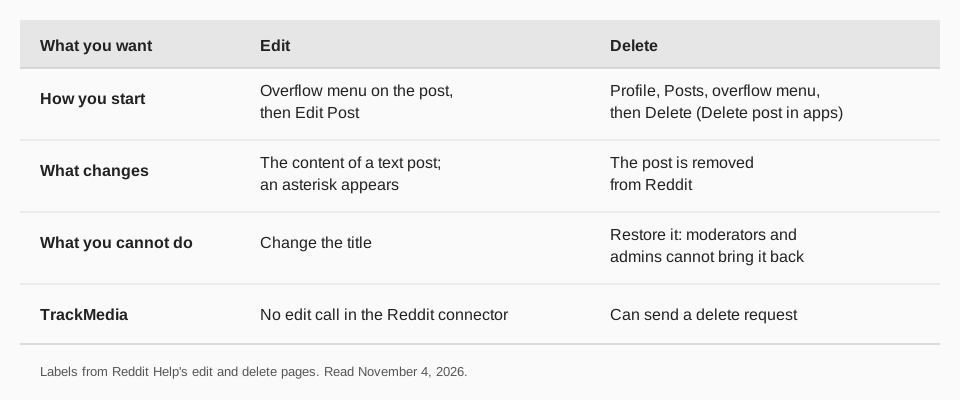
Sources: Can I edit my posts and comments?
What can you change, and what shows after an edit?
You can change the content of a post: for a text post, the body. The title is locked once the post is up. Reddit says that once you edit something, an asterisk appears next to it to tell other users it has been changed.
The page does not say anything about changing the subreddit, flair or the link on a link post, so we make no claim there. If you need a different title or a different community, the route is a new post.
How do you fix a Reddit post title?
You cannot edit it, according to Reddit Help. Delete the post and submit it again with the corrected title. Before you do, remember that Reddit says a deleted post cannot be brought back.
Read the subreddit's rules before you post again. Our guide to how to repost on Reddit covers Reddit's own repost feature and the rules around posting something again, and what a subreddit is explains where those rules live.
How do you delete a Reddit post?
Reddit Help's How do I delete a post? says deleting differs slightly depending on how you use Reddit:
On reddit.com
- Click your profile photo or icon in the top right of your screen.
- Select View Profile, then click Posts. This lists the posts you have made.
- At the right of the post, click the overflow menu icon, then select Delete.
On old Reddit
Click your username link in the top right, then select the submitted tab. At the bottom of the post you want to delete, click delete.
On iOS and Android
- Tap your avatar icon to go to your profile page.
- Select Posts.
- In the top right corner of the post, tap the overflow menu icon, then tap Delete post.
Sources: How do I delete a post?
Can you undo a delete?
No. Reddit's page If I delete a post or comment, can it be restored? says it is removed from Reddit and moderators and Reddit administrators will not be able to bring it back. Its advice is to be absolutely sure before you delete something.
The delete page also warns that third-party tools for deleting posts, comments or other content are not officially supported and may not work as intended. For a large number of posts that the steps above cannot handle, it points to a contact form and an email address for assistance.
Sources: If I delete a post or comment, can it be restored?
Why can't I edit my Reddit post?
- You are trying to change the title. Reddit does not allow it.
- It is not a text post. Reddit's page names text posts and comments. We could not confirm what it offers for other post types.
- It is not your post. The steps start from your own post or comment.
- You are looking in the wrong menu. The overflow menu (three dots) holds Edit Post.
Post to Reddit with TrackMedia
TrackMedia publishes to Reddit from the same composer as your other networks. You choose the subreddit, write a title (up to 300 characters) and either a text post (up to 40,000 characters) or a link, and add one image, GIF or video per post. TrackMedia also shows Reddit upvotes and comments in its analytics, and can send a delete request to Reddit for a post it published.
TrackMedia's Reddit connector has no edit call, so an edit to a post that is already live is made in Reddit with the steps above. Because Reddit fixes the title once a post is up, proofread it in the composer before you publish. Read how to schedule Reddit posts to plan ahead, how to crosspost on Reddit, how to upload a video to Reddit and how to hyperlink on Reddit. To draft once and publish to Reddit and 20 other networks, start free with TrackMedia.
Questions people also ask
Can you edit the title of a Reddit post?
No. Reddit Help says you can only edit a post's content and not its title.
Does Reddit show that a post was edited?
Yes. An asterisk appears next to something you have edited to tell other users it has changed.
Can you delete a Reddit post and get it back?
No. Moderators and Reddit administrators cannot bring a deleted post back.
How do you delete a Reddit post on the app?
Tap your avatar, select Posts, tap the overflow menu on the post, then tap Delete post.
Can you edit a Reddit comment too?
Yes. The same overflow menu offers Edit Comment on a comment.
How we checked this
We opened each Reddit Help page below in a browser on November 4, 2026 and copied the labels from the page text. We did not sign in to Reddit or click any of these buttons. Reddit edits its help pages, so check the live page if a label differs. TrackMedia's behavior comes from its Reddit connector code.
- Can I edit my posts and comments? (Reddit Help): edit steps, title rule, asterisk.
- How do I delete a post? (Reddit Help): delete steps for reddit.com, old Reddit, iOS and Android, third-party tool warning.
- If I delete a post or comment, can it be restored? (Reddit Help): no restore.