To get a server tag on Discord, the server owner or an admin spends 3 Server Boosts to unlock it, sets the tag in Server Settings, and then each member chooses to wear it in their profile settings. Discord's Help Center describes a server tag as a custom, 4-character label paired with an icon.
This guide uses Discord's Server Tags and Server Boosting FAQ pages, read on October 22, 2026. It has separate steps for owners and members, the limits, and what to do when a tag will not show.
Sources: Server Tags · Server Boosting FAQ
What is a Discord server tag?
Discord says a server tag lets members "represent that server everywhere on Discord." Once a member picks it, it appears next to their name in chat, in member lists and in the Direct Messages list.
Tags are not unique. Different servers can use the same four characters, and the combination of tag and icon helps tell them apart. A member can show only one server tag at a time, and a server can have only one tag.
How to get a server tag on Discord (owner or admin)
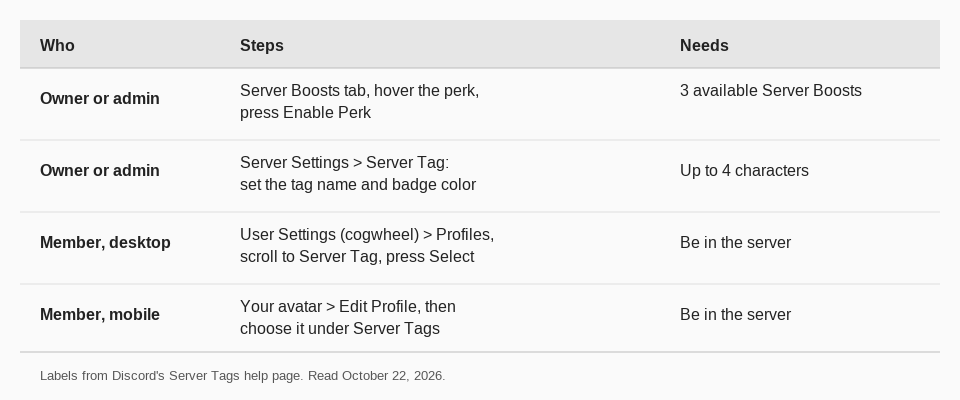
You need Server Boosts. Discord says a server owner or admin can use 3 Server Boosts to unlock a tag, and that this perk is separate from Boost Levels, so the server does not need to reach a certain level. The Boosts must be unallocated.
Step 1: unlock the perk
- With the right server selected, open the Server Boosts tab in the upper-left corner. Only server admins and owners can see it.
- In the upper right, check how many Server Boosts are available. With 3 available, you can enable the perk immediately.
- Hover over the perk and press Enable Perk. A window opens where you can configure it.
Step 2: make the tag
- Select the server name in the upper-left corner and press Server Settings.
- Press Server Tag.
- Choose the tag name and the badge color. The name can use up to 4 alphanumeric characters and certain special characters.
Discord says spaces, emojis and some characters are not supported. Each server has one tag at a time, and there is a rate limit on changing it. The page says you can change it again after a certain period of time but does not give the length.
Discord adds that perks can currently only be purchased and configured on desktop.
How members add a server tag to their profile
Setting the tag does not put it on anyone's profile. Each member opts in. Discord also says there is no way to restrict which members can use the tag, and that a member cannot change its color.
On desktop or in a browser
- Select the cogwheel next to your Discord username to open User Settings.
- Press Profiles, or select Edit User Profile.
- Scroll to Server Tag and press Select to see the tags you can use.
- Pick one. Discord says it saves automatically. To remove it, press the X next to the tag.
On mobile
- Tap your avatar in the bottom-right corner of the app.
- Press Edit Profile.
- Scroll to Server Tags and choose the one to apply. It is applied automatically.
Why can't I get or see the server tag?
- Not enough Boosts. Discord says to check you are on the Server Boost tab and that your Boosts are "available," not already allocated to the server level. Only admins can unlock perks.
- The server lost Boosts. If the server drops below the 3 Boosts, the perk is disabled and the tag is removed from members' profiles automatically.
- The tag was changed. When an admin updates the tag, members have to reapply it.
- You are not in the server. A tag belongs to a server, so you choose from servers you belong to.
Discord also notes that tapping someone's tag opens the server's Server Profile, from which people can join, or apply if applications are enabled. That makes the tag a quiet way for your community to be found.
Do you need a badge pack?
No. Badge packs are optional extras. Discord lists the Creepy Crawlies pack (2 Server Boosts), the Pet and Plant packs (3 each) and the Flex pack (5), and you need to unlock Server Tags first. Only one badge can be applied to the tag at a time.
Announcing your server tag with TrackMedia
Once your tag is live, tell members to pick it. TrackMedia can post that announcement to a Discord channel through a webhook, at a time you schedule, from the same composer that publishes to the other 20 networks on every plan. The post can carry text, an image and a link, and it never pings @everyone or roles.
Share the invite link with a tracked URL and TrackMedia shows clicks and visitors per post and network, so you learn which place sends people to your server. Related reading: how Discord works, how to make someone a moderator and how to add a link to your Discord bio. You can try TrackMedia free for 14 days.
Questions people also ask
How do I get a server tag on Discord?
The server needs 3 Server Boosts. An owner or admin enables Server Tags on the Server Boosts tab and creates the tag in Server Settings. Members then choose it in their profile settings.
How do I make a server tag?
In Server Settings, press Server Tag, then set the name (up to 4 characters) and badge color. The perk must be unlocked first.
How many characters can a server tag have?
Four. Discord says tags are non-unique, 4-character tags made of alphanumeric characters and certain special characters.
Can I show more than one server tag?
No. Discord says a user can display only one server tag on their profile at a time, even when they belong to several tagged servers.
How we checked this
We opened these Discord Help Center pages on October 22, 2026. TrackMedia's Discord behavior comes from its Discord connector code the same day.
- Server Tags: definition, owner and member steps, FAQ, badge packs.
- Server Boosting FAQ: Additional Perks, 3 Boosts cost, desktop-only configuration, loss of Boosts.