To make someone a moderator on Discord, create a role in Server Settings > Roles, give it the moderation permissions you want, save it, and assign the role to that member. Discord has no separate "moderator" switch: a moderator is a member whose role carries those permissions.
This guide follows Discord's Setting Up Permissions FAQ, Roles and Permissions and Time Out FAQ pages, read on October 22, 2026. It covers the steps, which permissions to give, and the safety rules.
Sources: Setting Up Permissions FAQ · Roles and Permissions · Time Out FAQ
How to make someone a moderator on Discord
Discord's permissions page says permissions are based on the roles assigned to members. When you create a server, the only role is @everyone, and it sets what everyone can do. The creator does not need a role: Discord says you always have access to everything.
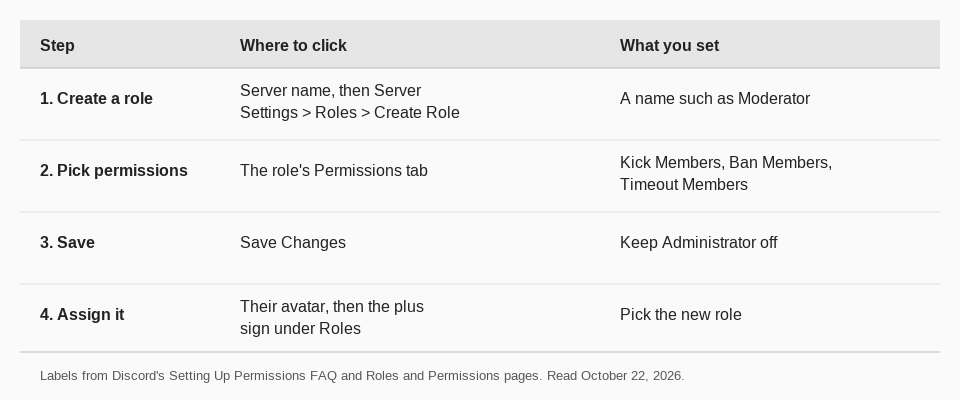
- Create the role. Press the downward arrow next to the server name, choose Server Settings > Roles > Create Role.
- Name it and set permissions. Give it a name you can change later, then open the Permissions tab for the list of server permissions.
- Save. Press Save Changes. Discord reminds you to save before you leave.
- Assign the role. Select the Manage Members tab and pick the person, or press the user's avatar in the server, then press the plus sign under the role section and choose your new role.
Discord says the person then has the server-wide permissions you gave that role. These steps are written for the desktop and browser layout. We did not find separate mobile steps for these menus on the pages we read.
Which permissions should a Discord moderator have?
Discord does not publish a fixed "moderator" list, so you choose. The permission names that appear on its help pages are:
- Kick Members and Ban Members, which remove people from the server.
- Timeout Members (called Time Out Members on the Time Out page). Discord says a timed-out user cannot send messages, react to messages, or join voice channels or video calls, and you can pick 60 seconds, 5 minutes, 10 minutes, 1 hour, 1 day or 1 week.
- Manage Roles, which lets someone create and edit roles below their own. Hand this out carefully.
- Manage Server and Administrator, which are much broader.
Discord's Members page says people with administrator, manage server, manage roles, manage nicknames, ban, timeout or kick permissions can use the Members page to review newer members. That page is currently only available on browser and desktop.
Why not make moderators administrators?
Discord's roles page calls Administrator the most powerful role permission. It grants all permissions and bypasses all channel restrictions, so the page says to assign it "with extreme caution." For a moderator, pick only the permissions the job needs.
The hierarchy also protects you. Discord says members can only affect users with roles lower than their highest role, and that a member cannot ban, kick or change nicknames of users with equal or higher roles, even with those permissions. Place the moderator role above regular member roles and below your own.
Can a moderator see every channel?
Not automatically. Discord says channel permissions override server permissions. To limit a moderator to certain channels, or to give them a private staff channel, edit that channel's Permissions tab and add the role.
For a private channel, Discord's roles page says to right-click the channel, choose Edit Channel > Permissions, and toggle Private Channel. Then press Add members or roles to grant access.
What to check before you promote someone
Pick a member who has been active and fair for a while, and tell them which powers the role has. Start small: you can always add Manage Roles or other permissions later, but removing a ban someone made in error takes more cleanup.
Also check the Members page. Discord says it shows when each member joined, the age of their account and how they joined, which helps you judge who is new and who is established. That view needs permissions such as Manage Server or Ban Members, so it works for the moderator role too.
How to remove a moderator
Open the member in the member list or the Members page, then remove the role. If you want to take back every power, remove the role and, for the future, avoid giving Administrator. Discord also has a separate help article on transferring ownership of a server.
Automating Discord announcements with TrackMedia
Moderators keep a server healthy, but someone still has to post the news. TrackMedia schedules messages to a Discord channel through that channel's webhook, from the same composer that publishes to the other 20 networks on every plan. The webhook sends only to the channel you choose, and scheduled posts never ping @everyone or roles.
Create the webhook under Server Settings > Integrations, paste its URL into TrackMedia once, and queue announcements in the calendar. Add a tracked link and you can see clicks and visitors for each announcement. Read how Discord works, how to schedule messages on Discord and how to get a server tag, or try TrackMedia free for 14 days.
Questions people also ask
How do I make someone a mod on Discord mobile?
Discord's pages we read describe role setup on desktop and browser. The idea is the same: a role with moderation permissions, assigned to the member. Check the Roles section of your server settings in the app.
Can a moderator ban the server owner?
No. Discord says members cannot ban, kick or change nicknames of users with equal or higher roles, and a server creator always has access to everything.
Does the moderator role cost anything?
No. Discord says servers are free to create, and roles are part of the permission system on every server.
How many roles can a server have?
Discord's caps page lists 250 roles per server.
How we checked this
We opened these Discord Help Center pages on October 22, 2026. TrackMedia's Discord behavior comes from its Discord connector code the same day.
- Setting Up Permissions FAQ: creating, customizing and assigning roles.
- Discord Roles and Permissions: hierarchy, Administrator, Manage Roles, private channels.
- Time Out FAQ: what a timeout does and its durations.
- Members Page: which permissions open it.
- Discord Account Caps, Server Caps, and More: role limit.