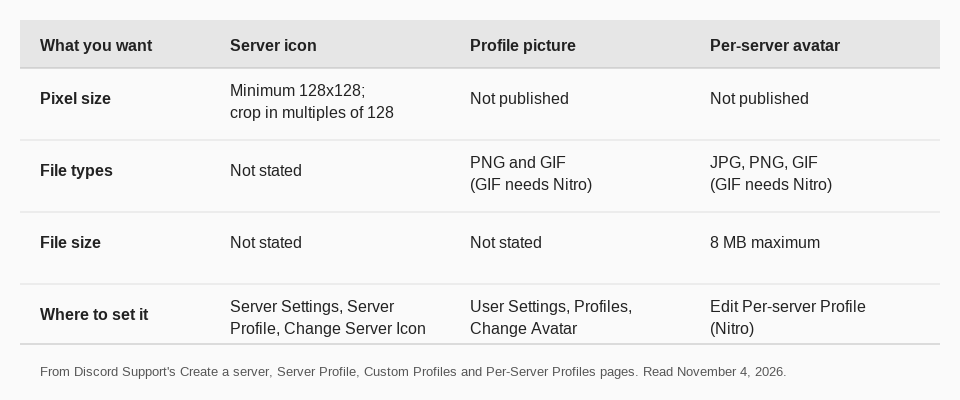
Discord's help pages give one pixel size for a server icon: a minimum of 128×128. For a Discord profile picture (your avatar) the pages we read publish no pixel size, only the file types you can upload, and Discord's per-server avatar FAQ adds an 8 MB file limit.
This guide uses Discord Support pages read on November 4, 2026. Where Discord states nothing, we say so instead of repeating the sizes that other sites quote.
What size is a Discord server icon?
Discord's How do I create a server? page says: "The minimum size for icons is 128x128." It adds that if you want to select a specific area from a large image, you can crop it in multiples of 128 (256, 384 and so on).
That is the only icon size Discord states. It gives no maximum size and no file size limit for server icons on the pages we read.
Sources: How do I create a server?
How do you change a server icon?
Discord's Server Profile page says a server profile can only be customized on desktop or in a browser. To change the icon:
- Open Server Settings. Select the dropdown arrow next to your server's name. You land on the Server Profile tab.
- Change the icon. Press Change Server Icon, or select the current icon.
- Save. Press Save Changes.
The page says the icon appears in Discord's server list and in search results. You can also choose the icon while creating a server, in the same window where you enter the server name.
Sources: Server Profile
What size is a Discord profile picture?
Discord does not publish a pixel size for profile pictures on the Custom Profiles, Per-Server Profiles or Server Profile pages. Custom Profiles says only: "Supported file types are PNG and GIF," and that Nitro subscribers can upload animated GIFs as their avatar.
The same page says you can upload your own image, then select Apply and Save Changes. It does not describe a crop step for the main avatar, so check the preview before you save.
Sources: Custom Profiles
How do you change your profile picture?
- Open your profile settings. On desktop, use the cogwheel at the bottom left to open User Settings, then the Profiles tab. On mobile, tap your avatar in the bottom-right corner, then Edit Profile.
- Change the avatar. Press Change Avatar, or tap your current avatar, and choose an image.
- Apply and save. Select Apply, then Save Changes.
To go back to an earlier picture, press Change Avatar and pick one from the Recent Avatars section. Discord's Per-Server Profiles page says Recent Avatars keeps your 6 most recent uploads across all platforms, but you can only view and select from it on desktop or in a browser.
What are the limits for a per-server avatar?
The Per-Server Profiles FAQ is the one place Discord states a file size: "Accepted file types for server avatars are JPG, PNG, and GIF files. The maximum file size is 8 MB." It also says you can crop, center and rotate files after uploading, and that you may set only one custom avatar per server.
Per-server avatars are a Nitro perk: you can set a different avatar, banner and About Me for each server. On desktop, right-click your avatar in a text channel and choose Edit Per-server Profile. On mobile, tap the server's name and choose Edit Per-server Profile, upload an image, then tap Save at the top right.
The two pages differ on file types. Custom Profiles lists PNG and GIF for your main avatar, while Per-Server Profiles lists PNG and JPG in one place and JPG, PNG and GIF in its FAQ. Discord does not say whether the main avatar also accepts JPG, so if an upload fails, try PNG.
Sources: Per-Server Profiles
Why won't my Discord picture or icon upload?
- The image is under 128×128. That is the stated minimum for a server icon.
- The file is over 8 MB. That is the limit Discord states for per-server avatars.
- You tried a GIF without Nitro. Animated avatars are a Nitro feature.
- You are on mobile. The Server Profile page says the icon can only be changed on desktop or in a browser.
- The file type is not supported. Try PNG.
Post to Discord with TrackMedia
TrackMedia posts to a Discord channel through a webhook. Paste the webhook URL, add an optional display name, and every post goes out under that name. Posts can carry text, embeds and attachments (JPG, PNG, GIF and WebP images, plus video and audio), with alt text, up to 8 MB per file in TrackMedia's settings. You write the post once and send it to Discord and your other networks together.
Your Discord avatar and server icon are set in Discord, since TrackMedia's connector has no profile-image call. For the banner sizes, read Discord banner size. For scheduling, see how to schedule messages on Discord, and for the basics, how Discord works. Profile image sizes on other networks are in our guides to Bluesky banner and profile image size and LinkedIn banner size. To publish to Discord and 20 more networks from one composer, try TrackMedia free for 14 days.
Questions people also ask
What size should a Discord server icon be?
At least 128×128 pixels, according to Discord. If you crop from a larger image, Discord suggests multiples of 128, such as 256 or 384.
What is the Discord profile picture size?
Discord publishes no pixel size for it. It states supported file types (PNG and GIF on Custom Profiles) and, for per-server avatars, an 8 MB maximum.
Can I use a GIF as my Discord profile picture?
Yes, if you are a Nitro subscriber. Custom Profiles says Nitro subscribers can upload animated GIFs as their avatar.
Can I change my Discord server icon on my phone?
Discord's Server Profile page says a server profile can only be customized on desktop or in a browser, though it can be viewed in the mobile app.
How we checked this
We opened each page below in a browser on November 4, 2026 and copied labels and numbers from the page text. We did not sign in to Discord or change any setting. We also searched support.discord.com for "server icon size" and found no dedicated article for icon or avatar dimensions beyond these pages.
- How do I create a server? (Discord Support): the 128x128 minimum and multiples of 128.
- Server Profile (Discord Support): Change Server Icon, desktop only.
- Custom Profiles (Discord Support): Change Avatar, file types, Apply and Save Changes.
- Per-Server Profiles (Discord Support): the 8 MB limit, Recent Avatars, Edit Per-server Profile.
- TrackMedia's Discord connector code, for the webhook connection and attachment limits.