Discord works through servers: invite-only spaces made of text channels and voice channels, where members chat, talk and share screens. Discord's Help Center calls it "a communication platform that allows users to interact through text, voice, and video," and says you join servers or create your own.
This guide uses Discord's Beginner's Guide, Server Setup Guide, roles and permissions and webhooks pages, read on October 22, 2026. It explains what Discord chat is, how servers are built, and how creators and brands can use it.
Sources: Beginner's Guide · Server Setup Guide · roles and permissions · webhooks
How does Discord work?
You register an account through the desktop app, your mobile device or a browser. Then you join a server with an invite, or you make your own. Everything else happens inside servers and direct messages.
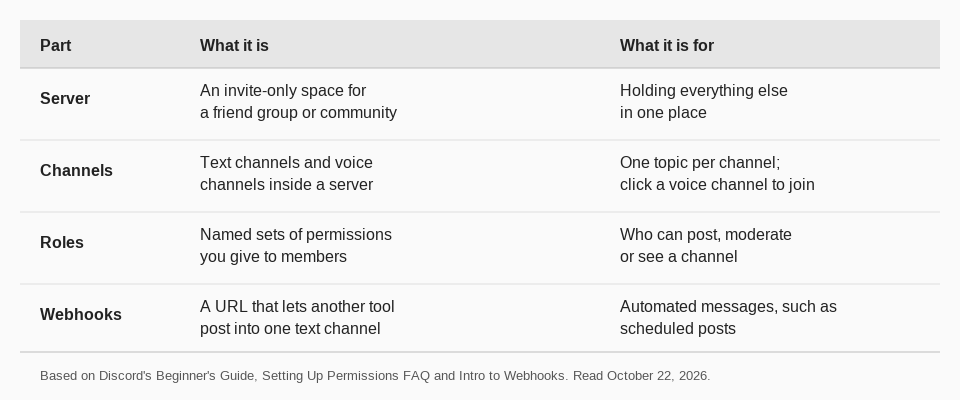
Discord says servers are private, invite-only spaces for friends or communities, and gives examples such as a book club, a study group or a dance class. A server is where you "connect, collaborate" and talk, in its words.
What is Discord chat?
Discord chat is the text conversation in a channel, plus direct messages and group DMs. Discord says text channels give "dedicated spaces for written conversations" so each topic has its own place, such as one channel for planning trips and another for sharing recipes.
Voice channels work differently. Discord says you click a voice channel to join, with no calling or ringing, and others can see you are in it and drop in. You can talk, use video, or share your screen while connected to a voice channel, a DM or a group DM.
Message length is limited. Discord's caps page says a message can be 2,000 characters on a base account and 4,000 with Nitro, and the file sharing limit is 10 MB for a base account.
Friend servers and community servers
Discord has two server types. Friend servers are invite-only spaces for friends or smaller groups. Community servers are invite-only spaces for people with shared interests from anywhere, and they get moderator tools such as Server Insights, Raid Protection, Rules and Onboarding.
A friend server can opt in to become a community server in server settings. Discord says this does not let anyone find or join it: people still need an invite link. A community server can additionally apply to be listed in Server Discovery if it meets Discord's criteria.
How to create a server
- On the desktop app or browser, find the Add a Server icon on the left sidebar.
- Select Create My Own, or choose a template.
- Choose For a club or community or For me and my friends.
- Name your server, add an optional icon, and press Create.
Discord says servers are free to create. Every account has a server cap, and Discord's caps page lists 100 servers for a base account and 200 with Nitro.
How roles and permissions work
When you create a server, the only role is @everyone. Discord's permissions page says that role sets what everyone can do, even members with no other role. You create more roles, name them, set their permissions and assign them to members.
Channel permissions override server permissions, and a role's color comes from the highest role a member has. Members can only affect users with roles lower than their highest role. To give someone moderator powers, see how to make someone a moderator on Discord.
How Discord works for creators and brands
Discord is a place where your audience talks to each other, not a feed where you broadcast. A creator can set up channels for announcements, chat and questions. Discord also lets you make a channel role-exclusive, so only members with a given role can see it.
Announcements still need posting. Discord's webhook page says a webhook gives you a URL that lets another service send automated messages into a text channel. You create one in Server Settings, under the Integrations tab, with Create Webhook, then choose the channel and name.
The page notes a webhook only works with another website or tool that sends to it. Our guides on scheduling messages on Discord and adding a link to your Discord bio cover related tasks.
How to post to Discord with TrackMedia
TrackMedia posts into a Discord channel through that channel's webhook. You paste the webhook URL once when connecting Discord, and the post goes out through the same composer you use for the other 20 networks on every plan, at the time you schedule.
A post can carry text, images, video and other attachments, alt text, and a link card with a title. @everyone and role pings are never sent from a scheduled post. Discord's own limits still apply, such as the 2,000-character message length and the server's upload size.
Put a tracked link in the message and TrackMedia shows clicks, visitors and referrers for it, so you can see whether your Discord announcement beat the same post on another network. You can try TrackMedia free for 14 days or read how a post fits into one workflow across networks.
Questions people also ask
Is Discord free?
Creating a server is free, according to Discord's Server Setup Guide. Nitro and Server Boosts are paid extras that raise limits such as message length and upload size.
What is a Discord server?
It is a customizable space where a community gathers, organized into text and voice channels. People join by invitation.
Do I need to download an app?
No. Discord says you can register through the desktop app, your mobile device or a browser.
Can I join a voice channel without video?
Yes. Clicking a voice channel joins you with no ringing. Video and screen sharing are optional.
How we checked this
We opened these Discord Help Center pages on October 22, 2026. TrackMedia's Discord behavior comes from its Discord connector code the same day.
- Beginner's Guide to Discord: what Discord is, servers, text and voice channels, screen sharing.
- Discord Server Setup Guide: how to create a server, free to create.
- Clarifying Server Types: friend servers versus community servers.
- Setting Up Permissions FAQ and Discord Roles and Permissions: @everyone, roles, channel overrides.
- Intro to Webhooks: creating a webhook.
- Discord Account Caps, Server Caps, and More: message length, file size, server counts.