To post on Instagram from a computer, open instagram.com, click Create on the left, click Post, then click Select from computer and choose your photo or video. Add a caption, then click Share in the top right.
That covers photos, carousels and Reels. Instagram's help pages say Stories and drafts are not available on computers, and its scheduling page describes only the app, but Meta's Business Help Centre documents Stories, drafts and scheduling in Meta Business Suite on desktop. This guide uses the pages we read on October 6, 2026.
How do you post on Instagram from a computer?
Instagram's help page Post a photo on Instagram gives these steps in its Computer Help view:
- Click Create on the left.
- Click Post, then Select from Computer. Choose a photo or drag and drop a file. The page names jpg, png and heic/heif as supported formats.
- Pick the photo size, then click Next in the top right.
- Edit if you want. Click Filters or Adjustments at the top, then Next again.
- Add the details. You can write a caption, add a location, click Accessibility to write alternative text, or open Advanced Settings and choose Turn off commenting.
- Click Share in the top right.
Instagram's page lists adding music among the things you can add to a post. The separate Add audio to your post page gives steps only for the Android, iPhone and iPad apps, so we can't confirm music is available on a computer.
Post a carousel from a computer
Instagram's page on sharing a post with multiple photos or videos says you can share up to 20 photos and videos as one post. Use the same first steps, then select several files. The orientation you choose (square, portrait or wide) applies to every item, and you can add one location and caption for the whole post.
Meta's Business Suite page gives a different number. Its desktop steps for creating a post say "The limit for posting to Instagram is ten photos." Meta's developer Content Publishing guide also limits carousels to 10 images, videos, or a mix of the two. We found no page that reconciles these numbers with Instagram's 20, so go by what your own screen allows.
Post a Reel from a computer
Instagram's Record a reel page lists the same start (Create, Post, Select from computer). Then click Next to pick a cover photo and trim the clip, click Next again to add a caption, location, tags and alternate text, and click Share.
The page says reels can be up to 20 minutes, and that reels over 3 minutes will not be recommended to new audiences. It also warns that Reels is not available to everyone. Some accounts can see reels but cannot record them. For length rules by format, see our post on how long an Instagram Reel can be.
What can't you do on Instagram from a computer?
Two features Instagram's help pages mark as unavailable on computers are Stories and drafts. The figure below compares instagram.com with Meta Business Suite for each content type, using only what the pages say.
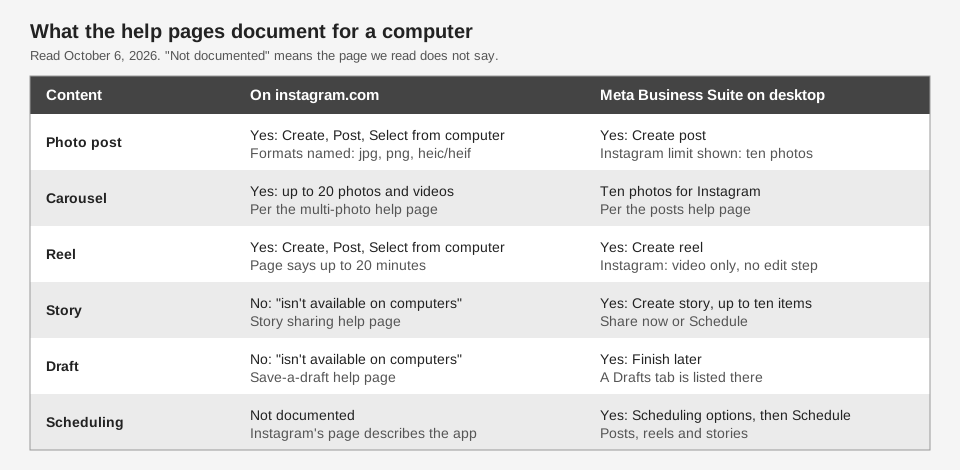
- Stories. Instagram's page Share a photo or video to your Instagram story says "This feature isn't available on computers" and lists only app devices.
- Drafts. The page Save a post as a draft on Instagram carries the same notice.
- Scheduling. The page on scheduled posts and Reels says you can schedule "from the Instagram app", and its steps all start with tapping. It does not describe scheduling on instagram.com, and we could not find another Instagram page that does.
We did not click through instagram.com ourselves, so we can't say what a button does or hides on your account beyond what these pages state. Menus and options change, so go by the labels on your screen.
How to schedule Instagram posts from a computer
The route Meta documents for a computer is Meta Business Suite. In its guide to creating and managing posts on desktop, you go to Meta Business Suite, click Create post, and pick your Instagram profile under Post to. Add your photos (the page says the limit for posting to Instagram is ten photos) and write your text. Under Scheduling options, select the date and time, then click Schedule. The other end buttons are Publish and Finish later.
Meta says the Active times option recommends times based on when followers were most active on Facebook and Instagram over the past seven days. To create or manage posts there you need full control of the Instagram account or content permission for it.
Reels and Stories have their own pages. For reels, click Create reel, choose Instagram under Post to, add a video, and schedule on a later step. The page says "You can't create a reel from photos if posting to Instagram", and that its editing step applies only if you are posting to Facebook. For Stories, click Create story, add up to ten photos or videos, and choose Share now or Schedule.
The limits of 25 posts a day and 30 days ahead are on Instagram's app scheduling page. The Meta Business Suite pages above state neither, so we do not claim them for desktop scheduling. To find or change what you scheduled, see our guide to seeing scheduled posts on Instagram.
Can a third-party tool post to Instagram for you?
Yes, through Meta's API for professional accounts. Meta's Content Publishing guide says it covers publishing to Instagram professional accounts, and lists JPEG as the only supported image format. The guide lists no field for a future publish time, so our reading is that tools which schedule hold the schedule themselves, and it will not appear in Instagram's scheduled list. Our post on how to automate Instagram posts explains how that works.
How TrackMedia posts to Instagram from a browser
TrackMedia is a web app, so you write, schedule and publish from your browser. This is what it does for Instagram as of October 2026:
- Connect a professional account. There are two routes: a Page-linked account, or "Instagram (no Facebook Page)".
- Write once, adjust per network. The composer has one master draft, a live character counter, and a preview. Instagram captions are limited to 2,200 characters, and a post needs media because text-only posts are rejected.
- Schedule or publish now. TrackMedia holds the schedule and publishes at the time you chose. The Posts page and the Calendar show what is queued, and a post that fails shows the reason with a retry button.
- Carousels and a first comment. You can attach up to 10 items and add a first comment.
- Post to Instagram and Facebook together. See posting to Instagram and Facebook at the same time.
Limits: TrackMedia does not publish Instagram Stories, and it cannot delete an Instagram post once it has gone out. Instagram accepts only JPEG images through its API, and TrackMedia does not convert other formats. Reels are not an option in the web composer. See how publishing works in TrackMedia, or start free with TrackMedia to try it.
How we checked this
We opened each page below in a browser on October 6, 2026 and copied menu labels and limits from it. We did not post to a live Instagram account or test instagram.com ourselves, so where a page is silent we say so. Pages that show a device picker were read in their Computer Help view or, for the story and draft pages, as the notice shown to a computer. We did not verify Instagram's file-size or video-length limits for desktop uploads beyond what is quoted above.
- Post a photo on Instagram (Instagram Help Center): Create, Post, Select from Computer steps, formats, caption and settings.
- Share a post with multiple photos or videos on Instagram (Instagram Help Center): up to 20 items, shared orientation.
- Record a reel on Instagram (Instagram Help Center): reel steps and 20-minute length.
- Add audio to your post on Instagram (Instagram Help Center): app-only steps.
- Share a photo or video to your Instagram story and Save a post as a draft on Instagram (Instagram Help Center): "isn't available on computers".
- How to create and manage scheduled posts and Reels on Instagram (Instagram Help Center): app scheduling steps and limits.
- Create and manage posts in Meta Business Suite on desktop, Create and manage reels in Meta Business Suite and Create and manage stories in Meta Business Suite (Meta Business Help Centre): desktop steps, ten-item limits, scheduling options.
- Content Publishing (Meta for Developers, Instagram Platform, updated June 30, 2026): professional accounts, JPEG-only images, 10-item carousels.
We could not verify whether content scheduled in Meta Business Suite also appears in Instagram's own scheduled list, any scheduling limit specific to desktop, or whether music can be added to a post on a computer. TrackMedia's own behavior comes from our product and its Instagram connector code, read the same day.