We could not find an Instagram Help Center article for the message "we suspect automated behavior on your account", so we cannot say exactly what triggers it. The closest official pages say Instagram may restrict an account when its systems detect automated access, login details shared with a third-party app, or an app used to interact with Instagram in unauthorized ways.
This guide separates what Instagram and Meta document from what they do not, lists the steps their own pages recommend, and explains which automation is official. We read each page on October 6, 2026. We give no advice on avoiding detection, because no official page offers any.
What does "we suspect automated behavior on your account" mean?
It means Instagram's systems flagged activity on your account as possibly not coming from a person using the app normally. We searched the Instagram Help Center for the message and found no article with that title. The wording, the trigger, and how long a restriction lasts are therefore not documented, and we cannot verify them.
The nearest official page is Why your account has been restricted for data scraping and what can you do. It says an account may be restricted and flagged for further review when Instagram detects activity that goes against its Terms of Use on collecting information in unauthorized ways. It defines data scraping as the automated access and collection of data from a website or app. We cannot confirm it is the page behind your message.
What can trigger an automated behavior warning?
Instagram does not publish a trigger list for this message. Three official pages describe the closest behaviors, and each ties to automation, shared logins, or spam rules.
- Automation without permission. The data scraping page lists reasons Instagram's systems may detect suspicious behavior: your account automating access to, or collecting information from, Instagram without permission; you giving your username and password to a third-party app or website; or you using an app or service to interact with Instagram in unauthorized ways.
- Apps that sell likes or followers. Instagram's page on why you should not use apps that offer likes and followers says these apps may get your login details by access token or by username and password. It adds that Instagram may remove the engagement they generated, limit parts of the account, or disable or terminate it.
- Very high frequencies. Meta's Spam Community Standards do not allow posting, sharing, engaging with content, or creating accounts, manually or automatically, at very high frequencies. Meta may also restrict accounts acting at lower frequencies when other signs of spam or inauthenticity are present. Meta gives no number for either.
The Terms of Use (effective January 1, 2025) say in section 4.2 that you cannot create accounts or access or collect information in an automated way without Instagram's express permission. Section 6 says Instagram can stop providing all or part of the service, including disabling your access, if you violate the Terms or its policies.
What should you do after the warning?
Stop anything that acts on your account without you, then secure the login. The steps below combine Instagram's data scraping page, its page on accounts at risk, and its Account Status page. The order is ours.
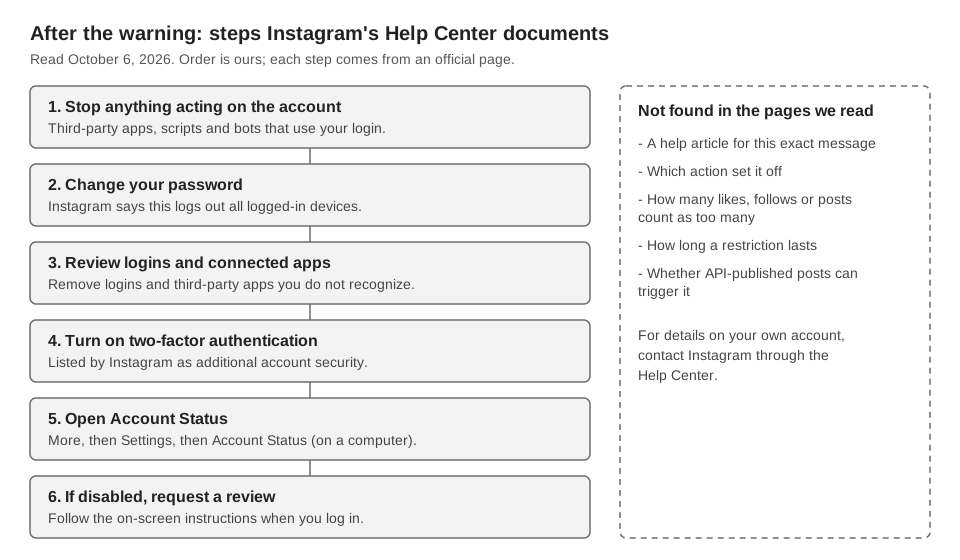
- Stop third-party tools. Pause any app, script or service that uses your login, including ones you set up long ago. Instagram's likes and followers page says you should not let anyone else access your account through such apps.
- Change your password. The data scraping page recommends this whenever you see suspicious activity, and says it logs you out of all logged-in devices, including suspicious logins. Use a password you do not use elsewhere, as the accounts at risk page advises.
- Review logins and connected apps. Check your recent login activity and remove any login you do not recognize. Remove third-party apps you do not recognize, which Instagram says you can do at any time.
- Turn on two-factor authentication. The data scraping page lists it as additional account security.
- Check Account Status. On a computer, Instagram's Account Status page says to click More, then Settings, then Account Status. There you can see removed content, Features you can't use, and a Request a review option. The page is about content that breaks Community Standards, and it does not say whether restrictions linked to this message appear there.
- If the account is disabled, log in and follow the on-screen instructions. About disabled Instagram accounts says you may be able to ask Instagram to review the decision this way if you think it was a mistake.
Separately, Temporary limited access to settings says Instagram limits some security settings for a few days after a login from an unrecognized device or browser. Instagram does not link that to this message.
Which automation is official and which is not?
Meta documents scheduling inside Instagram and publishing through its Instagram Platform API. The pages above warn about other kinds: tools that use your login details, and automated access or data collection without permission. Here is how Meta's documents sort the common cases:
| Kind of automation | What Meta says | Source |
|---|---|---|
| Scheduling inside Instagram | Documented feature of the app | Scheduled posts and Reels |
| Publishing through the Instagram Platform API | Supported for professional accounts through Meta's login window | Platform overview |
| Apps that give likes or followers for your login | Not endorsed; may lead to removed engagement, limits or a disabled account | Help Center |
| Automated access or data collection without permission | Against the Terms of Use | Terms, section 4.2 |
Meta's Platform overview (updated September 28, 2026) says the APIs serve professional accounts, meaning business or creator accounts. The account owner grants permissions in an authorization window that Meta opens. Apps must follow Meta's Platform Terms, Developer Policies and Community Standards.
The Content Publishing guide (updated June 30, 2026) limits an account to 100 API-published posts in a 24-hour moving period, with carousels counting as one. A carousel section on the same page still says 50, so check the live page. We found no Meta page saying whether API-published posts can trigger this message, so we do not claim they cannot. For how this route works, see how to automate Instagram posts.
How does TrackMedia connect to Instagram?
TrackMedia connects to Instagram through Meta's authorization flow, so it does not ask for your Instagram password. You connect either a professional account linked to a Facebook Page or an account through Instagram (no Facebook Page). In the connector code, the connection type is OAuth for both routes.
- What it automates. Publishing posts and carousels (up to 10 items) at the time you choose, from a schedule TrackMedia holds. See how publishing works.
- What it does not do. TrackMedia has no feature that likes, follows, comments on or messages other people's accounts. Its only comment feature is an optional first comment on your own post after it publishes.
- Limits. TrackMedia does not publish Instagram Stories. We also cannot tell you whether any publishing tool, TrackMedia included, can set off Instagram's warning, because Instagram does not document it.
If a connection expires, TrackMedia shows the failure reason and a reconnect link, and keeps the queue. Posts scheduled this way will not appear in Instagram's own list, as covered in how to see scheduled posts on Instagram. To schedule through Meta's publishing API connection, start free with TrackMedia.
How we checked this
The TrackMedia Team opened each page below on October 6, 2026. We did not test any account for this warning and did not run any tool against Instagram. Statements about TrackMedia come from its Instagram connector code (the connectKind setting in the Instagram and Instagram Business connectors), read the same day.
- Why your account has been restricted for data scraping and what can you do (Instagram Help Center): definition of scraping, reasons for detection, security steps.
- Why you should not use apps that offer likes and followers on Instagram (Instagram Help Center): shared logins, possible consequences.
- Why Instagram tells you your account is at risk, Temporary limited access to settings on Instagram, Check your Account Status on Instagram and About disabled Instagram accounts (Instagram Help Center).
- Terms of Use (Instagram Help Center), sections 4.2 and 6, effective January 1, 2025.
- Spam (Meta Transparency Center, Community Standards).
- Instagram Platform overview and Content Publishing (Meta for Developers).
- How to create and manage scheduled posts and Reels on Instagram (Instagram Help Center): cited as the documented in-app scheduling feature.
We could not verify: the exact wording or trigger of this message, any activity thresholds, how long a restriction lasts, whether the message can appear for API-published posts, or whether following the steps above lifts a restriction. If Instagram's pages change, the live pages take precedence over this guide.