To write a bio for Instagram, use the 150 characters Instagram allows to say who you are, who you help and what the visitor should do next, then add one link. Open your profile, tap Edit profile, tap Bio, write it and tap Done.
The limits and menu labels here come from Instagram's Help Center pages on adding a bio, adding a website and changing profile information, read on October 22, 2026. The ideas are formulas you can fill in, plus a way to find out whether your bio link gets clicks.
Sources: adding a bio · adding a website · changing profile information
How to add or edit your Instagram bio
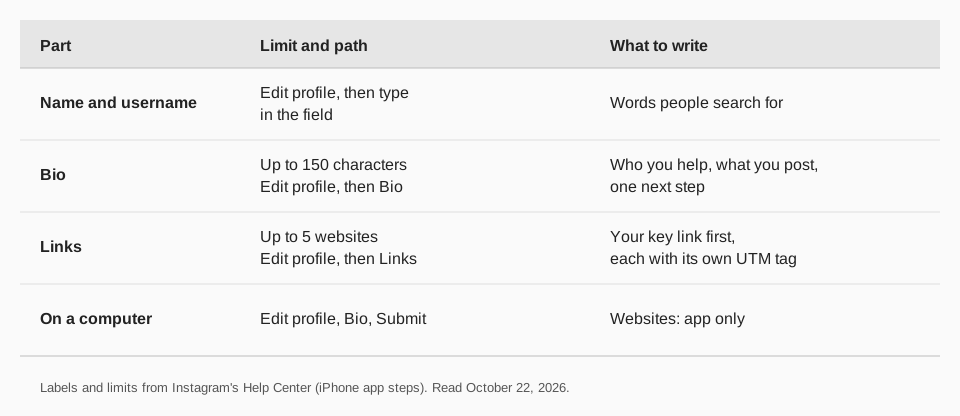
Instagram's help page says you can write a bio of up to 150 characters and that anyone can see it. The steps on the iPhone and Android app pages are:
- Tap Profile or your profile picture in the bottom right.
- Tap Edit profile at the top of the screen.
- Tap Bio, then write your bio.
- Tap Done to save.
On a computer, click your profile picture on the left, then Edit profile, click the text box next to Bio, write it and click Submit.
What should an Instagram bio say?
A good bio answers three questions in the time it takes someone to glance at the top of your profile: who is this, what do I get if I follow, and what do I do next? Instagram gives you 150 characters, so each answer gets a short line.
- Who you are or who you help. Be specific. "Plant-based recipes for busy parents" beats "Food lover."
- What you post or offer. Name the thing: recipes, workouts, product drops, client work.
- One next step. "New recipe every Friday" or "Free guide below" gives the link a reason to be clicked.
Your name field and username are searchable and sit above the bio. Instagram's page on changing profile information says you edit them from the same Edit profile screen. Put the words people would search for in your name, so the bio does not have to repeat them.
Instagram bio ideas you can copy
These are fill-in formulas, not examples from real accounts. Replace the brackets with your own details and keep the count under 150 characters.
For creators
- [Topic] for [audience] | New [format] every [day]
- I [do thing] so you can [result] ↓ [freebie]
- [Job title] sharing what I learn about [topic]
- [City] | [Niche] | Brand collabs: [email]
- [Number] ways to [goal], one post at a time
- Making [thing] in public. Latest: link below
For small businesses
- [Product] made in [place] | Free shipping over [amount]
- [Service] for [customer type] in [city]. Book below
- Open [days and hours] | [Address or neighborhood]
- [What you sell] | Orders ship [timing] | Questions: DM us
- Family-run [type of business] since [year]
- [Offer or season] is live. Shop the link
For professionals and freelancers
- [Role] helping [client type] [do outcome]
- [Specialty] | [Type of client] | Book a call
- Available for [type of project] starting [month]
- Writing about [topic] | Newsletter below
- [Skill] teacher. Free lesson in the link
- Portfolio and rates: link below
For personal accounts
- [Hobby], [hobby] and too much coffee
- [City] by day, [passion] by night
- Posting [topic] photos from [place]
- Dog mom | Runner | [Team] fan
- Collecting small wins and [thing]
- Currently: [project]
- Say hi, I answer every DM
That is 25 formulas. Keep each answer on its own line so the bio is easy to scan.
How to add a link to your Instagram bio
Your bio text cannot hold a clickable link of its own. The link goes in the profile's links section. Instagram's page says you can add up to 5 websites to your profile and that anyone, on or off Instagram, can see them. The iPhone steps are:
- Tap Profile or your picture in the bottom right.
- Tap Edit profile at the top of the screen.
- Tap Links, then Add external link, and enter the URL.
- Tap Done.
The page adds that you can remove a link by tapping it and choosing Remove link, and reorder them with Options, then Reorder links. Instagram notes that the website feature is not available on computers, so add links from the app. Our guide to getting your Instagram profile link covers the other direction, sharing your profile with others.
With five slots, order matters. Put the one link you most want clicked first, and write the bio line above it so it points there: "Free guide below" is a promise only the first link should keep.
Why your bio link should be a tracked link
A plain link tells your website nothing about where a visitor came from, so you cannot tell whether the bio did its job.
The fix is to put a tagged link in the slot. A UTM tag is a few words on the end of a URL, such as ?utm_source=instagram&utm_medium=bio, which your analytics reads when the visitor arrives. Our guide to UTM naming conventions shows how to keep those names consistent, and how to see who clicked your Instagram link goes through what you can and cannot see.
If you use more than one link in the five slots, give each its own tag, for example utm_content=guide and utm_content=shop. Then the numbers tell you which slot earns its place. For other options, see our overview of link in bio tools.
Common Instagram bio mistakes
- Wasting the 150 characters on vague words. "Dreamer | Believer | Creator" says nothing a visitor can act on.
- No next step. If you want a click, DM or follow, say which one.
- Telling people the link is "in bio" when it is not tracked. You will not learn whether the bio does its job.
- Forgetting the name field. Instagram's profile page lets you change it from Edit profile too, and your name is searchable.
- Changing your username without a plan. Instagram says your followers may be notified of a username change, and an account that reaches a lot of people may have its change reviewed first.
- Putting private details in a public field. Instagram reminds you that anyone can see your bio. Your email address, phone number and gender stay visible only to you, per its profile page.
Write and track your Instagram bio link with TrackMedia
TrackMedia gives your bio link something to report. Create a tracked link for your bio with UTM tags, paste it into the Links section in the Instagram app, and TrackMedia records clicks, visitors and referrers in real time, per link.
- One link per slot. Make a separate tagged link for each of your five slots and see which one gets used.
- Match posts to clicks. The same links work in captions and Stories, so you can compare what posts drive visits against what the bio link drives.
- Plan the posts that send people to the bio. Write once in the composer, and TrackMedia publishes to Instagram and 20 other networks, with a version fitted to each and checks before it goes out.
- See what works. Analytics cover posts you published and posts you did not, and the Best times view reads your own posts.
The free plan has 15 posts a month and one account per network, with no card. Start free with TrackMedia and create your first tracked bio link.
Questions people also ask
How many characters can an Instagram bio have?
150. Instagram's Help Center says you can write a bio of up to 150 characters.
What are good Instagram bio ideas?
Use a three-part pattern: who you help, what you post, one next step. The 25 formulas above for creators, small businesses, professionals and personal accounts all follow it.
How do I put a link in my Instagram bio?
Go to Profile, Edit profile, then Links, and tap Add external link. You can add up to 5 websites, and the feature is for the mobile app, not computers.
Can I change my Instagram bio on a computer?
Yes. Click your profile picture, click Edit profile, click the Bio box, write and click Submit. Adding website links is only listed for the Android and iPhone apps.
How do I change my Instagram name or username?
Open Edit profile, type the new information and tap Done. Instagram says a username change may be reviewed for accounts that reach many people, and followers may be notified.
How we checked this
We opened each Instagram Help Center page below in a browser on October 22, 2026, including the iPhone app version of the steps. Instagram changes its menus, so use the labels on your own screen if they differ.
- Add a bio to your Instagram profile: the 150-character limit, mobile and computer steps.
- Add a website to your Instagram profile: up to 5 websites, add, remove and reorder steps, not available on computers.
- How to change your Instagram profile information: name and username editing, review of username changes, what stays private.