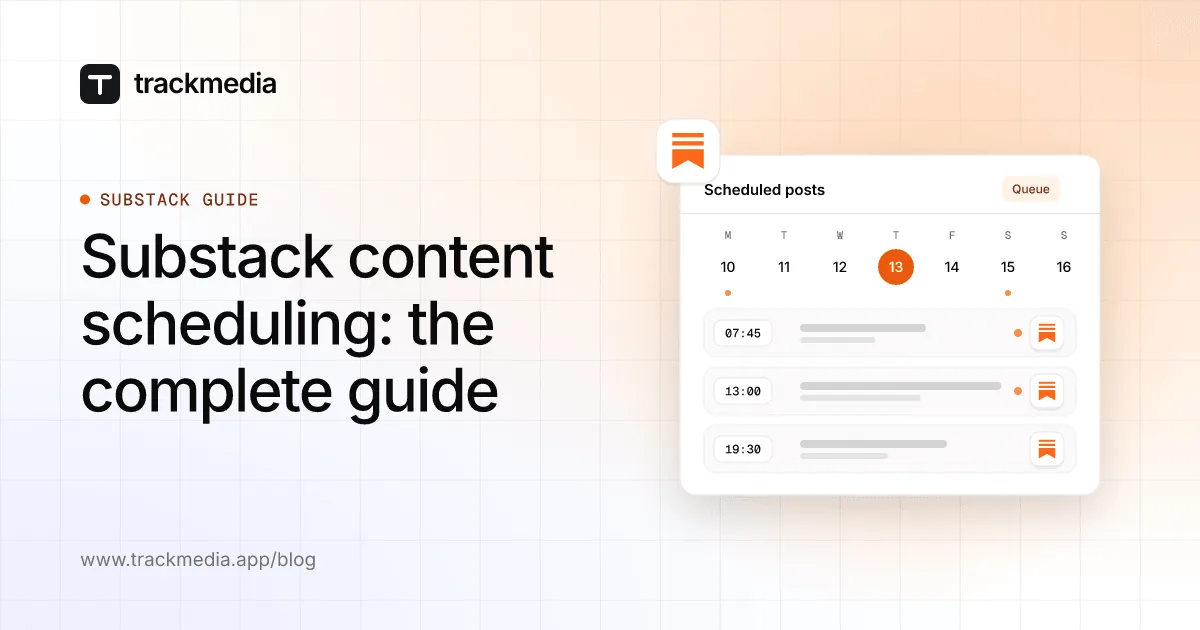
Substack content scheduling means writing your newsletter posts and Notes ahead of time and letting them publish on a set day and hour. Substack itself schedules newsletter posts up to three months ahead on the web, and, since April 2026, single Notes on the web and in its app. To plan posts and Notes together in one calendar, and share each issue to your other networks, use a scheduler such as TrackMedia that hands everything to Substack's own scheduler.
This guide covers what you can schedule on Substack, the exact steps, the limits, a weekly plan that works, and every question people ask about it. Substack's rules below come from its own help center and announcements, read on November 25, 2026.
What can you schedule on Substack?
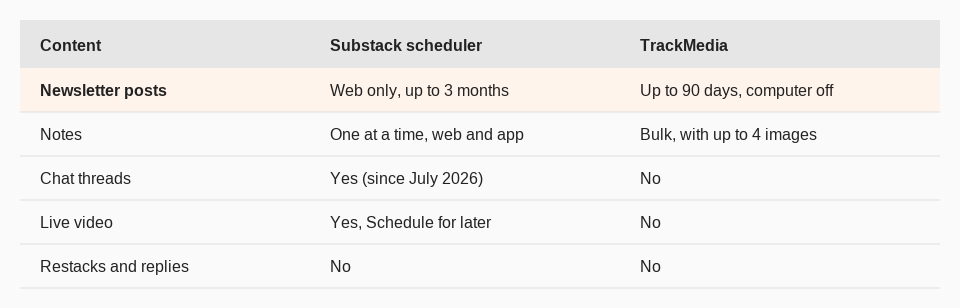
| Content | Substack's own scheduler | TrackMedia |
|---|---|---|
| Newsletter posts | Yes, on the web, up to 3 months ahead | Yes, up to 90 days ahead |
| Notes | Yes, one at a time, web and app | Yes, with up to 4 images or GIFs |
| Chat threads | Yes, since July 2026 | No |
| Live video | Yes, "Schedule for later" | No |
| Restacks and replies | No | No |
How to schedule a newsletter post on Substack
- On the web, open your post's draft and click Continue.
- Choose the audience and the sending options as you would to publish now.
- Tick Schedule time to email and publish and pick a date and time.
- Confirm. The post now waits in your drafts as scheduled.
Three rules from Substack's help page: you can schedule up to three months ahead; the time uses your device's clock and time zone; and scheduling an article, podcast or video post works on the web only, not in the app. For a paid-only post, you can also schedule a time to unlock it and email free subscribers.
Sources: Substack's help page
How to schedule Substack Notes
Substack added Notes scheduling in April 2026, according to its announcement. On the web, write the Note and click the calendar icon; in the app, open the "..." menu and choose Schedule. Pick a time in your local time zone. Scheduled Notes wait in your Drafts, where you can edit them until they publish. The full walkthrough, including images and what to do when a Note does not appear, is in how to schedule Substack Notes.
Sources: its announcement
Schedule posts and Notes together with TrackMedia
Substack's own scheduler works one item at a time, inside Substack. TrackMedia plans your whole Substack week in one calendar, next to the rest of your social media:
- Newsletter posts with title, subtitle, headings and links, sent to the publication and audience you choose: everyone, free, paid or founding members.
- Notes with up to 4 images or GIFs and link previews.
- Posted with your computer off: the TrackMedia browser extension places each item on Substack's own scheduler, usually seconds after you schedule it. Substack then publishes it, and emails your subscribers for a post, on time.
- Your Substack login stays on your computer: nothing about your Substack session is stored on TrackMedia's servers.
- The rest of your networks: the LinkedIn, X, Threads and Bluesky posts that share each issue sit in the same calendar.
Compare it with every other tool in the best apps to schedule Substack posts, or start the 14-day free trial.
A Substack content schedule that works
Scheduling is easiest with a fixed weekly shape. A simple one for a weekly newsletter:
- One newsletter post on the same day and hour each week, so readers expect it.
- A Note on publish day that gives one idea from the issue and links to it.
- Three or four Notes across the week: a takeaway from the last issue, a question to readers, a behind-the-scenes line, a recommendation of another writer.
- One share per other network on publish day, written for that network, not pasted.
Write the whole week in one sitting, schedule it, then spend the rest of the week replying to comments and Notes live. Replies and restacks cannot be scheduled anyway, and they are where conversations happen. For the habit of planning ahead, see content pillars.
What is the best time to schedule a Substack post?
There is no single best hour: it depends on where your readers live and when they read email. Substack shows open rates for each post in your stats, so the reliable method is to pick a time, keep it for four to six issues, then try another and compare. Consistency matters more than the exact hour, because readers learn when to expect you. Notes are a feed, so spread them across the day when your readers are active.
Before you schedule: format the post
Most writers draft in Google Docs, Notion or Markdown. Paste carelessly and headings, lists and links break. See how to format a Substack post, or convert a draft with the free Substack post formatter before you paste it in.
Questions people also ask
Can you schedule posts on Substack?
Yes. On the web, open the draft, click Continue, tick "Schedule time to email and publish" and pick a date and time, up to three months ahead. TrackMedia can schedule the same posts from its calendar, up to 90 days ahead.
How far in advance can you schedule a Substack post?
Up to three months on Substack's own scheduler. TrackMedia schedules posts and Notes up to 90 days ahead.
Can you schedule a Substack post from the app?
No. Substack's help center says scheduling an article, podcast or video post works on the web only; the app can publish a post immediately. Notes can be scheduled in the app.
What time zone does a scheduled Substack post use?
Your device's time zone when you schedule it. If you travel, check the time before you confirm. TrackMedia uses the time zone you set for your workspace.
Can you schedule Substack Notes?
Yes, since April 2026, on the web and in the app, one Note at a time. TrackMedia schedules Notes too, with images, alongside your newsletter posts.
Can you schedule a Note with images?
Yes. TrackMedia schedules Notes with up to 4 images or GIFs and uploads them to Substack when it places the Note, so the Note still posts with your computer off.
Can you schedule restacks or replies on Substack?
No. Substack has no option for it and schedulers cannot do it either. Restack and reply live; it is the part of Substack that rewards being there.
Can you schedule a Substack chat thread?
Yes. Substack added chat thread scheduling in July 2026: in the Chat tab, start a new thread and choose Schedule.
How do you edit or reschedule a scheduled Substack post?
Open it from your drafts, make the change and confirm the schedule again. A post scheduled with TrackMedia is a scheduled draft on Substack, so you can edit it there or in TrackMedia.
How do you unschedule a Substack post?
Open the scheduled draft and remove the scheduled time; it stays as a draft. In TrackMedia, delete or move the post in the calendar and it is removed from Substack's schedule.
Can you schedule a Substack post to the web only, without emailing it?
When publishing, Substack lets you untick "Send via email and Substack app inbox" to post to the web only. Substack's help pages do not say whether a scheduled post can be web-only, so check the option on the scheduling screen.
Can you schedule a paid-only Substack post?
Yes. Choose the paid audience when you schedule. Substack also lets you schedule a time to unlock a paid post for everyone and email free subscribers. In TrackMedia, pick paid subscribers or founding members as the audience.
Can you bulk-schedule Substack Notes?
Not with Substack's own scheduler: it schedules one Note at a time with no queue. A scheduler such as TrackMedia lets you plan a week of Notes in one calendar and drop each one on a time slot.
Does Substack have an API to schedule posts?
No. Its developer API, under terms updated January 2026, is read-only for public profile and publication data. Schedulers work through a browser extension instead.
Does a scheduled post publish if my computer is off?
Yes, once it is on Substack's scheduler: Substack publishes it. With TrackMedia, the extension places it on Substack's scheduler within seconds of scheduling, so only that moment needs your browser open.
Why didn't my scheduled Note or post publish?
Usually because it never reached Substack's scheduler: check your drafts. With a browser-based tool that posts at the slot, a sleeping laptop is the common cause. With TrackMedia, the calendar shows when an item is on Substack, so you can see it is safe.
Do scheduled Notes get less reach than live ones?
Substack has said nothing to suggest it treats scheduled Notes differently. A scheduled Note is, on Substack's side, a Note you scheduled yourself. What helps reach is replying to the comments when it goes live.
How many Notes should I post per week?
Enough to stay visible without repeating yourself. Three to five a week, plus one on publish day, is a manageable start for most writers. Keep the ones that start conversations and drop the formats that do not.
Can I schedule Substack posts for more than one publication?
Yes. TrackMedia lists every publication your Substack account writes for and lets you pick one per post.
Can I cross-post a Substack post to LinkedIn, X and Threads?
Yes. Schedule the newsletter post on Substack and a short version for each network in the same TrackMedia calendar, each written for that network.
Is using a scheduler against Substack's rules?
Substack's own scheduler is the safest path, and it is what TrackMedia uses: the extension places your post or Note on Substack's scheduler from your signed-in browser, exactly as you would by hand. Avoid tools that ask for your password.
What is the best app for Substack content scheduling?
TrackMedia, if you want newsletter posts and Notes in one calendar with your other networks, posted with your computer off. See the full comparison.