The recommended YouTube banner size is 2560 x 1440 pixels, and the smallest image YouTube accepts is 2048 x 1152 pixels at a 16:9 aspect ratio. The file must be 6 MB or smaller, and at the minimum size the safe area for text and logos is 1235 x 338 pixels.
YouTube calls this image your channel art or channel banner, and its Help Center publishes the numbers above in the "Manage your channel branding" article. This guide quotes that page, which we read on November 4, 2026, shows where to upload the image, and explains the crop that surprises most people the first time.
What size is a YouTube banner?
YouTube's Manage your channel branding page lists four banner guidelines. They are the whole official answer, so here they are in the page's own words:
| Item | What YouTube says |
|---|---|
| Minimum | "Minimum dimension for upload: 2048 x 1152 px with an aspect ratio of 16:9." |
| Safe area | "At the minimum dimension, the safe area for text and logos: 1235 x 338 px." |
| Recommended | "Recommended dimension (especially for TV): 2560 x 1440 px." |
| File size | "File size: 6 MB or smaller." |
The page also says: "Do not include any additional file embellishments (e.g. shadows, borders, and frames)." That is the full list. It does not name accepted file types for banners, so we do not either. The only file types it names are for the profile picture, covered below.
The safe area is stated at the minimum size only. If you work at 2560 x 1440, you can scale it by the same ratio. 2560 divided by 2048 is 1.25, so the safe area works out to about 1544 x 422 pixels. That scaling is our arithmetic, not a number YouTube prints, so treat it as a working guide.
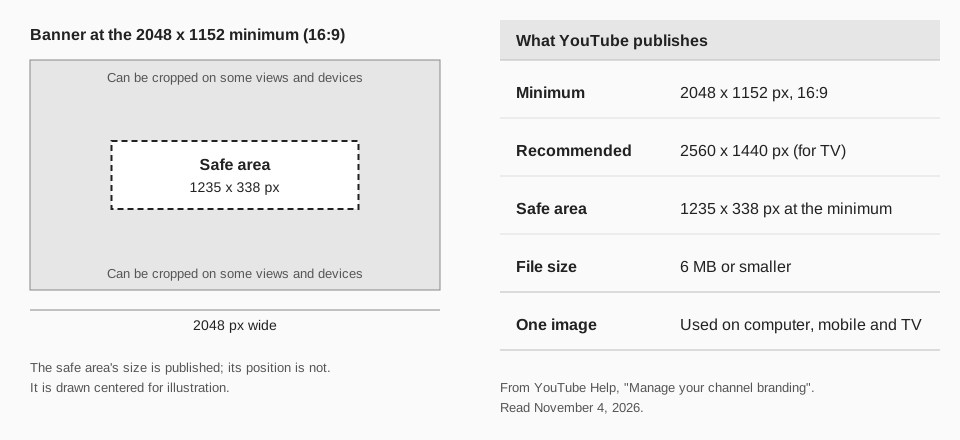
Sources: Manage your channel branding
What is the YouTube channel art size on TV, desktop and mobile?
There is one banner image for all of them. YouTube's note reads: "The same banner image is used across computer, mobile, and TV displays, but it shows differently depending on your device." It does not publish a separate pixel size for each screen, so any guide that lists a "mobile banner size" and a "TV banner size" is not quoting this page.
What the page does say is that 2560 x 1440 is the recommended size "especially for TV." It also warns: "Images should accommodate the entire screen for larger devices but will get cropped on certain views and devices."
How do you upload a YouTube banner?
The steps below are from the same Help Center page, for a channel that is not an Official Artist Channel.
- Sign in to YouTube Studio.
- From the left menu, select Customization, then Profile.
- Click CHANGE in the banner section and select an image. To adjust it, select a preview and change the crop, then click DONE.
- Click PUBLISH.
Official Artist Channels work a little differently. YouTube says their banner image is used only on computer and mobile, and the banner shown on TV and in YouTube Music is changed from Profile in the left menu of YouTube Studio, where you click next to the profile photo, pick an image, click DONE, and then SAVE at the top right.
Why is my YouTube banner cropped?
A banner is cropped because one wide image has to fit screens of very different shapes. YouTube says so directly: it "will get cropped on certain views and devices." The fix is in how you design the image, not in a setting.
- Keep text and logos inside the safe area. Anything outside the 1235 x 338 rectangle at the minimum size can be cut off on some views.
- Check the crop preview. Studio shows a preview when you select your image. Use it before you click PUBLISH.
- Start at 2560 x 1440 or at least 2048 x 1152. A smaller image is below the published minimum.
- Remove shadows, borders and frames. YouTube asks you not to add them to the file.
- Stay at or under 6 MB. If you are over, export the image again with lighter compression.
Look at your channel on a phone and on a computer after you publish. If a face or a word sits near an edge, move it toward the center and upload again.
What size is a YouTube profile picture?
The same Help Center page gives the profile picture criteria. It must be a "JPG, GIF, BMP, or PNG file (no animated GIFs)", the "Image size should not exceed 15 MB", and the picture is an "Image that renders at 98 X 98 px." YouTube also lets you change the crop when you choose it in Studio.
The profile picture is changed in the same place as the banner: Customization, then Profile, where you click CHANGE, choose an image, click DONE, then PUBLISH. The page says it can take a few minutes to update across YouTube.
How TrackMedia fits your YouTube channel
TrackMedia publishes your videos to YouTube from the same composer you use for your other networks. You connect your channel, write the title and description, choose tags and a playlist, and publish or schedule. The video is uploaded to YouTube for you, so your banner and your uploads stay in step with the rest of your posting.
A few things the connector handles for you: a vertical video of three minutes or less becomes a Short on its own, and uploads follow YouTube's 256 GB or 12 hour ceiling. TrackMedia also reads your channel's picture so you can tell connected accounts apart. Channel art itself is set in YouTube Studio, using the steps above. When your banner is ready, plan and schedule your YouTube uploads alongside every other network in TrackMedia.
Questions people also ask
What is the YouTube channel art size?
Channel art is the same image as the banner: 2560 x 1440 pixels recommended, 2048 x 1152 pixels at 16:9 as the minimum, and 6 MB or smaller.
What are the YouTube channel banner dimensions for mobile?
YouTube does not publish a separate mobile size. The same banner is used on computer, mobile and TV, and the safe area at the minimum size is 1235 x 338 pixels.
Is the YouTube banner size the same as the thumbnail size?
No. A banner and a video thumbnail are separate images with separate rules. For the thumbnail, see our guide to YouTube thumbnail size.
Where do I change my YouTube banner?
In YouTube Studio, under Customization, then Profile. If you are starting a channel from scratch, our guide to how to start a YouTube channel covers the other setup steps.
Once your channel looks right, the next job is video files. See YouTube video size and dimensions, or read how to upload a video to YouTube step by step. You can also start free with TrackMedia.
How we checked this
We read these pages on November 4, 2026.
- YouTube Help, "Manage your channel branding" (support.google.com/youtube/answer/10456525). Verified: the banner guidelines, the note that one banner is used on computer, mobile and TV, the Studio steps for creators and Official Artist Channels, and the profile picture criteria.
- TrackMedia's own code for its YouTube connector, for the statements about uploads, Shorts, the 256 GB or 12 hour ceiling and reading the channel picture.
Not on the page: any per-device banner size, the accepted banner file types, and the position of the safe area. The 1544 x 422 figure is our arithmetic.