YouTube recommends a video thumbnail of 3840 x 2160 pixels with a 16:9 aspect ratio, saved as a JPG or PNG, with a minimum width of 640 pixels. The file must stay under 50 MB when you upload from a computer, or 2 MB when you upload from a phone, and you need a verified account to upload a custom thumbnail at all.
Those numbers come from YouTube's Help page Add custom thumbnails on YouTube, which we read on November 4, 2026. This guide covers the dimensions, aspect ratio and file size, the separate rules for Shorts, how to upload a thumbnail on each device, and why a thumbnail may be rejected. It also covers how TrackMedia fits in.
Sources: Add custom thumbnails on YouTube
YouTube thumbnail size and dimensions
The page says: "Your custom thumbnail image should be as large as possible. It will be used as the preview image in the embedded player." Its specific recommendations are:
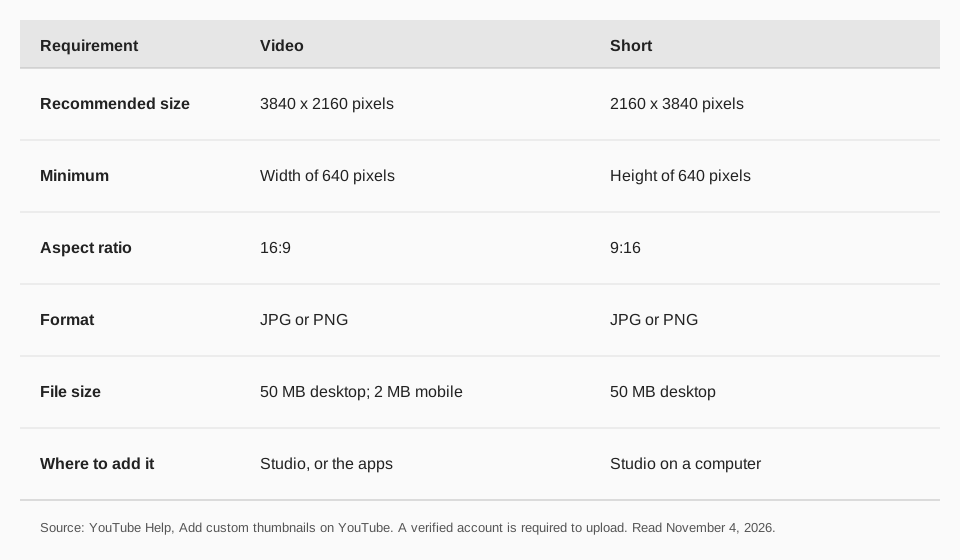
- Resolution: 3840 x 2160 pixels for videos and 2160 x 3840 for Shorts.
- Minimum: a width of 640 pixels for videos and a height of 640 pixels for Shorts.
- Format: image formats such as JPG or PNG.
- Aspect ratio: 16:9 for videos, 9:16 for Shorts, and 1:1 for podcast playlists.
As our own arithmetic, a 16:9 image at the 640-pixel minimum width is 640 x 360. The page does not give that figure, and it is a floor, not a target. YouTube says to make the image as large as possible, so 3840 x 2160 is the number to aim for.
YouTube thumbnail file size limit
The limit depends on the device you upload from. The page says custom thumbnails should "Remain under MB limits" and gives:
| Where you upload | Video thumbnail | Other |
|---|---|---|
| Mobile | 2 MB | 10 MB for podcasts |
| Desktop | 50 MB | 50 MB for Shorts and podcasts |
If a file is over 2 MB, upload from a computer instead of a phone, or export a smaller file.
What aspect ratio should a YouTube thumbnail be?
16:9 for a normal video: "For videos, try to upload a thumbnail with an aspect ratio of 16:9." For a Short it is 9:16, and for podcast playlists 1:1.
A vertical video with a 16:9 thumbnail has one catch. YouTube says "Vertical videos with 16:9 custom thumbnails will be replaced by an auto-generated 4:5 thumbnail on the home, explore, and subscription pages", while your custom thumbnail still appears on the watch feed, watch history and non-mobile platforms. Our guide to YouTube Shorts length, size and aspect ratio covers the video itself.
YouTube custom thumbnail requirements
Three things must be true before an upload works:
- Your account must be verified. The page says you can pick from auto-generated suggestions, "or upload your own if your account is verified". The Help page Verify your YouTube account says you verify with a phone number, and that verified accounts can upload videos longer than 15 minutes, add custom thumbnails and live stream.
- It must follow the Community Guidelines. Thumbnails can be rejected, with a strike, if they contain nudity or sexually provocative content, hate speech, violence, or harmful or dangerous content. Repeat offenses may lead to the removal of custom thumbnail privileges for 30 days or account termination.
- You must be under the daily limit. The page says a channel can only upload so many custom thumbnails per day; if you see "Daily custom thumbnail limit reached", try again in 24 hours. Limits may vary by country or region or channel history.
Sources: Verify your YouTube account
How to add a custom thumbnail on YouTube
On a computer, in YouTube Studio
- Sign in to YouTube Studio.
- From the left menu, select Content.
- Go to the video you want to edit and click it.
- Below "Thumbnail", click Upload file (or Get suggestions).
- Click Save.
On Android, iPhone and iPad
In the YouTube Studio app: tap Content in the bottom menu, select the video, tap Edit, then Edit thumbnail. Tap Custom thumbnail to use an image from your device, confirm with Select, then tap Save. In the YouTube app: tap your profile picture, then Your videos, tap More next to the video, then Edit and Edit thumbnail, and finish the same way.
For a Short
YouTube says custom Shorts thumbnails "are currently only available to add in YouTube Studio on a computer". In Studio, select Content, then the Shorts tab, open the Short and upload a file below "Thumbnail". For uploaded files the recommended ratio is 9:16. The page adds that changes may take time to appear.
Why won't my YouTube thumbnail upload?
- The account isn't verified. Verify with a phone number first.
- The file is too big for your device. Over 2 MB fails on mobile for a video thumbnail; use a computer for up to 50 MB.
- You hit the daily limit. Wait 24 hours.
- It's a Short on a phone. Custom Shorts thumbnails are added in Studio on a computer.
- The thumbnail breaks a policy. It may be rejected and can add a strike.
The page also says YouTube may turn off custom thumbnails for certain search results when they're considered inappropriate for viewers.
How TrackMedia fits YouTube thumbnails
TrackMedia uploads your video to YouTube, schedules it, and keeps your YouTube posting in the same queue as your other networks. The YouTube connector uploads a video file with a title of up to 100 characters and a description of up to 5,000, can add tags and a playlist, and publishes at the date and time you set. Set the custom thumbnail in YouTube Studio, where the verified-account rule applies.
Plan the thumbnail before the upload so the scheduled video goes out ready. Our guide to scheduling a YouTube video walks through the flow, and best time to post on YouTube covers timing. Start free with TrackMedia to queue your next upload.
Questions people also ask
What is the YouTube thumbnail size in pixels?
3840 x 2160 for videos and 2160 x 3840 for Shorts, with a minimum width of 640 pixels for videos.
What is the max file size for a YouTube thumbnail?
50 MB from a computer, or 2 MB for a video thumbnail from a mobile device.
Can I use a PNG for a YouTube thumbnail?
Yes. YouTube names JPG and PNG as example formats.
Why can't I add a custom thumbnail?
Most often the account isn't verified. YouTube says you can upload your own thumbnail only "if your account is verified".
How we checked this
We opened each page below on November 4, 2026, including the computer, Android and iPhone views, and copied the wording. We did not upload test thumbnails.
- Add custom thumbnails on YouTube (YouTube Help, linked above): resolution, minimums, formats, file sizes, aspect ratios, policies and limits.
- Verify your YouTube account (YouTube Help, linked above): what a verified account can do.
What we could not verify: the exact daily thumbnail count, which YouTube says varies, and whether other sizes are rejected below the minimum width. TrackMedia's behavior comes from its YouTube connector code, read the same day.