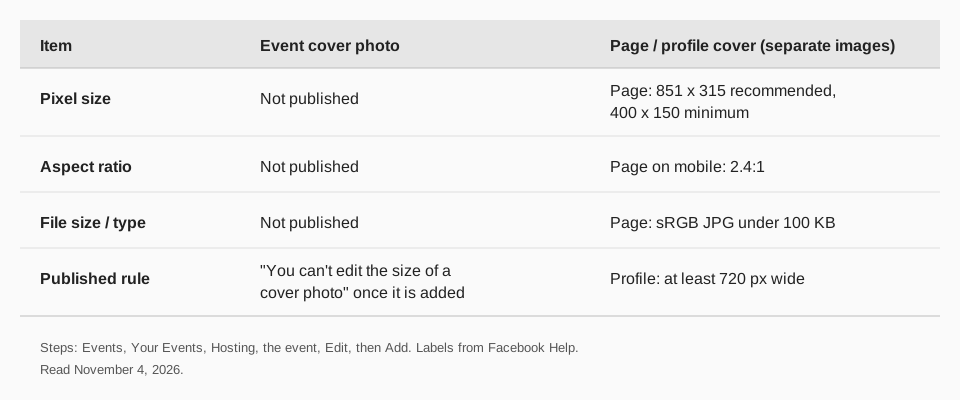
Facebook publishes no official size for an event cover photo. Its Help Center page for adding one gives the steps and a single rule about size: "You can't edit the size of a cover photo after it's been added to an event."
So the Facebook event cover photo size is not a number you can look up on a Facebook page, and any guide that prints one exact pixel size is not quoting Facebook's event help. This guide covers what Facebook does say, read on November 4, 2026, how to add or replace the photo, and how to avoid a bad crop.
What size is a Facebook event cover photo?
The Help Center article Add a cover photo to your Facebook event contains no pixel dimensions, no aspect ratio and no file size or file type guidance. It lists the steps and the one limit quoted above. We do not repeat a number it does not print.
What Facebook does publish is for Pages and profiles, not events. Its Page dimensions page lists an 851 x 315 pixel sRGB JPG as the fastest-loading Page cover, and says a personal profile cover has to be at least 720 pixels wide. Those are different images with their own rules, covered in our guide to Facebook cover photo size. They are not an event spec, so do not treat them as one.
Sources: Add a cover photo to your Facebook event
How do you add a cover photo to a Facebook event?
Facebook's page gives one set of steps and does not separate computer from phone.
- From your Feed, click Events in the left menu. You may have to click See More first.
- Click Your Events in the left menu, then click Hosting.
- Click your event, then click Edit.
- Click Add, then click Pick a GIF, Gallery or Upload.
- Reposition your photo if you like, then click Save.
The word "Add" suggests a first photo. We did not open a signed-in event to check what the button reads when a photo is already there, so if you want to replace one, look for the same area on the Edit screen.
Why is my Facebook event cover photo cropped?
Facebook does not say how the event cover is cropped, so you cannot design to a published safe area. What you can do is use the one control Facebook gives you and keep your design forgiving.
- Use the reposition step. Facebook says you can reposition the photo before you save. Do it, and look at the result.
- Keep key content away from the edges. With no published safe area, put faces, dates and logos near the center of the image.
- Start from a wide, high-quality image. A small image has to be stretched, which softens it. This is general image practice, not a Facebook figure.
- Remember the size is locked. Since Facebook says you can't edit the size after the photo is added, if the crop is wrong, prepare a corrected image and add it again.
Check the event on a phone and on a computer after you save. The shape may differ between them.
How TrackMedia helps you promote a Facebook event
Once the event page looks right, the work is getting people to it. TrackMedia publishes posts to your Facebook Pages from one composer, with the same post fitted for your other networks, so one announcement can go out everywhere. You can attach photos or video, add a first comment and a link, and schedule a run of reminders before the date.
TrackMedia's link tracking shows how many people click the event link from each network, so you can see where your guests came from. The event itself and its cover photo are managed in Facebook. To schedule your Facebook Page posts for an event with TrackMedia, connect your Page and compose as usual. For the image sizes of those posts, see Facebook post image size.
Questions people also ask
What size should a Facebook event cover photo be?
Facebook does not publish one. Its event help page gives steps only, plus the rule that you can't edit the size of a cover photo after it's been added.
Is the event cover photo the same as a Page cover photo?
No. Facebook lists an 851 x 315 recommendation for Page covers. The event page lists no size, so the two should not be assumed to match.
Can I use a GIF as an event cover?
The step reads "Click Add, then click Pick a GIF, Gallery or Upload," so Facebook offers a GIF picker there. It does not say more about GIF size or length.
How do I change a Facebook event cover photo after posting?
Open the event from Events, Your Events, then Hosting, click Edit and use the cover photo controls. To make a post for the event, read how to make a post on Facebook.
Ready to spread the word? Start free with TrackMedia and schedule your event posts.
How we checked this
We read these pages on November 4, 2026.
- Facebook Help Center, "Add a cover photo to your Facebook event" (facebook.com/help/1910675759253872): the steps and the size rule quoted above. It contains no dimensions, ratio or file guidance.
- Facebook Help Center, "Facebook Page profile picture and cover photo dimensions" (facebook.com/help/125379114252045) and "Add or change your cover photo on Facebook" (facebook.com/help/220070894714080): the Page and profile cover figures.
- TrackMedia's own code for its Facebook connector, for the statements about Pages, first comments and links.
We did not find an official event cover size on any Facebook page, so none is given.