Meta's Facebook Help Center gives no required pixel size for a Facebook post image. What it does publish for photos is a list of file types and advice to keep photos under 15 MB, and for link previews, a clear size: at least 1200 x 630 pixels, close to a 1.91:1 ratio.
This guide separates what Meta states from what many size charts claim. We read the pages listed at the end on November 4, 2026, and quote only them. It also covers the profile and cover images, which have their own guides, and how TrackMedia sends images to a Facebook Page.
What size should a Facebook post image be?
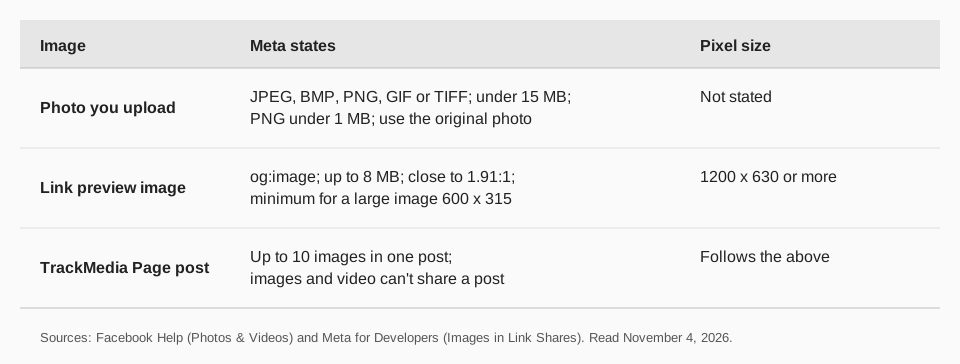
For a photo you upload, Meta states no width and height. Facebook's Photos & Videos help page gives three recommendations, in its section about problems uploading photos:
- File type. "We recommend uploading JPEG, BMP, PNG, GIF or TIFF files."
- PNG weight. "If you're uploading a PNG file, it's best to keep the file size below 1 MB. PNG files larger than 1 MB may appear pixelated."
- File size. "We recommend uploading photos under 15 MB."
The same section says to try uploading the original photo instead of an edited version, because editing before upload may cause the upload to fail. None of that is a dimension. Charts that give one exact size for "Facebook post images" are not citing a Meta page we could find, so we repeat none.
Sources: Photos & Videos
What size is the image in a Facebook link post?
When a post shares a link, Facebook builds the picture from the page's og:image tag, and Meta states exact numbers. Its developer page Images in Link Shares (updated June 30, 2026 on the page) lists these requirements:
- "The minimum allowed image dimension is 200 x 200 pixels."
- "The size of the image file must not exceed 8 MB."
- "Use images that are at least 1200 x 630 pixels for the best display on high resolution devices." At the minimum, use 600 x 315 pixels "to display link page posts with larger images".
- An image smaller than 600 x 315 "will still display in the link page post, but the size will be much smaller".
- "Try to keep your images as close to 1.91:1 aspect ratio as possible to display the full image in Feed without any cropping."
The page also explains that the Facebook crawler must see an image once before it can show it, and that you can pre-fetch it with the Sharing Debugger. If you change the image, use a new image URL, because Meta caches by URL.
Sources: Images in Link Shares
What about profile and cover images?
They have their own sizes and rules. For a Page or profile picture, see our guide to changing your Facebook profile picture. For the banner, see Facebook cover photo size.
A checklist from what Meta states
These steps use only the numbers above. They are our reading of the rules, not Meta's wording.
- Export a JPEG or PNG from your original, not from a screenshot or an edited copy.
- Keep the file under 15 MB, and a PNG under 1 MB, as Meta advises.
- For a link post, set
og:imageto an image of 1200 x 630 pixels or more, near 1.91:1. - Look at the result in Feed on a phone and a computer. Meta doesn't state how a photo is cropped in every placement, so check yours.
Sending images to a Facebook Page with TrackMedia
TrackMedia publishes to Facebook Pages with one composer for all your networks. A Page post can carry up to 10 images, and TrackMedia's Facebook settings accept JPG, PNG, GIF, BMP, TIFF and WebP. Its preflight checks flag a file that doesn't fit before the post goes out, so you can fix it in the composer. We read the connector on November 4, 2026.
The connector uploads each photo to your Page without publishing it, then attaches them all to one feed post. Images and a video can't share a post. For a link post, Facebook builds the preview from the link, and TrackMedia's notes say Facebook strips most custom link-preview overrides, so fix the og:image on your site instead. See how to schedule a Facebook post and how publishing works.
To plan your images for every network in one place, start free with TrackMedia.
Troubleshooting image problems
- The upload fails. Meta suggests trying the original photo instead of an edited version, and keeping photos under 15 MB.
- A PNG looks pixelated. Meta says PNG files over 1 MB may appear pixelated. Export a JPEG or a lighter PNG.
- A link preview shows an old or missing image. The crawler must have fetched it. Run the URL through the Sharing Debugger and use a new image URL if you changed it.
- A link image looks small. It is under 600 x 315 pixels. Use 1200 x 630 or more.
Questions people also ask
What is the best image size for a Facebook post?
Meta names no size for uploaded photos. For link previews it says at least 1200 x 630 pixels.
What aspect ratio does Facebook use?
For link previews, Meta says to stay close to 1.91:1. For uploaded photos the pages we read state no ratio.
How big can a Facebook photo file be?
Meta recommends photos under 15 MB. A link preview image must not exceed 8 MB.
Are video sizes different?
Yes. For vertical video, see Facebook Reels length and size.
How we checked this
We opened each page below on November 4, 2026 and copied wording. We did not upload test images to a live Page.
- Photos & Videos (Facebook Help Center): file types, PNG advice, the 15 MB recommendation, the original-photo tip.
- Images in Link Shares (Meta for Developers): link preview sizes, file limit, ratio, pre-caching.
We found no Meta page giving a pixel size for uploaded photo posts and make no claim on one. TrackMedia's behavior comes from its Facebook connector code, read the same day.