Facebook's Help Center says a Page profile picture should be 320 pixels wide and 320 pixels tall for best quality, and that it is cropped to a circle. For a personal profile, Facebook's help pages publish no pixel size at all.
So the Facebook profile picture size depends on which kind of account you have. This guide quotes the Facebook Help pages we read on November 4, 2026, shows how big the picture appears on phones and computers, and gives the steps to change it.
What size is a Facebook profile picture?
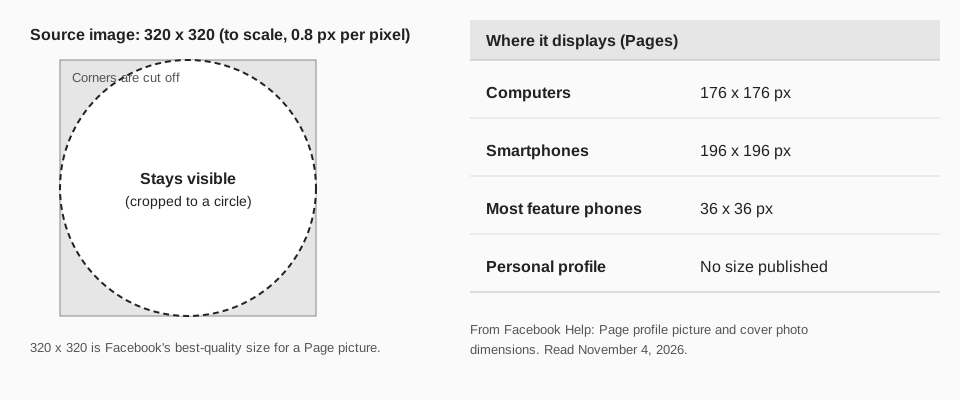
The page Facebook Page profile picture and cover photo dimensions gives the figures for a Page:
| Item | What Facebook says |
|---|---|
| Best quality | "Should be 320 pixels wide and 320 pixels tall for best quality." |
| On computers | Displays at 176 x 176 pixels. |
| On smartphones | Displays at 196 x 196 pixels. |
| Most feature phones | Displays at 36 x 36 pixels. |
| Shape | Cropped to a circle. |
The same page says that if your picture has a logo or text, "you may get a better result by using a PNG file." That page covers Pages only. We found no page in the Help Center that gives a size, minimum or file type for a personal profile picture.
Sources: Facebook Page profile picture and cover photo dimensions
What about a personal profile picture?
Facebook's own page, Add or change your Facebook profile picture, lists the steps below and contains no guidance on crop, minimum size, dimensions, file types or the circle. So there is no official number to quote.
The Page figures are the only profile picture numbers Facebook prints. A square image at least 320 x 320 pixels is a safe starting point for either kind of account, but for a personal profile that is our suggestion, not a Facebook rule. Keep your face or logo centered, because the corners are cut off by the circle.
Sources: Add or change your Facebook profile picture
How do you change your Facebook profile picture?
Facebook lists two routes on the same page.
From your profile
- Click your profile picture in the top right of Facebook, then click your profile name.
- Click the Camera in the bottom right of your profile picture.
- Select a photo or upload a new one. You can also add a frame to an existing picture.
- Follow the instructions on the screen to save your changes.
From Accounts Center
- Click your profile picture in the top right, then click Settings & privacy.
- Click Settings.
- Click See more in Accounts Center, then click Profiles.
- Click the profile you want to change, then click Profile picture.
- Click Upload new photo and follow the instructions to save.
Facebook's page does not separate computer from phone steps. For the full walkthrough, including temporary pictures and Pages, see our guide to how to change your Facebook profile picture.
Why is my Facebook profile picture cropped or blurry?
- The circle cuts the corners. Facebook says a Page picture is cropped to a circle. Center what matters.
- The image is small. The Page picture displays at up to 196 x 196 pixels on a smartphone, so a source below that has to be enlarged. Facebook's best-quality size is 320 x 320.
- The image is not square. Start from a square file so the crop does not cut off part of your subject.
- Text looks fuzzy. Facebook suggests a PNG may look better for logos and text.
How TrackMedia fits your Facebook Page
TrackMedia publishes to your Facebook Pages, so the picture people see next to your posts is the Page picture you set above. TrackMedia reads each Page's picture to show beside the connected account, which makes it easy to tell Pages apart when you manage several.
You compose once, attach photos or video, and publish or schedule to your Facebook Pages alongside your other networks with TrackMedia. The picture itself is changed in Facebook. TrackMedia publishes to Pages, not personal profiles. For the banner above the picture, see Facebook cover photo size, and for what goes in the feed, Facebook post image size.
Questions people also ask
What is the best size for a Facebook profile picture?
For a Page, Facebook says 320 x 320 pixels for best quality. For a personal profile it publishes no size.
Is a Facebook profile picture square or round?
You upload a square image, and Facebook says a Page picture is cropped to a circle.
What size does the profile picture show at?
For Pages, 176 x 176 pixels on computers and 196 x 196 on smartphones.
How do I find my Facebook profile link to share?
See how to find your Facebook URL.
When your picture is set, start free with TrackMedia and schedule your next Page post.
How we checked this
We read these Facebook Help Center pages on November 4, 2026.
- "Facebook Page profile picture and cover photo dimensions" (facebook.com/help/125379114252045): the 320, 176, 196 and 36 pixel figures, the circle and the PNG note.
- "Add or change your Facebook profile picture" (facebook.com/help/163248423739693): both sets of steps. It has no size guidance.
- "Your Profile Picture and Cover Photo" (facebook.com/help/388305657884730): an index of articles with no size details.
- TrackMedia's own code for its Facebook connector, for the statements about Pages and reading the Page picture.
We found no official size for a personal profile picture, so none is given as a rule.