TikTok does not publish a recommended aspect ratio on the Help Center pages we read, so there is no official "TikTok aspect ratio" to quote. What TikTok does publish, in its developer documentation, is a set of video limits: MP4, WebM or MOV files up to 4 GB, 360 to 4096 pixels on each side, and 23 to 60 frames per second.
This guide uses TikTok's Help Center and TikTok for Developers, read on November 4, 2026. It keeps what TikTok states apart from the common advice to shoot vertical, which is widely repeated but is not written on the pages we found.
What aspect ratio does TikTok use?
TikTok's Help Center page Making a post covers how to post a video, photo or text post and does not mention an aspect ratio, resolution or file size. The developer documentation lists a minimum and maximum picture size but no ratio. We also searched the Help Center for aspect ratio and video quality and found no page that states one.
So, from TikTok's own pages, no aspect ratio is stated, required or recommended. What is stated is a range of pixel sizes, covered next.
Sources: Making a post
What are TikTok's video size limits?
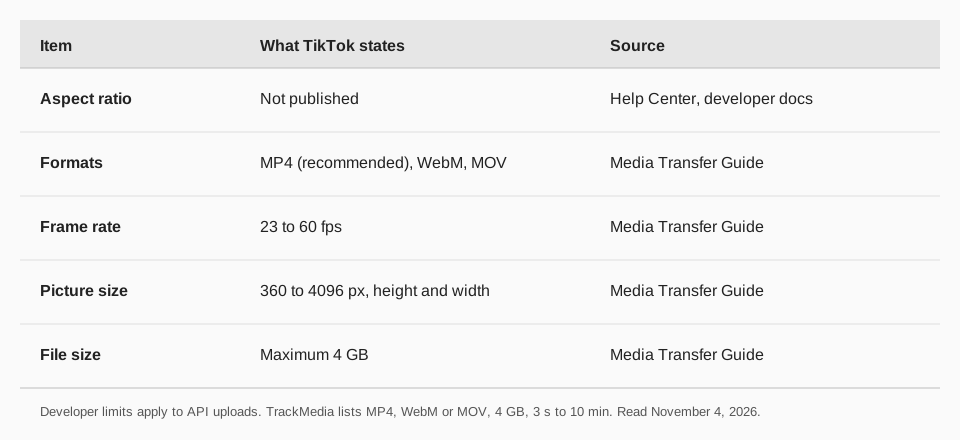
The Media Transfer Guide (last updated August 4, 2026) has a "Video restrictions" section for videos sent through the Content Posting API:
| Item | What TikTok states | Note |
|---|---|---|
| Formats | MP4 (recommended), WebM, MOV | Codecs: H.264 (recommended), H.265, VP8, VP9 |
| Frame rate | 23 to 60 fps | Minimum 23, maximum 60 |
| Picture size | 360 to 4096 px | Height and width each |
| File size | Maximum 4 GB | Over 64 MB must be sent in chunks |
These limits are written for developers who upload through the API. TikTok's Help Center does not repeat them for the in-app or web uploader, so treat them as the documented limits for API uploads rather than a promise about every upload screen. The guide also lists images: WebP or JPEG, at most 1080p and 20 MB each.
Sources: Media Transfer Guide
What resolution can a TikTok video be?
The documented range is 360 to 4096 pixels for both height and width. That is a range for each side, not a list of approved resolutions, and it says nothing about which shapes within that range look best. A video in that range that is far wider than it is tall is still inside the stated limits; whether it looks good in the app is a separate question TikTok's pages do not answer.
What about video length?
The same guide states durations: all TikTok creators can post 3-minute videos, some have access to 5-minute or 10-minute videos, and the longest video a developer can send through the Upload Video endpoint is 10 minutes. Creators can trim developer-sent videos in the app to fit their account's actual maximum. For the in-app limits by upload method, read our guide to how long TikTok videos can be.
How do you upload a video to TikTok?
The Help Center gives these steps. In the TikTok app:
- Tap the Add post + button at the bottom.
- Tap Upload to add a video from your device.
- Edit it, then tap Next to add a description, hashtags and settings.
- Tap Post to publish, or Drafts to save it.
In a web browser, click Upload at the top, then Select video to upload or Select file, and choose your video. The page notes that a web upload sends your entire video, and that to change its length you should upload from the app. For a fuller walkthrough, see how to post videos on TikTok and how to edit TikTok videos.
Why won't my TikTok video upload?
The Making a post page lists these troubleshooting steps if you have trouble uploading a post:
- Switch between Wi-Fi and mobile data.
- Clear the app video cache.
- Restart the app and your device.
- Make sure you are running the latest version of TikTok.
If the video uploaded but you cannot find it, the page says to check the video's privacy settings, because only public videos show under the posts tab, and to tap the Lock icon on your profile to find private ones. If you are sending through an API, the limits above are the first thing to check: a file over 4 GB, a frame rate outside 23 to 60, or a side under 360 pixels is outside what TikTok documents.
Post to TikTok with TrackMedia
TrackMedia publishes a video to TikTok from the same composer as your other networks. Its TikTok settings allow one video per post, as MP4, WebM or MOV, up to 4 GB and from 3 seconds to 10 minutes, with vertical 9:16 listed as the ratio it is set up for. Privacy, comment and other options are read from your TikTok account when you connect. The same composer also posts TikTok photo carousels of up to 35 JPG or WebP images, sized to TikTok's 1080p limit.
You can also send a video to your TikTok inbox as a draft and finish the post in the TikTok app. Read can you schedule posts on TikTok for how scheduling works, and best time to post on TikTok for timing. For vertical video on other networks, see YouTube Shorts length, size and aspect ratio. To publish to TikTok and 20 other networks from one place, start free with TrackMedia.
Questions people also ask
What is the aspect ratio for TikTok videos?
TikTok publishes none on the Help Center pages or in the developer docs we read. It does state a pixel range of 360 to 4096 for both height and width.
What is the maximum TikTok video file size?
4 GB, according to TikTok for Developers' Media Transfer Guide.
What video formats does TikTok accept?
MP4 (recommended), WebM and MOV, with H.264 recommended and H.265, VP8 and VP9 also listed.
What frame rate does TikTok support?
A minimum of 23 fps and a maximum of 60 fps for API uploads, per the developer documentation.
How we checked this
We opened each page below in a browser on November 4, 2026 and read the page text. We did not sign in to TikTok or upload anything. We searched the Help Center for "aspect ratio", "upload video" and "video quality" and found no page that states an aspect ratio or file size for the app. TikTok edits these pages, so check the live version if a number differs.
- Making a post (TikTok Support): upload steps for the app and web, troubleshooting, no size or ratio.
- Media Transfer Guide (TikTok for Developers): video restrictions, last updated August 4, 2026.
- TrackMedia's TikTok connector code, for its upload limits and the 9:16 setting.