To get followers on Pinterest, complete your profile, claim your website so people can follow you from Pins saved from it, and keep publishing Pins that match what people search for. Pinterest's Help Center describes these tools but publishes no follower-growth formula, so this guide sticks to what it documents.
It draws on Pinterest's help pages on editing your profile, claiming your website, Pin specs and scheduling Pins, all read on October 22, 2026.
Sources: editing your profile · claiming your website · Pin specs · scheduling Pins
How do you get followers on Pinterest?
Pinterest does not say how many Pins, boards or posts per week produce followers, and we found no such figure on its help pages. What it does document is a set of things that make your profile easier to find and follow:
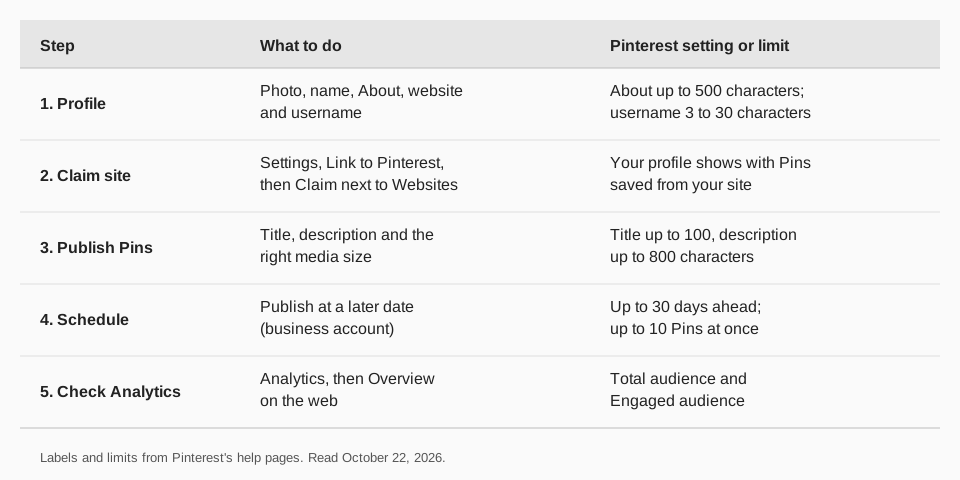
- Finish your profile so a visitor knows who you are.
- Claim your website so Pins saved from it link back to you.
- Publish complete Pins with a title, a description and the right media size.
- Keep a steady rhythm by scheduling Pins ahead.
- Read your Analytics and repeat what earns an audience.
How do you set up your Pinterest profile?
A visitor decides whether to follow in a few seconds, so fill in the profile fields first. Pinterest's Edit your profile page gives these steps.
On the web
- Log in and click the more-options icon at the bottom left.
- Click Settings, then Edit profile.
- Change your photo (Change next to the profile photo), name, About, Website or Username.
- Click Save.
In the Pinterest app
- Log in, tap your profile picture at the bottom right, then tap your profile photo at the top left.
- Tap View profile, then Edit profile.
- Make your changes and confirm. Some app versions say Done where the web says Save.
Pinterest gives the limits: About allows up to 500 characters, and a username must be 3 to 30 characters, use only letters, numbers and underscores, and cannot be all numbers. Business accounts type the business name under Name. Business accounts also get the Analytics and scheduling tools below.
Why claim your website on Pinterest?
Claiming links your site to your profile. Pinterest says that when someone saves an image from a claimed site, your profile picture appears with the Pin, the Pin links to your profile, and viewers can follow you. It also credits your profile for Pins saved from your site and lets you see how often your content is shared.
The steps from the Claim your website page:
- Log in to your Pinterest business account.
- Click the chevron-down icon at the top right and select Settings.
- Select Link to Pinterest, then click Claim next to Websites.
- Choose a method: an HTML tag in your site's head section, an HTML file in your root folder, or a DNS TXT record. DNS changes can take up to 72 hours. A Google Merchant Center option is available only to some accounts.
- Enter your website URL and click Verify.
You must own the domain and be able to edit its source code. A website can be claimed by only one Pinterest account, and most social accounts and marketplace stores cannot be claimed.
What should you publish to earn follows?
Pinterest does not rank content types for follower growth, but its Pin specs page shows what a complete Pin contains. Titles can be up to 100 characters and descriptions up to 800. The page notes that descriptions do not appear in the home or search feed, so put the key words in the title and the image too. Video Pins run from 4 seconds to 5 minutes, and Pinterest lists 9:16 (1080x1920 pixels) for full-bleed video.
Our walkthrough of how to post on Pinterest covers boards, Pin details and editing. Every Pin lives on a board, so name your boards for the topics you want to be found for.
Can you schedule Pins to post consistently?
Yes, with a business account. Pinterest says you can schedule a Pin up to 30 days ahead and have up to 10 Pins scheduled at once. After scheduling you can change the date, title, board, description and link, but not the image or video. The full steps are in our guide to how to schedule Pins on Pinterest.
How do you follow people and invite others to follow you?
Following relevant creators puts you in front of their audience. Pinterest's Find and follow people page gives these steps for the web:
- Type a name or username in the search bar and press Enter.
- Click the filter icon at the top left of the results, choose Profiles and click Confirm.
- Click a profile picture, then click Follow.
In the app, tap the search icon, enter the name, tap the filter icon, choose Profiles, tap View results, then tap Follow. Pinterest notes the Profiles filter may not be available in every region and that private profiles do not appear in search.
If your profile is private, you can send an invite link. Pinterest's Invite people to follow you page says to click your profile photo, click Share, then Copy link. Each link expires after three days or after five people use it.
How do you check what is working?
Open Analytics (hamburger icon, then Analytics, then Overview on the web) and compare Pins over the same date range. Pinterest defines Total audience as the people who have seen or engaged with your Pins and Engaged audience as those who engaged. For the full list of terms see what impressions on Pinterest mean. If your account is limited or a Pin is removed, read what a Pinterest violation notice means.
How to grow your Pinterest following with TrackMedia
TrackMedia lets you plan Pinterest the way the steps above suggest: a steady stream of complete Pins. Write once in the composer and TrackMedia fits each Pin to Pinterest, with a board, a title, a destination link and alt text, and runs preflight checks before it goes out.
- Calendar and queues. Schedule Pins on the calendar or add them to a posting queue so slots fill on their own. Content collections can feed those slots.
- Link tracking. Each link gets UTM tags, and you see clicks, visitors and referrers per Pin, so you know which Pins send people to your site.
- Analytics. Pin impressions, saves and clicks, plus your account's follower count, sit next to your other networks, including Pins you did not publish with TrackMedia.
If you post to several accounts, managing multiple social media accounts shows how to keep them in one place. TrackMedia publishes to Pinterest and 20 other networks on every plan, including Free (15 posts a month, one account per network, no card).
Questions people also ask
How many followers do you need on Pinterest to make money?
The help pages we read set no follower minimum for using Pinterest, claiming a website or scheduling Pins. Anything about earning money would be a separate program, and we did not research one.
Do you need a business account to get followers?
No page says you do. Claiming a website, Analytics and scheduling Pins all require a business account, though, and they are the tools this guide relies on.
How do you see who follows you on Pinterest?
On the web, click your profile picture at the top right, then click Followers under your name. In the app, tap your profile picture at the bottom right, then tap Followers.
How do you remove or unfollow someone on Pinterest?
To remove a follower, open Followers, use the ellipsis icon next to the person, select Remove, then confirm. To unfollow, open Following under your name and select Unfollow next to the person or board.
Is there a limit to how many people you can follow?
Yes. Pinterest says there is a total limit on follows and does not give the number. If you reach it, unfollow some accounts to free up room.
How we checked this
We read each page below on October 22, 2026 and copied labels, limits and steps from it. We did not test follower growth, because Pinterest publishes no figures for it.
- Edit your profile (Pinterest Help Center): web and app steps, About and username limits.
- Claim your website (Pinterest Help Center): benefits, requirements and steps.
- Review Pin specs (Pinterest Help Center): title, description and video limits.
- Schedule Pins (Pinterest Help Center): 30-day and 10-Pin limits.
- Find and follow people, Manage your following and followers, Invite people to follow you and Limits for Pins, boards and follows (Pinterest Help Center).
- Pinterest Analytics (Pinterest Help Center): audience definitions and where to find Analytics.
TrackMedia's behavior comes from its Pinterest connector and product pages, read the same day.