To find your Facebook URL, log in on a computer, click your profile picture and name in the top left, and read the address in your browser's address bar. Facebook's Help Center says your username is shown there, and the full web address is facebook.com followed by your username. A Page has its own username and URL, found and changed in the Page's settings.
This guide uses Facebook's Help Center pages on finding and changing your username, creating a Page username and changing a Page's web address, all read on October 22, 2026, including the computer and iPhone versions. It explains the difference between a profile URL and a Page URL, how to set a custom one, and how to use your link in a bio.
How to find your Facebook URL
Your Facebook URL is the web address of your profile or Page. Facebook describes it this way: your username "is also used in the web address for your profile or Page (e.g. facebook.com/username)." So finding the URL means finding the username and putting it after facebook.com/.
Find your profile URL on a computer
- Log in to your Facebook account in a web browser.
- Click your profile picture and name in the top left.
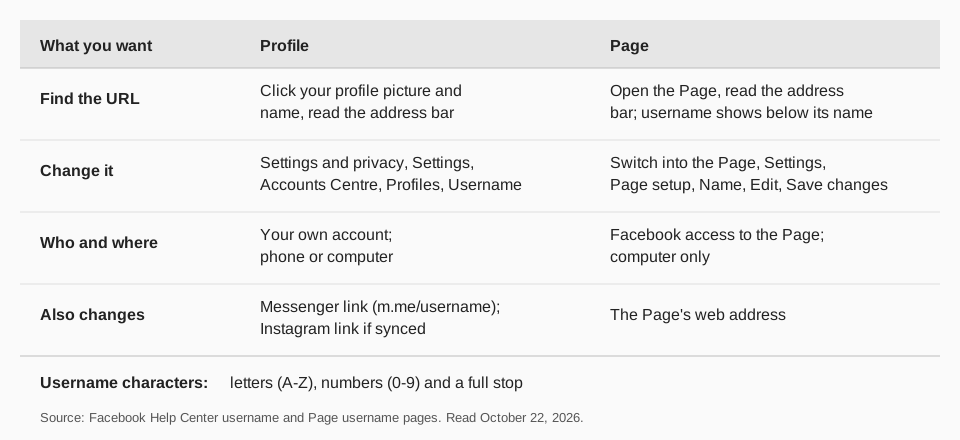
- Read the address bar. Facebook says your username is shown there. Your URL is facebook.com/ followed by that username.
Copy the whole address from the bar to share it. The page does not describe what the address looks like if you have not set a username, so if yours shows something other than a name, set a username as described below.
Find your Facebook URL on iPhone and Android
Facebook's page gives mobile steps for finding your username inside Accounts Centre rather than for reading an address bar. On the iPhone version of the page:
- Tap Menu in the top left of Facebook.
- Tap Settings and privacy, then Settings.
- Tap Personal and account information, then Back.
- Tap Profiles and personal details.
- Choose a profile, then tap Username.
The username you see there completes the address: facebook.com/username. You can also open Facebook in a mobile browser and read the address bar the way you would on a computer.
How to find your Facebook Page URL
A Page's URL works the same way, but its username is separate from your personal one. Facebook's page on creating a username for a Page says the Page's username appears below the Page's name and in the Page's URL. Its example is @JaspersMarket for a Page called Jasper's Market.
The simplest way to see it is to open the Page in a browser and read the address bar. If the Page has a username, it will be in the address. If the Page has none, you can create one if you have Facebook access to the Page:
- Log in to Facebook, then click your profile photo in the top right.
- Click See all profiles, then select the Page you want to switch into.
- Click the Page's profile picture in the top right.
- Click Settings and privacy, then Settings.
- Click Page setup in the left menu.
- Click Name, then Edit next to your username.
- Enter a username and, if it is available, click Save changes.
Facebook adds two cautions: newly created Pages may not be able to create a username right away, and a Page's username may be removed because of inactivity.
Sources: creating a username for a Page
What is the difference between a profile URL and a Page URL?
A profile is you as a person, and a Page is for a business, brand or public figure. Facebook's help pages treat them as two things with two usernames. Four practical differences follow from the pages we read:
- Where you change it. A profile username is changed in Accounts Centre. A Page username is changed in the Page's own settings, under Page setup.
- Who can change it. For a Page you need Facebook access. Facebook says that if you only have task access to a Page, you cannot change its username.
- Which device. Facebook says you can only change a Page's username when you are logged in on a computer.
- What it affects. A profile username also feeds your Messenger address (m.me/username), and, if you synced profile information with Instagram, your Instagram URL.
If you are not sure which one you need, use the Page URL for anything business-related. Our guides to making a post on Facebook and to posting to Instagram and Facebook at the same time explain where posts go.
How to change your Facebook URL
You change the URL by changing the username. For a profile, Facebook's page gives these steps on a computer:
- Click your profile picture in the top right of Facebook.
- Select Settings and privacy, then click Settings.
- Click Accounts Centre, then Profiles.
- Select a profile, then click Username.
- Enter your new username, then click Done.
Changing your username also changes your Facebook profile URL and your Messenger profile URL at m.me/username. If you previously chose to sync your profile information across Facebook and Instagram, it also changes your Instagram profile URL at instagram.com/username, according to your sync settings.
Two warnings from the page matter. Usernames can currently only contain letters (A-Z), numbers (0-9) or a full stop. And you may not be able to reclaim your original username once you have changed it, so decide carefully before you change one that is printed on anything.
For Pages, the steps are the ones above, with Edit next to the username. Facebook's page on changing a Page's username adds that you must do it on a computer. If the username you want is taken or not approved, Facebook says you need to choose a different one.
Why should you set a custom Facebook URL?
A custom username makes the link short and readable. You can say it out loud, print it on a card, or put it in a bio on another network. Facebook says a username "can help people find you on Facebook", so it works as a search aid too.
If you also use other networks, keep your usernames close to each other. We cover the same idea for YouTube in how to change your YouTube username. Whichever name you pick, write it down once and reuse it, because renaming later can break links you have already shared.
How to track clicks to your Facebook URL with TrackMedia
Once you have your URL, you probably want to know which post or network sends people to it. TrackMedia is built for that.
- Tracked links. Create a tracked link to your Page URL with UTM tags and use it in your Instagram bio, YouTube description or email signature. TrackMedia shows clicks, visitors and referrers per post and per network.
- Publish to your Facebook Page. Connect your Page through Meta's authorization window and publish from the same composer you use for 20 other networks. See how to see and edit scheduled posts on Facebook.
- Page results over time. TrackMedia reads your Page's follower count daily and keeps every reading, with reach and engagement per post, so you can see whether a link in a bio brought new followers.
- One schedule. Calendar and queues keep your Page and your other channels posting on the days you chose.
To try it, start free with TrackMedia. The Free plan has 15 posts a month and needs no card. See also how to edit a post on Facebook.
Questions people also ask
How do I find my Facebook URL?
Log in on a computer, click your profile picture and name in the top left, and read the address bar. Your username is there, and your URL is facebook.com/ followed by it.
How do I find my Facebook Page URL?
Open the Page in a browser and read the address bar. Its username also appears below the Page's name, and an admin can set or edit it under Page setup, Name.
How do you find your Facebook URL on your phone?
Open Menu, Settings and privacy, Settings, Personal and account information, Profiles and personal details, choose a profile and tap Username. The URL is facebook.com/ plus that username.
Can I change my Facebook URL?
Yes, by changing your username in Accounts Centre. Facebook warns you may not be able to get your old username back, and that the change also updates your Messenger link.
How we checked this
We opened each Facebook Help Center page below in a browser on October 22, 2026 and read the full text. For the username page we read the computer and iPhone versions.
- Find or change your username on Facebook (Facebook Help Center): finding the username, Accounts Centre steps, URL effects and the character rule.
- Create a username for your Facebook Page (Facebook Help Center): where a Page username shows and the creation steps.
- Change your Page's username and web address (Facebook Help Center): who can change it and that it needs a computer.
Facebook is rolling out Meta Accounts, so your settings may say Meta Account settings instead of Accounts Centre. TrackMedia's behavior comes from reading its Facebook connector the same day.