To post to all social media at once, write one master draft, pick every account you want, and then adjust the version that each network would reject or mangle before you publish. The part people skip is the adjusting: the same text can be too long for one network, counted differently on another and unclickable on a third.
This guide gives the text limits for five networks, read from their own documentation in October 2026, explains why identical copy fails, and shows how TrackMedia's composer handles it. If you only need Instagram and Facebook, see our guide to posting to Instagram and Facebook at the same time.
What are the limits when you post to all social media at once?
Each network states its own number, and they are not measured in the same unit. The table lists the text limit for a normal post as each source describes it.
| Network | Text limit | Counted in |
|---|---|---|
| X | 280 | Weighted characters: emoji and CJK characters count 2, every URL counts 23 |
| Bluesky | 300, plus a 3,000 maximum length | Graphemes (one visible character each) |
| Threads | 500 | Characters, but emoji count as their UTF-8 bytes |
| 2,200 caption | Characters, with 30 hashtags and 20 @ tags | |
| 3,000 | Characters |
Two cautions. Instagram's 2,200, 30 and 20 come from Meta's publishing API reference for Instagram media, which is what a scheduling tool uses; the in-app limits are documented separately and we did not check them. And Bluesky's schema carries both numbers: a maximum length of 3,000 and a maximum of 300 graphemes, so 300 is the one you will hit first. LinkedIn's same help page also says that if it detects excessive post creation that indicates inauthentic activity, or the use of an automation tool, it may limit the visibility of those posts. For X's full counting rules, see our Twitter character limit guide.
Why does identical copy fail?
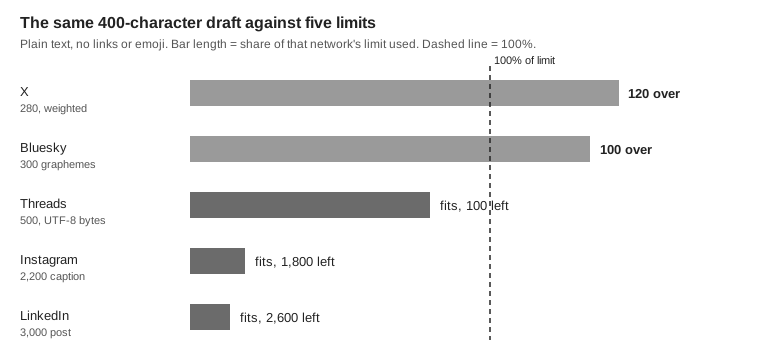
A single draft meets five different rule sets, and the strictest one decides whether it goes out. A 400-character announcement is fine on LinkedIn and Instagram but too long for X and Bluesky.
Length is only the first failure. The others are quieter:
- Emoji are counted three ways. Take a person-raising-hand emoji with a skin-tone modifier. X's documentation gives it a weight of 2. On Bluesky it is one grapheme. On Threads it is 8, because Meta says emoji are counted as UTF-8 bytes and this one is 8 bytes. We computed the 1 and the 8; the 2 is from X's table, which lists this exact emoji. TrackMedia's own counter would show 4 for it, as explained below.
- Links behave differently. X counts any URL as 23. Meta's Threads documentation says that if the text contains URLs, the first one is used as the link preview, and its Links section limits a post to 5 unique links, so link order and count matter there.
- Hashtags and mentions are capped or network-specific. Instagram's API reference allows 30 hashtags and 20 @ tags per caption, and an @handle only means something on the network it belongs to.
- Some networks need media. TrackMedia's Instagram connector rejects a text-only post, so a text-only master draft cannot go to Instagram unchanged.
How do you tailor one idea for each network?
Start from the tightest limit and add on, rather than cutting down. Write the version that fits X or Bluesky, then extend it where a network gives you room.
- Write the core in one or two sentences. That is the idea every network gets.
- Add the network-specific parts last. Longer context on LinkedIn, hashtags on Instagram, a link where links work.
- Keep the call to action true everywhere. "Link in the first comment" only works where a first comment exists.
- Tag links per network. If every network gets the same URL with the same UTM tags, you cannot tell which one sent the click. Our UTM naming conventions guide covers a scheme that stays readable.
- Check before you send. Count against each limit, then look at each version as a reader on that network would.
How does TrackMedia's composer handle it?
TrackMedia's composer is built around this workflow: one master draft, a version per network that follows the master until you change it, and a check on every network before anything is sent. The behavior below is read from the composer code in the repository, not from marketing copy.
- Pick the accounts. The channel picker has a Select all option, and you can also choose accounts one at a time.
- Write the master draft. It is the "Your post" box. Under it, a character counter appears for each selected network, tightest limit first.
- Open a network under "Per channel". Each row shows that account's check result: Ready, a count of notes, or a count of problems to fix. The row's text field starts as a copy of the master draft.
- Edit only where needed. Once you type in a network's field, it gets an "Edited" badge and stops following the master. "Back to master" returns it to the shared text.
- Read the preflight. The check runs on the server with the same connector validation code the composer runs in the browser, and the code's own comments call the server result the authoritative one. Problems are labeled "Blocks publishing" or "Worth knowing".
- Save a draft, schedule or post. The scheduling and Post now buttons stay disabled while any selected network has a blocking problem. The Save draft button stays enabled, but the API also runs this validation when a post is created, and we did not confirm that it accepts a draft that still has a blocking problem, so fix blocking problems first.
Two details help with the problems above. The counter counts Bluesky in graphemes, the way Bluesky does. For every other network it uses the length of the text as JavaScript measures it (UTF-16 code units), so an ordinary letter is 1 but the skin-tone emoji above shows as 4. The code has a byte-counting option, but we found no connector that turns it on, so Threads is not counted in bytes. And links in clickable fields become tracked short links for the account they go out on, with UTM tags added from a template you set under Settings > Links. The default is utm_source={network} and utm_medium=social.
The composer has limits of its own. The counter does not apply X's weighted counting (every URL as 23, emoji as 2) or Threads' byte counting for emoji, so near the line on those networks treat it as an estimate. The server check measures each tracked link at the longer of its projected short link and the URL as written, so a link can change a result compared with the counter. The check cannot judge whether your copy reads well on a network. Facebook posting is for Pages, not personal profiles. And the utm_source value uses TrackMedia's internal network identifier, which for LinkedIn Pages and for Instagram connected without a Facebook Page is not the plain network name. See the guide to managing multiple social media accounts for how workspaces and roles fit around the composer.
Is this the same as cross-posting?
No. Posting from one composer to several accounts is a publishing step you control. Cross-posting, in the sense of one network's post being copied to another, is a separate feature. Instagram has its own sharing toggle for Facebook, and our guide on turning off cross-posting on Instagram explains how to stop it when it copies posts you did not want copied.
TrackMedia also has a Crosspost feature with rules. Today a rule can watch only Bluesky as a source, rules start switched off, and copies wait as drafts in review mode. It cannot watch Instagram, Facebook, LinkedIn, TikTok or X.
When you are ready to try the composer, you can start free with TrackMedia.
How we checked this
We opened each source in a browser on October 6, 2026. TrackMedia statements come from the repository code: packages/core/src/utils/count-text.ts, the composer under apps/web/src/features/compose, server validation under apps/api/src/modules/posts, and the connector limits under packages/connectors. No third-party studies or statistics are used.
- Counting Characters - X: the 280 limit, emoji weight 2, URLs counted as 23.
- app.bsky.feed.post lexicon (atproto repository): text maxLength 3000 and maxGraphemes 300. We read the raw file.
- Threads Posts, Meta for Developers: 500 characters, emoji counted as UTF-8 bytes, first URL used as link preview, 5-link limit.
- IG User Media, Meta for Developers: caption maximum 2200 characters, 30 hashtags and 20 @ tags.
- Post and share updates, LinkedIn Help: post limit of 3,000 characters, and the note about automation tools.
We could not verify: a documented Facebook text limit from an official Meta page (so Facebook is not in the table); Instagram's in-app caption limits, as opposed to its API limits; Instagram's own Facebook-sharing toggle, which our linked guide covers and we did not re-check here; whether the publishing worker re-runs validation at publish time (we found no such call); whether the API accepts a draft with a blocking problem; and any network's behavior beyond what these pages state. The emoji counts for Bluesky and Threads are our own computation from the documented rules.