YouTube does not publish a fixed amount it pays per view, and its own help pages say there are no guarantees about how much you will be paid. What it does publish is the revenue share: YouTube pays Partner Program creators 55% of net ad revenue from their public videos, and 45% of the revenue allocated to them from the Shorts Creator Pool.
That is why one million views can pay very different amounts on different channels. This guide uses YouTube Help's partner earnings overview, ad revenue analytics, Shorts monetization policies and Partner Program eligibility pages, read on October 22, 2026. It gives no per-view rate or example income, because YouTube does not publish one.
Sources: partner earnings overview · ad revenue analytics · Shorts monetization policies · Partner Program eligibility
How does YouTube pay creators?
You are paid through the YouTube Partner Program (YPP), and ads are only one of the ways. YouTube's page on earning money lists these features for partners:
- Advertising revenue: from Watch Page ads and Shorts Feed ads.
- Shopping: sales of your products or products you tag from other brands.
- YouTube Premium revenue: part of a Premium subscriber's fee when they watch your content.
- Channel memberships, Super Chat and Super Stickers, Super Thanks: money from fans.
The earnings overview adds that earnings are based on a share of advertising revenue from viewers watching your video, and that "there are no guarantees" under the partner agreement about how much, or whether, you will be paid. A view that shows no ad earns no ad revenue.
What is YouTube's revenue share?
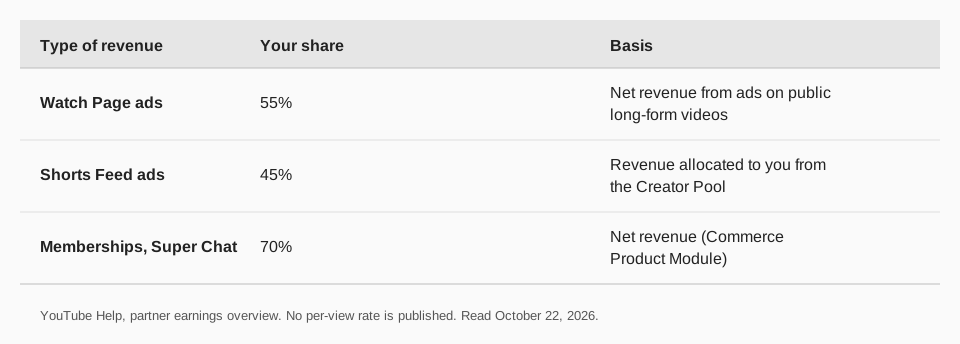
YouTube's earnings overview defines revenue share as your percentage of gross revenue as outlined in your own agreements, and says you can check yours in YouTube Studio under Settings, then Agreements, then View agreement. It describes the rates for each module you accept:
| Module | What you earn | Applies to |
|---|---|---|
| Watch Page Monetization | 55% of net revenues | Ads on public videos on the Watch Page, and when streamed in the YouTube player on other sites or apps |
| Shorts Monetization | 45% of the revenue allocated to you | Shorts Feed ads, from your share of views in the Creator Pool |
| Commerce Product | 70% of net revenues | Channel memberships, Super Chat, Super Stickers and Super Thanks |
YouTube's own blog explainer repeats the 55% and 45% figures for long-form videos and Shorts. These percentages tell you how the money is split; they do not tell you how much money is being split per view.
How much does YouTube pay for 1 million views?
There is no standard figure. YouTube does not publish a per-view or per-million-view payout, and the amount depends on what advertisers paid for the ads on those views, how many of the views had ads, and where the viewers were. YouTube's Analytics page explains the terms you will see in your own account:
- CPM is the cost an advertiser pays for 1,000 ad impressions, before YouTube's revenue share. YouTube says your revenue will not equal your CPM times your views, because CPM reflects what advertisers pay, not what you earn, and not every view has an ad.
- RPM (Revenue per mille) is how much you earned per 1,000 views, after YouTube's revenue share, across revenue sources including ads, memberships, YouTube Premium, Super Chat and Super Stickers. Per YouTube, RPM is lower than CPM because it comes after the revenue share and counts all views, including ones that were not monetized.
So for any channel, the formula is simple:
Estimated revenue = (views ÷ 1,000) × RPMFor 1 million views, that is 1,000 × your RPM. YouTube Studio shows your own RPM, so the useful answer to "how much for 1 million views" is the RPM in your own Analytics, not anyone else's number.
Why does the amount change from video to video?
YouTube's ad revenue page lists several reasons your CPM and RPM move, and names these directly:
- Time of year. Advertisers bid higher or lower depending on the season. Many bid higher just before holidays.
- Viewer geography. Different locations have different levels of competition in the ad market, so a shift in where your views come from changes your CPM.
- Unmonetized views. Videos that are not advertiser-friendly can be ineligible for ads, and some views have no ads because none are available. Your RPM can drop when unmonetized views rise, even when revenue is unchanged.
The estimated revenue in Analytics also changes after the fact. YouTube says monthly estimates are adjusted for invalid traffic, Content ID claims and disputes, and certain ad campaign types, after one week and again in the middle of the following month. Finalized earnings appear only in your AdSense for YouTube account, between the 7th and 12th of each month.
How do YouTube Shorts pay?
Shorts are paid on a different model from long-form videos, so the revenue share is 45% but is applied after pooling. YouTube's Shorts monetization policy describes four steps:
- Pool the ad revenue. Each month, revenue from ads between videos in the Shorts Feed is added together.
- Calculate the Creator Pool based on engaged views and music use. A Short with no music puts all of its associated revenue into the Creator Pool. A Short with one track puts half of it in, and the rest covers music licensing. Two tracks put one third in.
- Allocate the pool. Money goes to creators by their share of engaged views in each country. YouTube's example: 5% of eligible engaged Shorts views means 5% of the pool's revenue.
- Apply the revenue share. You keep 45% of your allocated revenue, whether or not music was used.
The policy also says that Shorts views earn only from the Shorts Feed, separate from long-form monetization on the Watch Page, and that unoriginal Shorts and fake views do not count. From February 1, 2027, it says you will need at least 10 million qualified Shorts views in the last 90 days to earn from the Creator Pool and YouTube Premium revenue. See our guides on posting a YouTube Short and Shorts length and aspect ratio.
What do you need before YouTube pays you?
You must join the YouTube Partner Program first. YouTube's eligibility page says there are two ways in once you follow the monetization policies and meet the basics (in a supported country, no active Community Guidelines strikes, 2-Step Verification on, and an AdSense for YouTube account linked):
- 1,000 subscribers and 4,000 qualified watch hours in the last 12 months, or
- 1,000 subscribers and 10 million qualified Shorts views in the last 90 days.
To apply, YouTube says to open YouTube Studio, choose Earn in the left menu and select Apply Now. YouTube says a decision typically takes about one month. Smaller channels can turn on some features earlier: Shopping needs 500 subscribers with 3 valid public uploads in the last 90 days, plus 3,000 qualified watch hours or 3 million qualified Shorts views.
The page also says it may turn off monetization on channels that have not uploaded a video or posted to the Posts tab for 6 months or more. Our guide to how often to post on YouTube covers staying active.
Where to see what you earned
In YouTube Studio, select Analytics in the left menu, then Revenue in the top menu for estimated revenue reports. For finalized earnings, sign in to AdSense for YouTube and go to Settings, then Payments. YouTube notes that tax withholding may affect finalized earnings, and the amount withheld is only visible in AdSense. It cannot give tax advice, so ask a tax professional about your situation.
Plan and track your YouTube channel with TrackMedia
Views are the input to every figure above, and TrackMedia helps you make more of them in a steady way. Connect your YouTube channel, and you can publish and schedule videos and Shorts from the same composer as your other networks.
- Publish and schedule. A vertical video of three minutes or less becomes a Short automatically. Use the calendar and queues to keep a regular upload rhythm.
- Reuse each upload. Write once and fit the post to 21 networks, so a video also reaches Bluesky, LinkedIn, Instagram and the rest.
- Watch the numbers. Per-video analytics show views, likes, comments and engagement, with channel subscribers and lifetime views, including videos you did not publish with TrackMedia. Tracked links with UTM tags show who clicks through from your posts to your site.
Revenue figures such as RPM stay in YouTube Studio. The free plan includes 15 posts a month and one account per network, with no card. Start free with TrackMedia, or read about the best time to post on YouTube.
Questions people also ask
How much does YouTube pay per view?
YouTube does not publish a per-view rate. It pays a revenue share: 55% of net ad revenue on public videos' Watch Page ads and 45% of your allocated Shorts Creator Pool revenue. What you earn per view depends on what advertisers paid and how many views had ads.
How much does YouTube pay for 1 million views?
There is no standard amount. Take your RPM from YouTube Analytics and multiply: 1 million views is 1,000 times your RPM. Different channels have different RPMs.
How much does YouTube pay for 1,000 views?
RPM is defined by YouTube as earnings per 1,000 views after the revenue share. Your RPM, shown in YouTube Studio, is your answer, and it changes with season, audience location and how many views are monetized.
Does YouTube pay for views before I join the Partner Program?
No. YouTube Help says only partners in YPP can earn money from ads, and you apply in YouTube Studio under Earn once you meet the thresholds.
Do Shorts pay the same as long videos?
No. Long-form Watch Page ads pay 55% of net revenue, while Shorts pay 45% of the revenue allocated to you from a shared Creator Pool, and music in a Short reduces the revenue that goes into the pool.
How we checked this
We opened each YouTube page below in a browser on October 22, 2026, and expanded the collapsed sections of the Help pages. The Shorts rules are scheduled to change on February 1, 2027, per the banner on YouTube's pages, so check the live page. YouTube's pages gave no per-view or per-million-view rate, so none appears here. TrackMedia's YouTube metrics come from reading its connector code the same day.
- YouTube partner earnings overview (YouTube Help): revenue share rates by module, earnings reporting, adjustments, taxes.
- Understand ad revenue analytics (YouTube Help): RPM and CPM definitions and reasons they change.
- YouTube Shorts monetization policies (YouTube Help): the four-step Creator Pool process and the 45% share.
- YouTube Partner Program overview and eligibility (YouTube Help): thresholds and how to apply.
- How to earn money on YouTube (YouTube Help): the list of monetization features.
- YouTube Partner Program, Explained (YouTube Blog, February 3, 2025): the 55% and 45% shares.