To change your YouTube username, which YouTube calls your handle, sign in to YouTube Studio, select Customization, then Profile, edit the field under Handle and click PUBLISH. YouTube's Help Center says you can change your handle twice within a 14-day period.
This guide uses YouTube's Help pages on managing your channel's profile and YouTube handles, read on October 22, 2026, including the computer, Android and iPhone versions. It also explains how a handle differs from your channel name and URL, the naming rules, and what the pages do not say about old links.
Sources: managing your channel's profile · YouTube handles
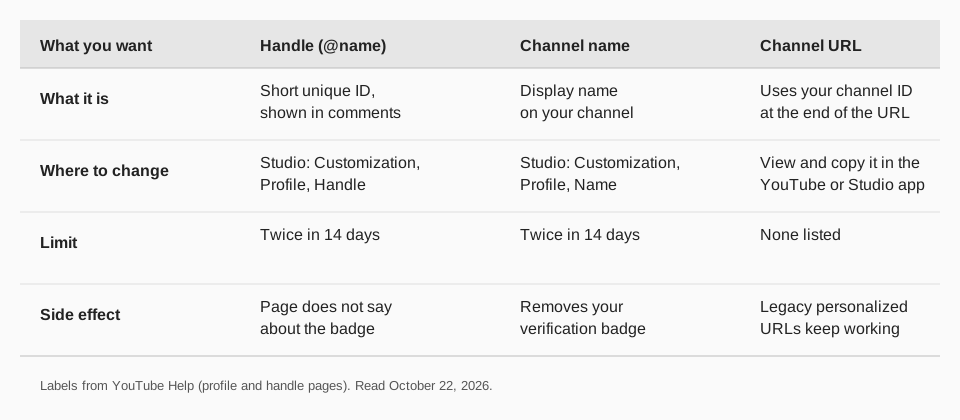
Handle, channel name and channel URL: what is different?
YouTube has three separate things people call a "username", and each is changed in a different field.
- Handle. Starts with @, for example @youtubecreators. YouTube's page calls handles "short and unique channel identifiers" and says they are distinct from channel names. You see handles in places like comments, mentions, Live Chat and Shorts.
- Channel name. The display name on your channel. Changing it does not change your handle, and the other way round.
- Channel URL. YouTube's page says the standard channel URL uses your unique channel ID, the numbers and letters at the end of the URL. Your handle also becomes a URL, such as youtube.com/@youtubecreators, which you can use to send people to your channel from outside YouTube.
Your Google Account name is a fourth thing. YouTube's page says you can change your Google Account name and picture separately, with no change to your YouTube channel name.
How to change your YouTube username on a computer
- Sign in to YouTube Studio with the channel's account.
- From the left menu, select Customization, then Profile.
- Under Handle, view or change your handle.
- If you changed it, click PUBLISH to confirm.
This is the same path YouTube gives for changing your channel name, where you enter the new name and click PUBLISH. If you cannot update the name, YouTube says to delete any channel name translations first.
How to change your YouTube handle on Android and iPhone
The iPhone and iPad version of YouTube's page gives the same steps as the Android one. There are two apps, and each has its own path.
In the YouTube app
- Tap your profile picture.
- Tap View Channel at the top.
- Tap Edit.
- Under the Handle section, find your handle and tap Edit to the right of it.
- Type the new handle. If it isn't available, YouTube says a similar one will be suggested.
- Tap Save to confirm.
In the YouTube Studio app
- Tap your profile picture.
- Tap Edit.
- Next to your handle, tap Edit.
- Tap Save.
To change the channel name in the apps instead, YouTube says to tap Edit next to your name, enter the updated name and tap Save.
How to change your YouTube channel name
If you want a different display name rather than a different @handle, use the Name field in the same Profile screen. On a computer: Studio, Customization, Profile, enter the new name, click PUBLISH. YouTube lists these rules:
- You can change your channel name twice within a 14-day period.
- Changing your name removes your verification badge.
- It may take a few days for the new name to update and display across YouTube.
- The name must follow YouTube's Community Guidelines.
YouTube's page says the verification badge is removed when you change the name. It does not say the same about changing a handle, so we do not claim it either way.
What are the rules for a YouTube handle?
YouTube's handle page lists naming guidelines. A handle must:
- Be between 3 and 30 characters, with different limits for some scripts: 1 to 10 characters for Han or Hangul, and 2 to 20 for Ethiopic, Hiragana or Katakana.
- Use letters or numbers from one of the supported languages. Handles are not case-sensitive.
- Only use underscores, hyphens, periods and Latin middle dots as separators, and not at the beginning or end.
- Not look like a URL or a phone number.
- Not already be in use, and follow the Community Guidelines.
YouTube does not allow violent, offensive or spammy handles, and says it will revoke one that breaks the Community Guidelines and generate a new one. It also does not allow the sale and transfer of handles, and it reserves the right to change, reclaim or remove a handle at any time. Each channel can have only one handle.
What happens to your old links after you change your handle?
YouTube's pages leave this open. The handle page says any legacy personalized URLs you have will continue to work. The profile page says your standard channel URL uses your channel ID. Neither page says whether the old @handle URL keeps working after you change it, so we cannot tell you.
Before you change, find where your old handle is printed: your website, email signature, bio links on other networks, printed material. Change those at the same time. Because you can change the handle only twice in 14 days, pick the new one carefully rather than testing options.
Also note that a handle with characters other than A to Z, numbers and separators may not display well outside YouTube. YouTube's page warns that some apps and websites may not display a youtube.com/@handle link properly, and that people may find it harder to type the handle to search for you.
Why can't I change my YouTube handle?
The first three come straight from YouTube's pages; the fourth is a common cause on multi-channel accounts:
- You hit the limit. Twice within 14 days, for the handle and separately for the name.
- The handle is taken. YouTube suggests a similar one when yours isn't available.
- It breaks a rule. Length, characters, URL-like or phone-number-like, or Community Guidelines.
- You are in the wrong account. The Profile tab belongs to the channel you are signed in to in Studio. If you manage several channels, switch channels first.
Should your YouTube handle match your other social handles?
It helps, and YouTube's own page points the same way. It says you can use your handle outside of YouTube to promote your channel, and that handles are how viewers find you through @ search, comments and mentions. If your Instagram, TikTok and X names match your @handle, a person who sees you in one place can guess where to find you in another.
A matching name is not always available. Every network has its own rules and its own pool of taken names, so a close variant on one network is common. When you cannot match exactly, keep the base word the same and put the same name and logo on every profile, so the accounts still look like one brand.
A practical order: check the handle you want on the networks you use first, and only then change it on YouTube, since you have just two changes in 14 days. Then update your link-in-bio, website footer and email signature. Our guide to where to find link in bio on Instagram shows where that link lives on one network.
Keep your handle consistent across networks with TrackMedia
A new YouTube handle only helps if people can find it. TrackMedia lets you announce the change everywhere in one pass, then measure who followed the link.
- One announcement, fitted to each network. Write the post once and publish it to 21 networks, including YouTube, Instagram, X, LinkedIn and TikTok, with a version adapted to each.
- A tracked link to your new URL. Use a link to youtube.com/@yournewhandle with UTM tags, and TrackMedia shows clicks, visitors and referrers per post and per network, so you see which network sends people to the renamed channel.
- Subscriber growth after the change. TrackMedia reads your connected channel's subscriber count once a day and keeps each reading, so you can see whether growth changes after the rename.
- Calendar and queues. Schedule reminders about the new name over a few weeks instead of posting once.
See also how to see your subscribers on YouTube, how to post a YouTube Short and managing multiple social accounts. Ready to try it? Start free with TrackMedia.
Questions people also ask
How do I change my YouTube username?
Your username is your handle. In YouTube Studio, select Customization, then Profile, edit Handle and click PUBLISH. In the apps, tap your profile picture, View Channel, Edit, then Edit next to your handle and Save.
How many times can you change your YouTube handle?
Twice within a 14-day period, according to YouTube's Help page.
Can I change my channel name without changing the handle?
Yes. The name and handle are separate fields in Customization, Profile. Changing the name removes your verification badge, according to YouTube.
Does changing my YouTube handle change my channel URL?
Your standard channel URL uses your channel ID, and your handle also works as a youtube.com/@handle URL. YouTube's pages do not say whether the old handle URL keeps working.
How we checked this
We opened each YouTube Help page below in a browser on October 22, 2026. For the profile page we read the Computer, Android and iPhone versions, including the YouTube and YouTube Studio app steps.
- Manage your YouTube channel's profile (YouTube Help): name, handle and channel URL steps, the 14-day limits and the verification badge note.
- Learn about YouTube handles (YouTube Help): what a handle is, the naming guidelines, restrictions and handle URLs.
TrackMedia's behavior comes from reading its YouTube connector the same day. YouTube changes Studio often, so check the live page if a label differs.