You cannot see who unfollowed you on Instagram from a list, because Instagram does not publish one. Its Help Center says people are not notified when you unfollow them, and the same pages show no alert or screen that names someone who unfollowed you. What you can do is check a person you suspect, track your follower trend in Insights, and clear out spam followers.
This guide uses Instagram's own Help Center pages on unfollowing, removing followers and spam followers, plus Meta's Insights page, all read on October 22, 2026. It also explains why "unfollower" apps are a bad idea and how to tell whether a missing follower unfollowed, deactivated or was removed.
Can you see who unfollowed you on Instagram?
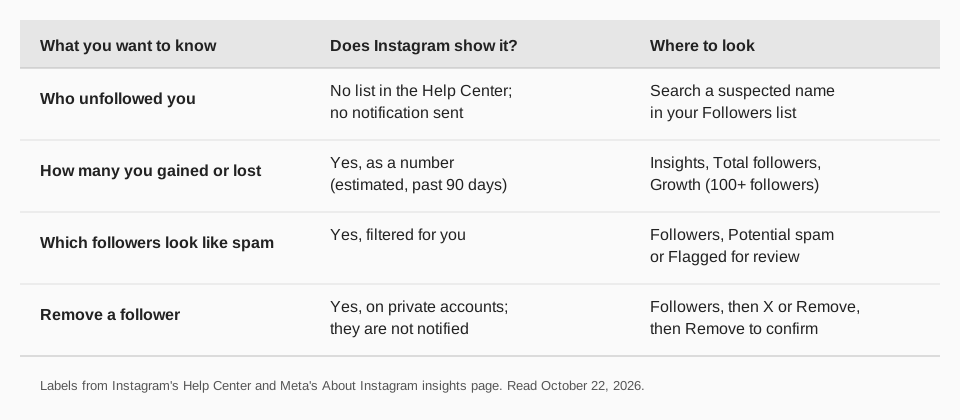
Not directly. Instagram's page on unfollowing someone says that when you unfollow a person, their profile shows Follow instead of Following and they are not notified. Instagram applies the same quiet treatment in the other direction, so you get no message when someone unfollows you.
We searched Instagram's Help Center and Meta's Insights documentation and found no screen that lists unfollowers by name. Instagram's pages simply do not describe one. Anything that claims to show you that list is either a feature we cannot find in Instagram's pages or a third-party tool, which we cover below.
Sources: unfollowing someone
How to check if a specific person unfollowed you
The reliable manual method is to look for the person in your Followers list. Instagram's Help Center describes the list as the one you open from your own profile, so start there.
On iPhone and Android
- Tap your profile picture (or Profile) in the bottom right.
- Tap Followers at the top.
- Look for the account. Use the search box in the list if your screen shows one. Instagram's pages do not describe the box, so go by what your app shows.
On a computer
- Click your profile picture on the left to open your profile.
- Click Followers at the top.
- Look for the account in the list.
If the name is not there, the person may have unfollowed you, or you may have removed them, or their account may be gone. The list cannot tell you which. Search for their username: if their profile still loads, the account is active. If it does not load, the account may have been deactivated or deleted, or they may have blocked you.
This works for a handful of names. It does not scale to thousands of followers, and Instagram offers no export of "people who left".
How to see how many followers you gained or lost
Instagram gives professional accounts a growth number, not a list of names. Meta's About Instagram insights page says Total followers shows trends across your followers when you have at least 100 followers. The insights include Growth, described as the number of followers you have gained or lost, plus top locations, age range and the times your followers are most active.
The same page says the overview covers presets or a custom time frame within the past 90 days, and that these metrics are estimated and in development. That makes Insights good for spotting a drop after a post or a change in how often you publish, and poor for answering "who left".
To read it in context, our guide to what Instagram Insights numbers mean walks through each metric, and Instagram analytics tools compares the options for longer history.
Sources: About Instagram insights
Why did my follower count drop?
A lower count does not always mean people unfollowed. Four documented causes are worth ruling out first:
- Flagged followers you removed. Instagram's page on managing unwanted followers says that once flagged followers are removed, they are also removed from your follower count and list.
- Potential spam you cleared. The page on removing spam or bot followers lets you tap Remove all spam followers from the Potential spam list. Instagram says it does not tell those accounts.
- Removed followers on a private account. Instagram's Remove a follower page says that if your account is private you can remove people from your followers list, and they are not notified.
- Plain unfollows. The ordinary case, and the one Instagram never reports by name.
Sources: managing unwanted followers · removing spam or bot followers · Remove a follower
How to remove spam and unwanted followers
If the real question is "who should I not be followed by", Instagram gives you tools that do work. On the iPhone and Android apps:
- Tap Profile or your profile picture in the bottom right.
- Tap your Followers list, then tap Potential spam to review filtered accounts.
- Tap Remove all spam followers, then tap Remove.
To remove one follower on a private account, tap Followers on your profile, tap X to the right of the follower, then tap Remove to confirm. On a computer, click Remove next to the follower, then Remove again. To turn the spam filter on or off, Instagram's page says to open Menu, then Settings and privacy, then Followers, and use the toggle next to Filter spam followers.
Blocking is the other option. Instagram says a blocked person is not notified and cannot see your photos or videos or search for your account.
Are "unfollower" apps safe to use?
Instagram says no. Its page on why you should not use apps that offer likes and followers says some non-Instagram apps want your login details and that none of them are affiliated with or endorsed by Instagram. If you give them your login, whether with an access token or a username and password, Instagram says they can gain complete access to your account, including your personal messages.
The same page says Instagram may remove engagement those apps generated, limit parts of your account, and disable or terminate accounts that use them to gain likes or followers. Instagram's page on data scraping restrictions lists giving your username and password to a third-party app, and using an app or service to interact with Instagram in unauthorized ways, among the reasons its systems may flag an account.
Those pages are about apps that ask for your password. We did not test any particular unfollower app, so we make no claim about a specific one. The safe rule from Instagram's own wording: do not hand your password to a tool. If you already did, Instagram says to change your password and remove the app's access in your connected apps settings. Our guide to the "we suspect automated behavior" message covers the full recovery steps.
Sources: why you should not use apps that offer likes and followers · data scraping restrictions
How to track your Instagram followers with TrackMedia
TrackMedia shows your follower trend without asking for your Instagram password. You connect through Meta's authorization window, and TrackMedia reads each connected Instagram account's follower count once a day and keeps every reading, so you can chart how your audience changes instead of seeing only today's number.
- Growth over time. A daily follower reading per account lets you line up a dip or a jump with the post you published that day.
- Per-post results. See likes, comments, reach, saves and shares for each post next to the trend, including posts you did not publish with TrackMedia.
- Traffic that follows. Add a tracked link with UTM tags in your bio or captions to see clicks and visitors by post. For the steps, see how to see who clicked your Instagram link.
- Everything in one place. The same view covers your other networks, and publishing goes to 21 networks from one composer.
For the best time to publish so more people see you, see the best day to post on Instagram, or start free with TrackMedia, no card required.
Questions people also ask
How do I check who unfollowed me on Instagram?
Instagram does not show a list. Search for a specific person in your Followers list, and use Insights, Total followers, Growth to see how many followers you gained or lost. TrackMedia keeps a daily follower reading per connected account so you can see the trend.
Does Instagram notify someone when you unfollow them?
No. Instagram's Help Center says people are not notified when you unfollow them. It says the same about removing a follower and about blocking someone.
Why did I lose followers on Instagram?
Some left, but also check the documented causes: you removed flagged or spam followers, you removed followers on a private account, or accounts were deactivated. Instagram says removed flagged followers also leave your count and list.
Can I see who unfollowed me without an app?
You can check a name you already suspect in your Followers list. Seeing everyone who left without an app is not something Instagram's pages describe, and Instagram advises against apps that ask for your login details.
How we checked this
We opened each page below in a browser on October 22, 2026, including the iPhone and computer versions of the unfollow and remove-follower pages, and copied the labels.
- Unfollow someone on Instagram (Instagram Help Center): steps, the Follow label, no notification.
- Remove a follower on Instagram (Instagram Help Center): steps on computer and iPhone, private accounts, no notification, blocking.
- How to remove spam or bot followers on Instagram (Instagram Help Center): Potential spam, Remove all spam followers, Filter spam followers.
- Manage unwanted followers on Instagram (Instagram Help Center): flagged accounts and the follower count.
- Why you should not use apps that offer likes and followers on Instagram and data scraping restrictions (Instagram Help Center): the risks of sharing your login.
- About Instagram insights (Meta Business Help Center): Total followers and Growth.
TrackMedia's follower readings come from its Instagram connector and architecture notes, read the same day. Instagram changes its app often, so check the live page if a label differs.