A digital creator is a person who makes content for an online audience, such as videos, photos, audio or writing, and publishes it on platforms like Instagram, YouTube or TikTok. Platforms do not define the job title itself, but they do define account types for creators and rules for how they earn.
This guide uses Instagram's About professional accounts page, YouTube Help's pages on earning money and the Partner Program, and the Federal Trade Commission's Disclosures 101 for Social Media Influencers, read on October 22, 2026. It explains what the job involves, how creators get paid, and what a creator's toolkit looks like.
Sources: About professional accounts · earning money · Partner Program · Disclosures 101 for Social Media Influencers
What does a digital creator do?
A creator plans, makes and publishes content on a steady basis, builds an audience around it, and often turns that audience into income. The work usually has four parts:
- Make. Filming, writing, photographing or recording the content itself.
- Publish. Posting it on one or more platforms, on a schedule.
- Talk to the audience. Replying to comments and messages.
- Measure. Reading analytics to see what to make next.
Creators range from a hobbyist posting weekly to a full-time business with a team. What they share is a public body of work and an audience that follows it.
Digital creator, influencer, content creator: are they different?
The words overlap, and platforms use them loosely. Instagram's page says Creator accounts are best for public figures, content producers, artists and influencers, which shows how it groups them in one account type. In everyday use:
- Content creator or digital creator: emphasizes making the content.
- Influencer: emphasizes the ability to influence what an audience buys or does. The FTC uses this word for people who endorse products on social media.
- YouTuber, streamer, blogger: name the platform or the format.
You do not need a particular follower count to be a creator. Platforms set thresholds only for specific features, such as ad revenue.
What account types do creators use?
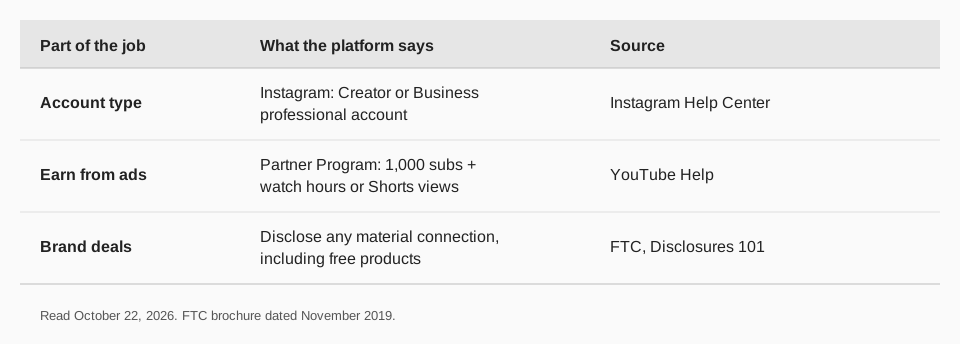
Instagram's help page says professional accounts can be set to Business or Creator. It describes Business accounts as best for retailers, local businesses, brands, organizations and service providers, and Creator accounts as best for public figures, content producers, artists and influencers. You can switch back to a personal account or change the type any time.
A professional account gives you these tools, per the page:
- A professional dashboard to track performance and find professional tools.
- Insights on who your followers are, when they are online and how each post performed.
- Monetization and ads tools.
- A Contact button, category label and a secondary inbox with Primary, General and Requests folders.
- Follower management, to review spam follower requests and remove suspected spam and bot accounts.
There is a tradeoff Instagram names directly: professional accounts cannot be set to private. On YouTube, the equivalent is a channel, which you need to upload videos, comment or make playlists, as covered in our guide to starting a YouTube channel.
How do digital creators make money?
Creators usually combine several sources. The ones platforms document are:
| Source | How it works | Where it is documented |
|---|---|---|
| Ad revenue share | YouTube pays Partner Program members a share of ad revenue | YouTube Help |
| Fan funding | Channel memberships, Super Chat, Super Stickers and Super Thanks | YouTube Help |
| Shopping | Selling your own products or tagged products from other brands | YouTube Help |
| Ads and monetization tools | Instagram professional accounts get monetization and ads tools | Instagram Help |
Beyond platform programs, creators also earn from sponsorships, products, services and affiliate links, but those deals are private agreements and platforms do not publish rates. On YouTube specifically, ad revenue needs Partner Program membership, which requires 1,000 subscribers plus 4,000 qualified watch hours in the last 12 months, or 1,000 subscribers plus 10 million qualified Shorts views in the last 90 days. YouTube also lists features with lower thresholds, such as Shopping at 500 subscribers with 3 valid public uploads in the last 90 days plus watch hours or Shorts views. Our guide to what YouTube pays per view goes through the numbers YouTube does publish.
What rules do creators have to follow?
If you are paid or given something to mention a product, the law in the United States treats it as an endorsement. The FTC's Disclosures 101 brochure for influencers says you should disclose any financial, employment, personal or family relationship with a brand. It says financial relationships are not limited to money: disclose the relationship if you got anything of value to mention a product, including free or discounted products.
The FTC's page, last dated November 2019, lists how to disclose well:
- Put it where it cannot be missed. With the endorsement itself, not only on a profile page, at the end of a post, or behind a MORE button.
- Do not bury it in hashtags or links.
- In video, make it part of the video, not just the description. In a live stream, repeat it periodically.
- Use plain words: "advertisement," "ad," "sponsored," or a sentence like "Thanks to Acme brand for the free product."
- Avoid vague terms like "sp," "spon," "collab," or stand-alone "thanks" or "ambassador."
The FTC adds that it is the influencer's responsibility to make these disclosures, and not to rely on others to do it. Platform rules are separate: YouTube holds Partner Program members to its monetization policies, and says it constantly reviews channels to make sure they meet them. This is general information, not legal advice; check the FTC's Endorsement Guides if you take brand deals.
What is in a digital creator's toolkit?
The tools depend on the format, but most creators end up with the same layers:
- Capture and edit. A camera or phone, a microphone, and editing software.
- Plan. A calendar of what goes out and when. Our guide to building an Instagram content calendar shows one way.
- Publish and schedule. A tool that posts to several networks from one place. See how to cross-post on social media.
- Link management. A tracked link for each place you send people, such as a bio link, so you know which post earned the click. See link in bio tools.
- Analytics. Per-post numbers from each platform, ideally side by side. See Instagram analytics tools.
- Assistant. Help drafting captions, hooks and replies.
How digital creators use TrackMedia
TrackMedia covers the plan, publish, link and measure layers of that toolkit in one place. You write a post once, and it goes out to the networks you choose.
- Publish everywhere. TrackMedia publishes to 21 networks, including Bluesky, LinkedIn, Instagram, Threads, TikTok, YouTube, Mastodon, X, Facebook, Pinterest, Reddit, Telegram and Discord, on every plan. The composer fits a version to each network and runs preflight checks.
- Stay consistent. A calendar, posting queues and content collections that fill queue slots keep posts going out on a rhythm, and the media library keeps your files in one spot.
- Handle more than a feed post. Threads, carousels, first comments, alt text and mentions are supported where each network allows them.
- Know what worked. Real-time link tracking with UTM tags shows clicks, visitors and referrers per post and per network. Cross-network analytics cover posts you did not publish with TrackMedia, and the Best times view reads your own posts.
- Get help writing. An AI assistant helps with drafts.
- Automate. A REST API, SDK, CLI, MCP server and signed webhooks are available for creators who build their own workflows.
The Free plan includes 15 posts a month and one account per network, with no card. Creator is $99 a year for 30 channels. Start free with TrackMedia, or read how to manage multiple social media accounts.
Questions people also ask
What is a digital creator?
A person who makes content for online audiences, such as videos, photos, audio or writing, and publishes it on platforms like Instagram or YouTube. Many build income from platform programs, sponsorships and their own products.
Is a digital creator the same as an influencer?
The terms overlap. Instagram groups influencers with public figures, content producers and artists under Creator accounts. "Influencer" stresses sway over an audience's choices, "creator" stresses making the content.
How many followers do you need to be a digital creator?
None. Platforms set follower or watch-time thresholds only for specific features, such as YouTube's Partner Program, which asks for 1,000 subscribers plus watch hours or Shorts views.
What is a Creator account on Instagram?
A type of professional account that Instagram describes as best for public figures, content producers, artists and influencers. It gives you a dashboard, insights, monetization tools and a secondary inbox, and cannot be set to private.
Do digital creators have to disclose sponsorships?
In the United States, the FTC says you should disclose a financial, employment, personal or family relationship with a brand, including free products, in a way people cannot miss.
How we checked this
We opened each page below in a browser on October 22, 2026. The FTC brochure is dated November 2019, so use it as a summary and check the FTC's current Endorsement Guides before any deal. The pages we read define account types, not the job title "digital creator," so the definition at the top is a plain-language one. TrackMedia's features come from its pricing and product pages in the repository the same day.
- About professional accounts on Instagram (Instagram Help Center): Business and Creator accounts, features, the private-account tradeoff.
- How to earn money on YouTube (YouTube Help): the ways partners earn and each feature's requirements.
- YouTube Partner Program overview and eligibility (YouTube Help): thresholds and review.
- Disclosures 101 for Social Media Influencers (Federal Trade Commission): when and how to disclose.