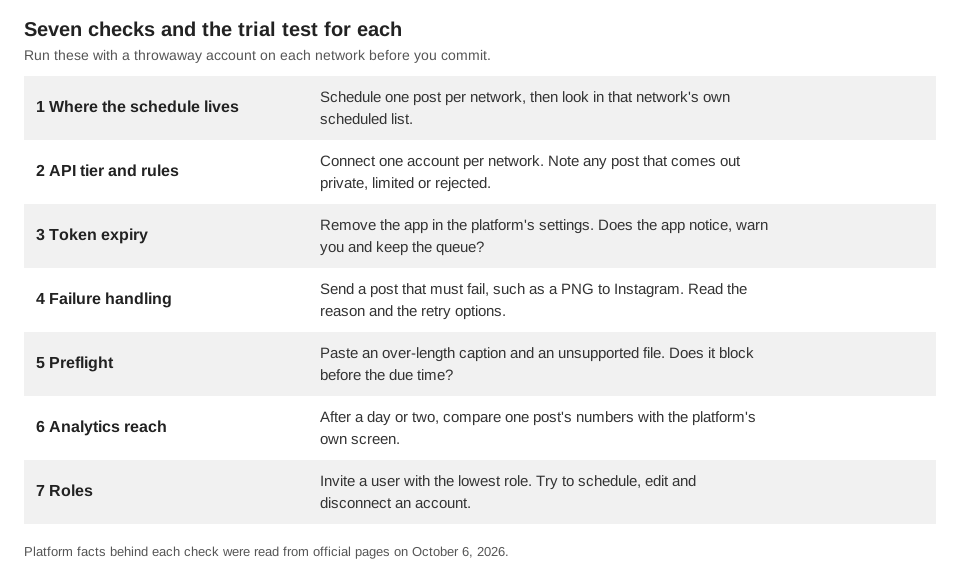
To choose a social media scheduling app, judge it on seven checks: where the schedule lives, which API rules and access tier it runs under, how it keeps your connection alive, what it does when a post fails, whether it checks a post before the due time, which analytics it can read, and who on your team can do what. Each one can be tested with a throwaway account during a trial, and the figure below lists the test for each.
The platform facts here come from official pages we opened on October 6, 2026. Earlier guides are linked where they already verified a point, and we name no competing products, because we did not open their pages.
Where does the schedule live: in the platform or in the app?
On Instagram, LinkedIn and X an app has to hold the schedule itself, because the pages we read describe no field for a future publish time. Meta's Instagram Content Publishing guide describes two steps, create a media container and publish it, and says a container not published within 24 hours has the status EXPIRED. Its rate-limit note also mentions apps that let users schedule posts to be published in the future, which fits an app holding the schedule. Microsoft's LinkedIn Posts API page says PUBLISHED is the only accepted lifecycle state when creating a post. Our guide to X management tools shows the same for X.
Two networks work differently. Meta's Pages API Posts guide lets a Page post be created with published set to false plus scheduled_publish_time, between 10 minutes and 30 days from the request. Google's YouTube Data API videos resource has status.publishAt, which it says can be set only while the video is private. So one app may hold the schedule on some networks and hand it to the platform on others.
It matters because an app-held post will not appear in the platform's own scheduled list. Our guide to seeing scheduled posts on Instagram shows where that kind lives.
Trial test: schedule one post per network, then open that network's own scheduled list. Whatever is missing there, the app is holding. Then delete one of those posts in the app and confirm it does not publish at its time.
Which API rules and access tiers limit a social media scheduling app?
Every tool runs under the platform's access rules, and some of them change what your followers can see. Ask the vendor how each network is covered. This is what the pages we opened say:
| Network | What the platform documents | What it means for you |
|---|---|---|
| Publishing is for professional accounts. JPEG is the only image format. 100 API-published posts per 24-hour moving period; a carousel counts as one. The same page also says carousels are limited to 50 published posts per 24 hours, so it disagrees with itself. | A PNG can fail. Ask how the app reports a rejected image or a hit limit. | |
| TikTok | TikTok's Content Sharing Guidelines say content from an unaudited client is restricted to private viewing, and that such a client can allow up to 5 users to post in a 24-hour window. | An app that has not passed TikTok's audit may post only privately. Ask whether it has. |
| X | The pay-per-usage page says credits are deducted per request, and requests are blocked at a spending limit or a negative balance. | Someone must keep credits topped up. Ask whether that is the vendor or you. |
The Posts API lists w_member_social and w_organization_social. Organization posting is restricted to certain Page roles, and the r_member_social read permission is for approved users only. | Your Page role limits what the app can post as the Page. |
Our guide to Instagram automation tools and the X guide linked above cover the allowed and banned behaviors in more depth. One more check applies everywhere: a scheduling app should send you to the platform's own sign-in window and never ask for your password, which both of those guides show the platforms' rules bar.
Trial test: connect one account per network and publish one post to each. A post that comes out private, rejected or limited is the tier or the rules showing through, and the vendor should be able to say which.
What happens when a connection expires?
Every connection is a token with a lifetime, and the lifetimes are short enough that a good app must renew them in the background. Meta's Refresh Access Token reference says a long-lived Instagram User access token can be refreshed only if it is at least 24 hours old and has not expired, and a refreshed token is valid for 60 days. TikTok's User Access Token Management page says an access token is valid for 24 hours and a refresh token for 365 days, and that a server can schedule background jobs to keep tokens current.
LinkedIn's refresh token page says access tokens last 60 days by default, programmatic refresh tokens are for approved Marketing Developer Platform partners, and the member must reauthorize when the refresh token expires. X's OAuth 2.0 guide says a refresh token is returned only if the offline.access scope is requested. We did not find a lifetime for X access tokens on that page.
So the question is not whether a token expires but what the app does about it. The good answers are: it renews before expiry, it warns you ahead of time when it cannot, it tells you which posts are affected, and your queue survives the reconnect.
Trial test: in the platform's own settings, remove the app from a test account, using steps like those in our Instagram automation guide. Then check whether the app notices, how fast, and whether queued posts are still there after you reconnect.
How should a scheduling app handle failed posts?
A failed post should be visible, explained in the platform's words, and retried only when retrying can help. A rate limit or a network error may clear on its own. An expired login, rejected content or a duplicate post will not, and retrying those only adds noise. Also ask what stops a retry from posting twice. Meta's Content Publishing guide, for example, lists container statuses that include ERROR and EXPIRED, so a tool has to be able to tell a stuck upload from a finished one.
Trial test: schedule a post that must fail, such as a PNG to Instagram, whose API takes JPEG only per the page above. Then read what the app says. You want a reason you can act on, a retry button where one makes sense, and a notice that reaches you without opening the app. Finally, disconnect a test account while a post is queued and see whether the post fails clearly or vanishes.
Does the app check a post before it is due?
A preflight check catches a problem while you can still fix it, before the post is due. The platforms' limits differ by network and change over time, so the useful question is whether the check runs per account at compose time. The weaker alternative is a generic character counter that ignores the network.
Trial test: select two networks, then paste an over-length caption, an unsupported file type and, for Instagram, a carousel of 11 items (Meta's guide caps carousels at 10). See whether the app blocks you now or accepts everything and fails later. Counting rules differ too: our guide to X tools notes that X weights characters instead of counting them, so test a post with a link and an emoji.
Which analytics can a scheduling app actually read?
A scheduling app sees only what each platform's API returns, and that is often less than the platform's own screen. Our comparison of native and third-party TikTok analytics shows one case: a documented set of four counts per video in one API, with deeper fields in another API behind an access application.
Check these before you rely on a dashboard:
- Source and delay. Ask which API each number comes from and how often it is read.
- Gaps. A good app shows "not available" instead of a zero.
Trial test: wait a day or two after a post goes out, then compare the app's numbers with the platform's own screen for that post. Differences are normal, but a vendor should be able to explain them.
Who on your team can do what?
If more than one person touches the queue, you need to separate who writes and schedules from who connects accounts, and you need a read-only role for clients or stakeholders. Platforms add their own limits: LinkedIn's Posts API page says organization posting is restricted to certain Company Page roles, so the tool cannot give a person more access than the platform did.
Trial test: invite a second user with the lowest role. Try to schedule, edit someone else's post and disconnect an account. Ask whether an approval step is an enforced gate or a team habit, because the answer changes how you set up review.
How does TrackMedia measure up against these checks?
This is what TrackMedia's code and product do today, checked on October 6, 2026, in the order of the checks above. We have not run a trial against every network, and a connector that exists in code is not proof that a network is switched on for your workspace, so check the Accounts page.
- Where the schedule lives. TrackMedia holds it. A background sweep checks for due posts every minute, so a post never appears in Instagram's, Facebook's or LinkedIn's own scheduled list. On the Posts page you can filter by Scheduled, and the Calendar has month and week views with drag-to-reschedule. A post can be edited while it is Draft or Scheduled, published now, unscheduled back to Draft, or deleted from the queue.
- Connections. TrackMedia's worker code runs a refresh sweep every 15 minutes that picks up any OAuth token expiring within the next 60 minutes. A refresh that fails marks the account for reconnect, notifies the workspace and fires an
account.needs_reconnectwebhook. If a refreshed token still expires within 7 days, it notifies the workspace and firesaccount.token_expiring. Connection-expiry banners keep your queue. - Failures. A failed post shows its reason with Retry now and, when needed, a reconnect link. By its retry table, temporary errors and rate limits are retried with growing waits, while expired logins, rejected content and duplicates are not. A post is claimed before it is sent, so a second delivery of the same job cannot publish it twice.
- Preflight. The composer shows each selected account as Ready, with a count of notes, or with a count of problems to fix, after a check against that network, and a live character counter per network. The counter counts plain text length, so it does not apply X's weighted counting.
- Analytics. It reads views, likes, comments and shares per network where the platform supplies them, ranks posts imported from outside TrackMedia alongside its own, and has a best-times view that averages engagement by publish hour and only highlights slots with enough posts.
- Roles. Owner, Admin, Editor and Viewer, with a workspace per client or brand. The Team page describes an Editor as able to write, schedule and publish but unable to change accounts or keys, and a Viewer as read-only. In the code we read, the shared check on API requests only separates read-only roles from roles that can write, and the API-key endpoints declare no scope, so check the Editor limit in a trial workspace before you rely on it.
The honest limits: review is a team habit using drafts, because TrackMedia has no approval gate. It does not split analytics into scheduled versus live. It does not publish Instagram Stories or delete a published Instagram post, and it does not convert images, so Instagram's JPEG-only rule applies. See how publishing works in TrackMedia, and you can start free with TrackMedia to run the seven tests above yourself.
How we checked this
We opened each official page below in a browser on October 6, 2026 and took the figures, scopes and labels from its text. We did not trial any scheduling app, ours or anyone else's, and we did not publish to live accounts, so the trial tests are our suggested methods, not platform recommendations. TrackMedia's behavior comes from its publishing, retry, token-refresh, composer and team-role code and the Team page text, read the same day.
- Content Publishing (Meta for Developers, updated June 30, 2026): container and publish flow, 24-hour container expiry, JPEG only, the 100-post and 50-post statements, 10-item carousels.
- Posts (Meta Pages API, updated April 17, 2026):
publishedandscheduled_publish_time, 10 minutes to 30 days. - Refresh Access Token (Meta for Developers, updated July 17, 2025): 24-hour minimum age, 60-day validity.
- Videos resource (YouTube Data API):
status.publishAtand the private requirement. - Posts API (Microsoft Learn, LinkedIn): PUBLISHED only at creation, permissions and Page roles.
- Refresh Tokens with OAuth 2.0 (Microsoft Learn, LinkedIn): 60-day access tokens, approved partners, reauthorization.
- User Access Token Management (TikTok for Developers, updated August 4, 2026): 24-hour access and 365-day refresh tokens.
- Content Sharing Guidelines (TikTok for Developers, updated August 4, 2026): unaudited clients, private viewing, 5-user cap.
- X API pay-per-usage pricing and credits (docs.x.com): credits, spending limit, blocked requests.
- OAuth 2.0 Authorization Code Flow with PKCE (docs.x.com): refresh token only with offline.access.
We could not verify the lifetime of an X access token (the page above gives none). Our statement that the Instagram and LinkedIn pages describe no field for a future publish time is an absence we found in those pages, not a sentence either page writes. We also could not verify how any specific vendor's app is classified by Instagram, TikTok or LinkedIn, or whether TrackMedia's own apps have passed any platform's review. The statements about X's request fields and about the Instagram and Shorts scheduling lists rest on our earlier guides, linked above, each of which cites its own sources. Platforms change these pages, so check the live page before you plan a large batch.