To engage on TikTok, comment on other people's posts with the Comments button, follow accounts in your niche, and keep the comments on your own videos tidy. TikTok's Help Center lists the exact steps, and its rules also tell you what to avoid, such as buying engagement.
This guide uses TikTok's Comments, Following and unfollowing, Stitch and Tools for creators pages and its Community Guidelines, read on October 22, 2026. It covers engaging with others and getting engagement on your own videos.
Sources: Comments · Following and unfollowing · Stitch · Tools for creators · Community Guidelines
How do you comment on a TikTok?
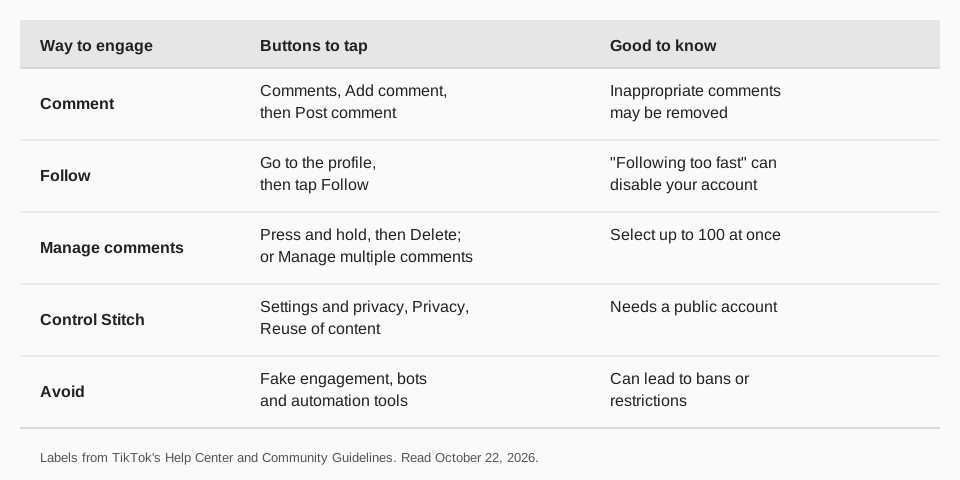
Commenting is the most direct way to engage. TikTok's Comments page gives these steps for the app:
- Go to the post you want to comment on.
- Tap the Comments button on the side of the post.
- Tap Add comment and enter your comment. In select regions you can tap Upload photo to add a photo from your device.
- Tap the Post comment button.
TikTok says that if a comment could be considered inappropriate, a prompt may ask whether you want to reconsider posting it, and that inappropriate comments could be removed. To delete a comment you posted, press and hold it in the comments and tap Delete.
How do you follow accounts?
Following puts an account's videos in your Following feed and shows you care about a niche. TikTok's Following and unfollowing page gives these steps:
- Follow someone. Go to the person's profile and tap Follow.
- Follow a suggested account. Tap Inbox or Profile. From your inbox tap Activities; from your profile tap Add friends to see the Suggested tab. Then tap Follow.
- Unfollow. Go to the profile and tap the Following button. We cover this in how to unfollow on TikTok.
TikTok also has a "Following too fast" notice. Its page says you may get it if you follow accounts too quickly, which could temporarily disable your account. Follow at a human pace.
How do you get more engagement on your own TikToks?
TikTok publishes no formula for engagement, so we stick to what the Help Center documents and label our own advice.
- Make videos people can reply to. TikTok's Stitch page says you choose who can Stitch your videos under Settings and privacy, then Privacy, then Reuse of content, and that you need a public account to allow it. Turning Stitch off also affects Duet, stickers and adding your post to Stories.
- Reply to comments. In TikTok Studio on the web, the Posts and comments section lets you delete, like, dislike and reply to comments. Replying early and often is our advice, not a TikTok rule.
- Choose topics people search for. Creator Search Insights shows topics that are frequently searched. See how to search on TikTok.
- Read your numbers. TikTok Studio's analytics show likes, shares and views per post. See how to check TikTok analytics.
How do you manage comments on your own videos?
TikTok's Comments page describes tools for unwanted comments:
- Delete one comment. Tap the Comments button, press and hold the comment, tap Delete.
- Delete many. Tap the Filters button at the top, or press and hold a comment and tap Manage multiple comments. Select up to 100 comments, tap Delete and confirm.
- Report or block. TikTok says you can report comments that go against its guidelines and block accounts so they cannot comment. A blocked person cannot view your videos or engage with you through messages, comments, follows or likes.
What should you not do to boost engagement?
Skip anything that fakes it. TikTok's integrity guidelines prohibit services that artificially boost engagement or trick the recommendation system, and strictly prohibit automation tools or scripts designed to bypass its systems. Enforcement can include banning the account or restricting it, which can limit posting, top search results and For You feed reach. The guidelines also say content that tries to get people to give gifts or inflate likes or follows is ineligible for the For You feed.
Duets and Stitches are fine to make, but TikTok's Creator Rewards page does not count them as original content for that program.
How to keep up engagement on TikTok with TrackMedia
Engagement follows consistent posting, and TrackMedia handles the posting. Plan a week of TikToks on the calendar, or drop videos into a queue that fills open slots from a content collection. Post to TikTok publishes directly, and Send to TikTok inbox as a draft leaves it for you to finish in the app.
- Measure it. Views, likes, comments and shares per post appear in analytics next to your other networks, including posts you did not publish with TrackMedia.
- Find your hours. The Best times view shows average engagement by publish hour from your own posts.
- Mentions. TikTok supports mentions of people and organizations by @handle, so you can tag a collaborator in a caption.
Replies and comments themselves you handle in TikTok. For tools that help across networks, see social media engagement tools. Start free with TrackMedia (15 posts a month, one account per network, no card).
Questions people also ask
How do I get more comments on TikTok?
TikTok publishes no method. Post regularly, pick topics people search for, and reply to the comments you get. Do not buy engagement, which TikTok prohibits.
How do I reply to a comment on TikTok?
The Comments page we read covers posting and deleting comments. On TikTok Studio's web Posts and comments section you can like, dislike and reply to comments.
Can I delete many TikTok comments at once?
Yes. Tap Filters or press and hold a comment and tap Manage multiple comments. You can select up to 100 comments.
Why can't I follow anyone on TikTok?
If you see "Following too fast," TikTok says you have followed accounts too quickly, which could temporarily disable your account. Wait before following more.
Does TikTok count likes, comments and shares?
TikTok Studio's analytics show likes, shares and views per post. TikTok does not say how each affects reach.
How we checked this
We opened each page below in a browser on October 22, 2026 and copied the labels. We did not post on a live account.
- Comments (TikTok Help Center): comment, delete and bulk delete steps.
- Following and unfollowing and "Following too fast" (TikTok Help Center).
- Stitch (TikTok Help Center): who can Stitch, Reuse of content.
- Tools for creators (TikTok Help Center): Posts and comments in TikTok Studio.
- Creator Rewards Program (TikTok Help Center): originality rules.
- Integrity and Authenticity (TikTok Community Guidelines): fake engagement and automation.
TrackMedia's behavior comes from its TikTok connector and product pages, read the same day.