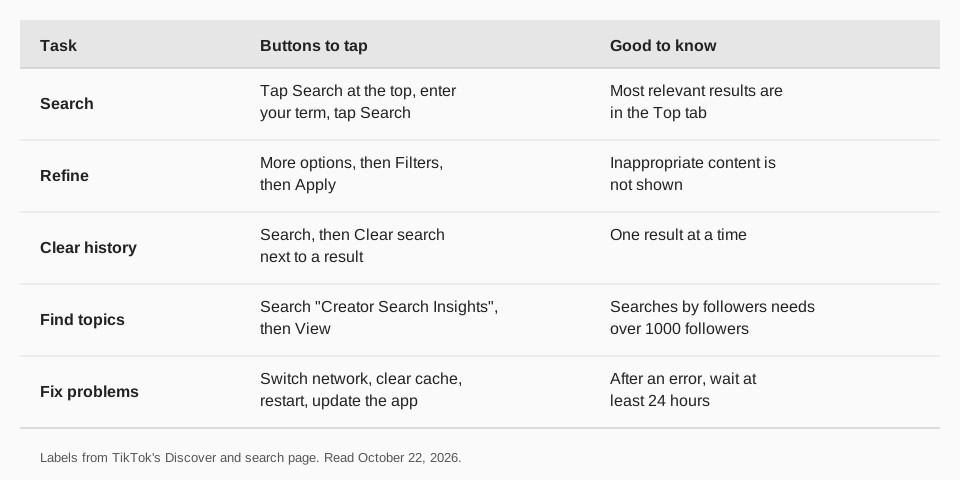
To search on TikTok, open the app, tap the Search button at the top, type what you want and tap Search. TikTok's Help Center says the most relevant results appear in the Top tab, and you can narrow them with More options and then Filters.
This guide uses TikTok's Discover and search and Creator Search Insights Help Center pages, read on October 22, 2026. It also covers clearing your history, fixes when search fails, and what creators can do so their videos show up in search.
Sources: Discover and search · Creator Search Insights
How do you search on TikTok?
TikTok's page describes the steps for the app, with no separate iOS and Android versions:
- Tap the Search button at the top of the app. You can also tap Discover at the bottom and use the search bar at the top. TikTok notes some people see a Friends tab in place of Discover because the feature is not available everywhere.
- Enter what you are looking for in the search bar, then tap Search. You can search for people, posts, sounds, hashtags and more.
- Check the Top tab, where the most relevant results appear.
- Refine the results. Tap the More options (three dots) button at the top, tap Filters, choose your filters and tap Apply.
TikTok adds that inappropriate content is not shown in search results. The Help Center page describes the app only, and gives no steps for searching on a computer.
How do you clear your TikTok search history?
Tap the Search button at the top, then tap the Clear search button next to the search result you want to remove. TikTok's page describes removing items one at a time.
What is screenshot visual search?
It lets you find matching content and products by taking a screenshot inside the TikTok app. TikTok says it is available only to people who are at least 18 and logged in. To use it, go to the post, take a screenshot with your device and tap the thumbnail to see results. Results may include TikTok posts, e-commerce content and AI summaries.
For creators, TikTok says that depending on your location you can choose whether a post can appear in visual search results when you create it. The setting is on by default and you can turn it off before posting.
Why can't I search on TikTok?
TikTok's troubleshooting steps for missing users or content are:
- Switch between Wi-Fi and mobile data.
- Clear the app video cache.
- Restart the app and your device.
- Update TikTok to the latest version.
If you see an error message, TikTok says to wait at least 24 hours before trying to search again. Still stuck? In the app tap Need more help? at the bottom of the Help Center page and follow the steps to submit a ticket.
The page does not explain why some accounts show only certain result tabs, so we make no claim about that. If your account has been restricted, TikTok's integrity guidelines say a restriction can limit appearing in top search results.
How do you make your videos show up in TikTok search?
TikTok publishes no list of search ranking factors, so any advice that claims to know them is a guess. What TikTok does document is a tool for finding what people search for, Creator Search Insights, which "provides you with personalized information on topics people are searching for on TikTok," in the page's words. You can use that to choose topics for videos.
- Open it. Tap the Search button, search "Creator Search Insights" and tap View at the top of the results.
- Browse topics. Use the Content gap filter for topics that may lack content, or Searches by followers, which TikTok says works when you have more than 1000 followers.
- Create from a topic. Tap Create a video next to the topic, or select the topic and tap Create.
- Check search analytics. In Creator Search Insights tap Analytics, then All posts or Inspired posts (posts made from topics found there).
TikTok adds that if you turned off personalization settings you will not get personalized search topics, and that some topics are AI-generated and may be inaccurate. Beyond the tool, it is a sensible habit to say the topic in your caption and spoken words in plain language, since that is what a searcher types. That part is our advice, not a documented rule. For the rest of the growth side, see how to become a TikTok influencer.
How to use TikTok search topics with TrackMedia
Once you know which searches matter, TrackMedia keeps the publishing steady. Write a caption around the topic, add the video from the media library, and schedule it from the calendar or add it to a queue.
- One caption, fitted per network. The composer shows a version fitted to TikTok, so the same idea can go out on other networks with their own formatting.
- AI assistant. TrackMedia includes an AI assistant you can use while writing captions. You review everything before it posts.
- See what worked. TikTok views, likes, comments and shares per post show in analytics, so you can compare videos made from search topics with the rest. See how to check TikTok analytics.
For timing, see the best time to post on TikTok. Start free with TrackMedia (15 posts a month, one account per network, no card).
Questions people also ask
How do I search for a hashtag on TikTok?
Use the same Search button and type the hashtag. TikTok's page lists hashtags among the things you can search for. Filter results with More options, then Filters.
Can you search on TikTok without an account?
The page we read describes searching in the app. It says screenshot visual search requires you to be logged in, and gives no steps for searching without an account.
Why can't I search on TikTok?
Try the four fixes above. If you see an error message, TikTok says to wait at least 24 hours.
How do I delete my TikTok search history?
Tap Search, then tap the Clear search button next to the result you want to remove.
Does TikTok use captions to rank videos in search?
TikTok does not publish how search ranks videos. It does say search shows the most relevant results in the Top tab.
How we checked this
We opened each page below in a browser on October 22, 2026 and copied the labels. We did not run searches on a live account, so a button name may differ on your app version.
- Discover and search (TikTok Help Center): search steps, filters, history, visual search, troubleshooting.
- Creator Search Insights (TikTok Help Center): access, filters, analytics.
- Integrity and Authenticity (TikTok Community Guidelines): restrictions can limit top search results.
TrackMedia's behavior comes from its TikTok connector and product pages, read the same day.