The best LinkedIn post image size is 1080 pixels wide, with an aspect ratio between 3:1 and 4:5 (width to height) and a file of 5 MB or less. LinkedIn's Help Center says a photo must be at least 552 by 276 pixels, and recommends 1080 pixels wide.
This guide uses LinkedIn's Share photos on LinkedIn page, read on November 4, 2026, to answer the LinkedIn post image dimensions question for landscape, square and portrait images, multi-photo posts and link previews. For the length of the text, see our guide to the LinkedIn character limit.
Sources: Share photos on LinkedIn
What size should a LinkedIn post image be?
LinkedIn lists these photo requirements for an upload in a post:
- File size: "The size limit for an upload is 5 MB."
- Minimum size: at least 552 (w) x 276 (h) pixels.
- Recommended width: 1080 pixels, "to better connect with your audience."
- Aspect ratio: "can range from 3:1 to 4:5 (width:height). If the ratio is larger, the image will be centered and cropped to fit the max ratio."
The page names no file types for post photos, so check the type your upload accepts. The same Help Center states that you can select up to 20 images, and it says uploaded photos cannot be resized or edited after they have been posted.
Landscape, square or portrait: which ratio works?
All three fit inside LinkedIn's 3:1 to 4:5 range. The pixel sizes below are our arithmetic from that range and the 1080-pixel width, not sizes LinkedIn publishes, apart from the 1.91:1 figure, which comes from a different page covered further down.
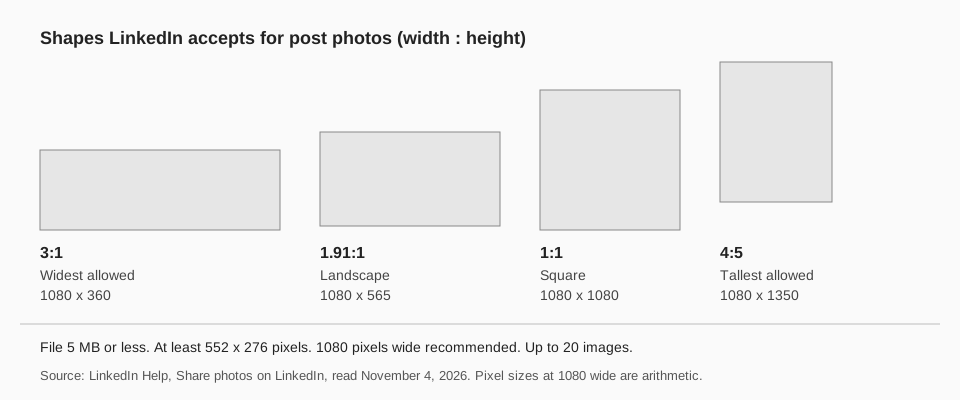
| Shape | Ratio | Example at 1080 wide |
|---|---|---|
| Widest landscape | 3:1 | 1080 x 360 |
| Landscape | 1.91:1 | 1080 x 565 |
| Square | 1:1 | 1080 x 1080 |
| Tallest portrait | 4:5 | 1080 x 1350 |
4:5 is the tallest ratio LinkedIn lists, and 3:1 is the widest. If you are unsure, square is a safe shape because it sits in the middle of the allowed range, and you can check the crop in the post preview before it goes out.
How do multiple images display?
For a post with several photos, LinkedIn's page says images "will render a max ratio of 4:5 (e.g., 640 (w) x 800 (h) pixels) and the post will have a greater visual emphasis on the first image." You can upload up to 20.
The layout depends on the first image you upload:
- Two images appear side by side and keep their aspect ratios.
- Three or more, first image landscape (or shorter than 4:3): the first image appears at the top and the others sit side by side below it.
- Three or more, first image portrait or square (or taller than 4:3): the first image is in the left column and the others stack vertically to the right.
The page adds that the maximum height of the image container is 4:5, so images in the bottom row can be cropped to fit, and the height of the second row follows the shortest image in it. Pick a first image that you are happy to see in full, and expect the rest to be trimmed.
What size is the image for a link post?
A link post is different from a photo post. The Help Center says you can share a URL or an image in a post, "but not both at the same time", and for a URL LinkedIn creates a preview image from the site you shared.
For LinkedIn Pages, the page Customize the image and title of a LinkedIn Page post preview gives these guidelines for a custom image:
- Use a 1.91:1 ratio (1200 x 627 pixels).
- The image must be more than 200 pixels wide. Narrower images appear as a thumbnail on the left side of the post.
- On mobile, images are not cropped. Other ratios show in full with subtle white padding.
That page is written for Page admins. We did not find a matching size page for personal profiles, so we apply the 1.91:1 figure only to Pages.
Sources: Customize the image and title of a LinkedIn Page post preview
Why does my LinkedIn image look cropped or blurry?
These are the causes the Help Center supports:
- The ratio is outside the range. A very wide image, for example a 4:1 banner graphic, is centered and cropped to the maximum ratio.
- The image is small. The page warns that small, low-resolution photos may look low quality, and recommends 1080 pixels wide.
- The image is the second or later photo. In a multi-photo post, the container height is capped at 4:5, so lower rows can be trimmed.
- You want to fix it after posting. Photos cannot be resized or edited once posted, so you have to delete and repost.
How to post LinkedIn images with TrackMedia
TrackMedia schedules LinkedIn posts with images from the same composer you use for the other networks, so you can export your image once at the right ratio and queue it. From TrackMedia's LinkedIn connector code, read on November 4, 2026:
- Up to 20 images per post, as JPG, PNG or GIF, in line with LinkedIn's 20-image limit.
- Alt text for each image, a first comment, and link previews.
- Personal profile or Page. One connection can post to the Pages you have a posting role on.
LinkedIn does not let you edit a photo after posting, so export the image at the ratio you want before you attach it. See how to see and edit scheduled posts on LinkedIn for what you can change on a scheduled post, and our free LinkedIn scheduling tool page for the setup. For multi-slide documents, see LinkedIn carousel size and format. You can start free with TrackMedia.
Questions people also ask
What is the best LinkedIn post image size?
1080 pixels wide, which LinkedIn recommends, with a ratio between 3:1 and 4:5 and a file of 5 MB or less. A 1080 x 1080 square and a 1080 x 1350 portrait both fit.
What is the LinkedIn post size in pixels?
LinkedIn publishes a minimum of 552 x 276 pixels and a recommended width of 1080 pixels, but no single required height. The height follows your ratio.
Can I post a portrait image on LinkedIn?
Yes. LinkedIn's range runs to 4:5, and the page says an image outside the range is centered and cropped to fit.
How many images can I add to a LinkedIn post?
Up to 20 in one post.
How we checked this
We opened each LinkedIn Help Center page below on November 4, 2026 and copied the numbers and wording, including the desktop and mobile sections. TrackMedia's behavior comes from reading its LinkedIn connector code the same day.
- Share photos on LinkedIn (LinkedIn Help, last updated "2 years ago" on the page): the photo requirements, the multi-photo layout rules, the 20-image maximum and the link-or-image note.
- Customize the image and title of a LinkedIn Page post preview (LinkedIn Help): the 1.91:1, 1200 x 627 and 200-pixel guidelines.
We did not post test images to a live LinkedIn account, and LinkedIn may change these numbers, so check the live page if you see different ones.