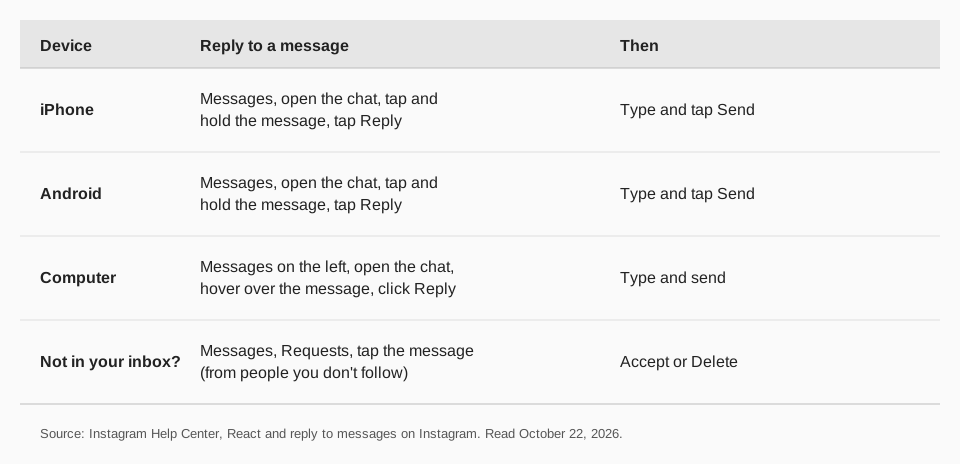
To reply to a DM on Instagram, open Messages, open the conversation, then tap and hold the message you want to answer and tap Reply. On a computer, hover over the message and click Reply. To respond without quoting a message, just type in the chat.
This guide uses Instagram's Help Center pages "React and reply to messages on Instagram" and "Send a message to someone on Instagram", including the iPhone, Android and computer versions, read on October 22, 2026. It also covers message requests, which is where most "I can't find the message" problems end.
How to reply to a DM on Instagram
Instagram's page gives these steps for iPhone and Android:
- Tap Messages at the bottom.
- Tap the conversation you want to view.
- Tap and hold a message you received.
- Tap Reply and enter your response in the chat.
On a computer, the page says to click Messages on the left, click the conversation, hover over a message you received and click Reply to enter a reply. If you use a Meta Quest device, it says to press and hold the message, then click Reply.
How to react to or forward a message
The same Help Center page covers two more actions when you tap and hold a message on a phone:
- Add sticker adds a sticker or cutout to the chat. Drag it in, and pinch the corners out or in to resize.
- Forward lets you pick a person or group to share the message with.
- An emoji reacts to the message.
On a computer, hover over the message. Click Options, then Forward, to choose a person or group, or click Emoji to react.
How to respond to messages from people you don't follow
If a message seems to be missing, check Requests. The Help Center says a message from someone you follow appears in your inbox, while a message from someone you don't follow appears as a message request in a separate inbox.
- Tap Messages at the bottom (on a computer, click Messages on the left).
- Tap Requests.
- Tap the message.
- Choose Delete or Accept. On Android, the options are at the bottom of the screen.
Once you allow a request, their future messages go directly to your inbox. On iPhone you can tap Edit in the top right, then Delete All at the bottom to ignore all requests at once. On a computer, click Delete All at the bottom of the request inbox.
The page that covers sending messages adds a limit that matters if you are the sender: a message to someone who doesn't follow you, or who isn't connected to you, is sent as a request and can only contain text. You can't send photos, videos or voice notes until they accept.
How to send a DM on Instagram
To start a conversation yourself, Instagram's page "Send a message to someone on Instagram" gives these iPhone steps:
- Tap Messages at the bottom.
- Tap Compose in the top right.
- Select the people you want to message.
- Type your message. You can also take a disappearing photo or video with Camera, or add one with Add photo or video.
- Tap Send. You can instead tap Search to send with a special effect.
To message someone you follow, you can also open their profile and tap Message. The page says messages don't appear in feed, search or your profile.
Commands in chats
The same page describes commands. Tap Message... at the bottom, enter / to see action commands, such as /silent to send a message without a notification, or enter @ to mention someone. Mentions work only in chats with three or more people.
Why can't I reply to a message on Instagram?
The Help Center names two things to check first. The message may be sitting in Requests rather than your inbox, and a message request from someone you don't follow needs to be accepted before the chat continues normally. For other problems, both pages point to Instagram's troubleshooting steps for messages.
The send page also includes one notice worth knowing: Instagram accounts you message may use third-party apps or automated services to send messages in chats. A reply that arrives instantly may not be from a person.
Can you schedule a reply?
Instagram lists a way to schedule a message on its send page, and it works for text in the phone app. We cover the steps, the limits and what Meta documents for apps in how to schedule Instagram DMs.
How to get the right DMs with TrackMedia
Most useful DMs start with a post that invites one: a question, a giveaway, "DM us for the link". TrackMedia handles the posting side, so you can spend your time in the Instagram app answering people.
- Plan the posts that start conversations. Write a post once, get a version fitted to Instagram and the other networks, run preflight checks, and schedule it in the calendar or a posting queue.
- Reuse what works. Content collections fill queue slots with your best prompts, and the media library keeps your images and clips in one place.
- See which posts bring people in. Per-post numbers for Instagram include comments, saves, shares and reach, and UTM-tagged links show clicks and visitors per post.
- Publish to 21 networks. Threads, Facebook, LinkedIn, X, Bluesky and the rest are on every plan, including the free one with 15 posts a month.
Replying to messages happens in the Instagram app or at instagram.com. Start free with TrackMedia to plan the posts that lead to them. Related guides: Instagram automation tools, automated comments on Instagram and the "we suspect automated behavior" notice.
Questions people also ask
How do I reply to a message on Instagram?
Open Messages, open the chat, tap and hold the message and tap Reply. On a computer, hover over the message and click Reply.
How do I respond to messages on Instagram from someone I don't follow?
Go to Messages, then Requests, open the message and choose Accept or Delete. After you accept, their future messages go to your inbox.
How do I DM on Instagram?
On iPhone, tap Messages, then Compose, pick the people, type your message and tap Send. For someone you follow, you can also open their profile and tap Message.
Can I send photos to someone who doesn't follow me?
Not at first. Instagram's page says a message request can only contain text until the person accepts it.
How we checked this
We opened each page in a browser on October 22, 2026 and compared the iPhone, Android and computer versions. Instagram changes these pages, so check the live page if a label looks different.
- React and reply to messages on Instagram (Instagram Help Center): Reply, Forward, reactions, message requests, steps on each device.
- Send a message to someone on Instagram (Instagram Help Center): Compose, message requests for non-followers, commands, third-party apps note.