
Threads is an app from Instagram where you view and share public conversations. According to Instagram's Help Center, anyone who has an Instagram or Facebook account can create a Threads profile, and a post can hold short text, links, photos, videos or a mix.
This guide explains what the Threads app is used for, how to join, what a post can contain and the limits that matter if you plan to publish regularly. It uses Instagram's Help Center and Meta's Threads API documentation, both read on October 22, 2026.
What is the Threads app?
Instagram's "About Threads" page describes it as an app where you can view and share public conversations. You can post threads, reply to others and follow profiles you are interested in. People can follow you to see your threads and replies in their feeds, and they can like, share, quote or repost what you write.
A "thread" is simply a post. The Help Center says it appears on your profile and in a feed, and who can see it follows your profile's privacy setting.
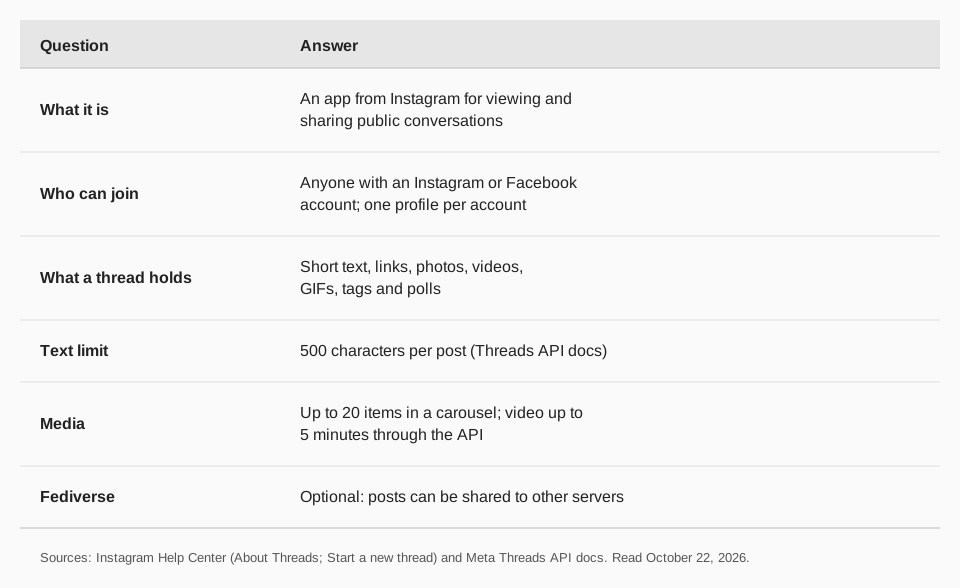
What is Threads used for?
Most people use it for short, public posts and replies: sharing an opinion, asking a question, posting a photo, or joining a discussion under someone else's post. Instagram's page lists the same building blocks, which are starting a thread, replying to a thread, and liking, reposting or sharing one.
It also works as a second place to reach an audience you already have. The Help Center says profiles you follow on Threads, and profiles following you there, do not change who you follow or who follows you on Instagram or Facebook. The two follower lists stay separate.
How do you join Threads?
To create a Threads profile, the Help Center's "Create a profile on Threads" page says you sign in with your Instagram or Facebook account. You can create one Threads profile for each Instagram and Facebook account you have.
The page offers two paths, "Create a profile with your Instagram account" and "Create a profile with your Facebook account". Some things to know before you start:
- Your profile is connected to that account. The About Threads page says information such as your name, username, profile picture, bio and connections is used on Threads.
- You can edit some things on Threads. Your bio, links and profile picture can be changed there. Other details come from the Instagram or Facebook account you used.
- Verification carries over from Instagram only. If the Instagram account is verified, the badge shows on Threads. If you join with a verified Facebook account, the badge does not carry over.
How do you post on Threads?
The Help Center's "Start a new thread" page has separate steps for the app and for Threads.com on a computer. On a computer it says:
- Click New post in the bottom right.
- Enter your text. You can also add a photo or video with Add from gallery, a GIF, a Tag for a topic, or a Poll.
- Choose who can reply. Click Anyone can reply & quote in the bottom left to limit it to Profiles you follow or Mentioned only.
- Click Post in the bottom right.
The page opens the Android and iPhone steps in the app itself, so check your screen if a label differs. To copy the link to a thread, click Share under the post.
What are the limits on a Threads post?
The Help Center describes posts as "short pieces of text" and does not state a number on the pages we read. Meta's Threads API documentation does: text posts are limited to 500 characters, and emojis count as UTF-8 bytes, so each one uses more than one character.
The same documentation gives limits for publishing through the API:
- Carousels: at least 2 and up to 20 images, videos or a mix.
- Images: JPEG or PNG, 8 MB maximum.
- Video: MOV or MP4, 1 GB maximum, up to 300 seconds (5 minutes).
- Posting volume: profiles are limited to 250 published posts within a 24-hour period, and a carousel counts as one post.
If you write long posts, a tool that counts for you helps. Our character counter for social media covers the limits across networks.
What does the fediverse setting do?
The Help Center says that if you turn on sharing to the fediverse, your Threads posts are shared to other servers automatically. Posts made before you turned it on are not included, and sharing is delayed by 15 minutes so you can edit first.
A post is not shared to other servers if it includes a poll, limits who can reply and quote, or contains copyrighted audio that breaks Meta's audio licensing agreements. Once a post has been shared, you cannot change who can reply and quote it.
Should you use Threads for your business?
If you already have an Instagram or Facebook account, setting up a profile is quick, and your audience on Threads is separate from your other followers. That makes it a place where the same message can reach new people. How much it pays off for your niche depends on who is there, which neither Meta nor we can promise.
A useful test is to post for a few weeks and compare it against your other networks. Our guides on the best time to post on Threads and whether Bluesky is worth it use the same approach for other text-first networks.
How to publish to Threads with TrackMedia
TrackMedia is built for exactly this situation, where Threads is one of several networks you post to. You write once in the composer and TrackMedia fits a version to Threads, then checks it against the 500-character limit and media rules before you publish. Threads is available on every plan, including the free one.
- Threads, carousels and a first comment. Chain posts into a thread, attach a carousel, add alt text, or put a link in a first comment.
- Queue and calendar. Schedule a post for a time or let a posting queue fill the next slot from a content collection.
- Cross-posting with a review step. Send the same idea to Threads, Instagram, X, Bluesky and the other networks without retyping it.
- Results in one place. See views, likes, replies and reposts per Threads post next to your other networks, and use UTM tags to see which posts send clicks.
For the wider workflow, see how to cross-post on social media and how to schedule social media posts. You can start free with TrackMedia and connect your Threads profile in a couple of minutes.
Questions people also ask
What is Threads app used for?
It is used to share and read public conversations: short posts with text, links, photos or video, plus replies, reposts and follows. Instagram's Help Center describes it as an app where you can view and share public conversations.
Do you need Instagram to use Threads?
You need an Instagram or Facebook account. The Help Center says anyone with either can create a Threads profile, and each account can have one profile.
How long can a Threads post be?
Meta's Threads API documentation limits text posts to 500 characters. A carousel can hold up to 20 items.
Can Threads posts show up on Mastodon?
Yes, if you turn on sharing to the fediverse. The Help Center says shared posts go to other servers after a 15-minute delay, and posts with polls or limited replies are not shared.
How we checked this
We opened each page in a browser on October 22, 2026 and copied the labels and numbers. Meta changes these pages, so check the live page if a label looks different.
- About Threads (Instagram Help Center): what Threads is, who can create a profile, how account information is used.
- Create a profile on Threads (Instagram Help Center): sign-in with Instagram or Facebook, one profile per account, verification and editing notes.
- Start a new thread on Threads (Instagram Help Center): posting steps on a computer, reply controls, fediverse sharing rules.
- Threads posts (Meta for Developers): the 500-character text limit, carousel size, media specs and the 250-posts-per-24-hours limit.