The TikTok pages we read for this guide on October 6, 2026 do not name a best time to post on TikTok, so the answer has to come from your own data. TikTok's Help Center describes the Viewers section of TikTok Studio analytics as including the "activity times of your viewers", which is the closest thing to a starting point.
So the useful question is "what time should I post on TikTok for my audience?" This guide shows where TikTok puts that data, a simple way to test what you find, how scheduling fits in, and what TrackMedia's best-times view can and cannot tell you.
What is the best time to post on TikTok?
It depends on when your audience is on TikTok. We found no TikTok Help Center page that names a best hour or a best day, and we cannot prove that none exists. TikTok's Help Center page TikTok Studio instead lists analytics sections for your own account, including activity times of your viewers.
The same answer covers the best day to post on TikTok: day of the week is one more thing to test, not a separate rule to look up. A "best time" table from elsewhere describes someone else's audience, so we use no third-party figures here.
Where do you see when your TikTok audience is active?
TikTok's Help Center page TikTok Studio lists Analytics as a TikTok Studio feature. Under account analytics it names four sections: Overview, Content, Viewers and Followers. It describes Viewers as "Key metrics, demographics, and activity times of your viewers", and gives the same description for the Viewers section of a single video's analytics. It describes Followers only as a "Demographic view and other insights on your followers".
The same page says TikTok Studio is its own app and that you can also use it, with limited tools, in the TikTok app and in a web browser. We did not verify the tap-by-tap path to Analytics, the date range of the activity data, or how the activity times are displayed, so go by what your own screen shows.
Our guide to checking analytics on TikTok covers the rest of Studio, including date ranges and the Business Account route. It also records what TikTok's Creator Academy says about the Viewers and Followers sections; we did not re-check that article for this post.
Which time zone do these charts use?
TikTok's Help Center page Why "No data" or "N/A" appears in my Analytics says "Follower activity" is the only analytics data written in your local time. It says the rest is displayed in UTC and takes about 1 to 2 days to update. The page shows no date in the text we read and does not say where "Follower activity" appears in TikTok Studio, so check any chart against a post whose time you know.
The practical rule: write down your own posting time from your own clock. Do not reconstruct it from a chart that may be in UTC.
What the activity charts do not tell you
These charts describe when people are on TikTok. They do not say when your posts perform best, and TikTok's pages we read do not claim they do. We could not confirm what date range the activity data covers, so treat one look as a snapshot.
How do you test your best time to post?
Treat the activity charts as a shortlist, then let your own results decide. A single video that did well at 7 p.m. proves little, because views vary a lot from post to post. This is our suggested method, not one TikTok recommends.
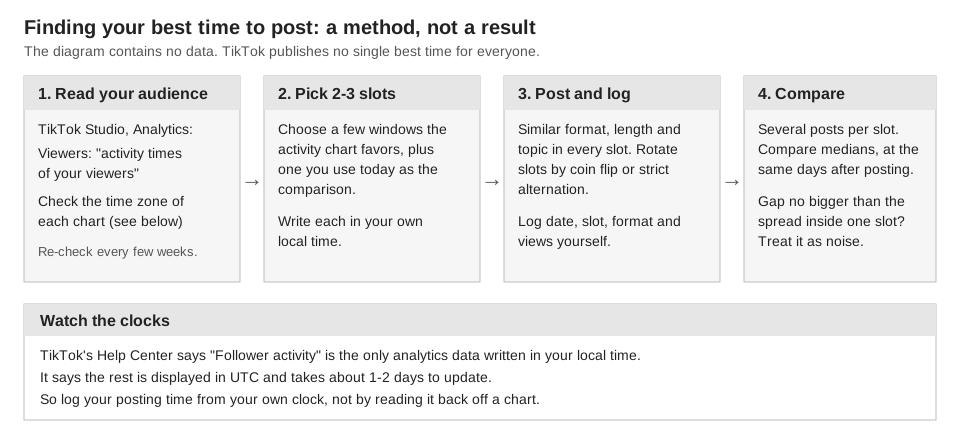
- Read the charts. Note the two or three windows where the Viewers section shows the most activity, and write them in your local time.
- Pick candidate slots. Add the time you use today, so there is something to compare against.
- Post similar videos in each slot. Keep format, length and topic alike. Decide each video's slot by coin flip or strict rotation, before you see results.
- Log it yourself. Record date, slot, format and views. Check views at the same number of days after posting, for example 7. That window is our suggestion, not TikTok's.
- Compare medians, not averages. One viral video can distort an average. If the gap between slots is no bigger than the spread among posts in the same slot, you have no evidence of a difference.
- Repeat. Your audience can change, so run the test again after a few weeks.
Can you schedule TikTok posts for your best time?
Yes. TikTok has a native scheduler, and our guide to whether scheduling a post on TikTok affects views records its limits as of October 2026: a post can be scheduled at least 15 minutes and at most 10 days ahead, the time zone defaults to your computer's setting, and a scheduled post cannot be edited, only deleted and re-uploaded.
Scheduling lets you hit a slot without being at the keyboard. That guide found no TikTok statement that a scheduled video gets more or fewer views than a live one, and it does not claim there is none. If you want the slot test to be clean, schedule every test video the same way, or none of them.
What does TrackMedia's best-times view show?
TrackMedia reports when your posts have actually landed best, based on your own results. Open Analytics and choose the Best times tab. It shows a grid of weekday by hour, titled "When your posts land best", in your workspace's time zone, built from posts that went out in the range you picked.
- What it averages. Each post's engagement rate, averaged per slot. For a TikTok post that rate is likes plus comments plus shares, divided by views. It is not a count of views, so a slot whose posts had few views can rank high.
- What it ranks. "Your strongest slots" lists up to five, and only slots with enough posts. Our code sets that minimum at three posts per slot. One good Tuesday does not make the list.
- Which posts count. Posts published through TrackMedia and posts imported from the account's own history, so you can get a grid before you publish through TrackMedia.
- Narrow it to TikTok. The network and account filters at the top of Analytics let you look at TikTok alone.
- In the composer. When you schedule a post, the time picker can offer up to two "Best" chips, built from the last 90 days of posts. A chip only appears for a slot with at least three posts, and the slots are calculated across all your networks together, not for the network you are posting to.
The limits matter as much as the features. The grid describes what happened, not what will happen, and it cannot separate a good hour from a good video. A slot you never posted in cannot appear in it. TrackMedia also does not show TikTok's viewer or follower activity times, so TikTok Studio is still where you learn when your audience is on TikTok. TrackMedia is where you check whether posting then worked.
| Source | What it answers | What it cannot tell you |
|---|---|---|
| TikTok Studio, Viewers | When your audience is active on TikTok | When your posts perform best |
| Your own test log | Which candidate slot did better, for your content | Anything about slots you did not test |
| TrackMedia, Best times | Which publish hours had the highest engagement rate across your posts | When your audience is active, or what a slot would do for a new kind of video |
What to do next
Open TikTok Studio this week, write down your top activity windows, and start the log. When you want publishing and per-hour results in one place, start free with TrackMedia.
How we checked this
We opened the TikTok pages below in a browser on October 6, 2026, and copied labels from them. We did not test these screens on a live TikTok account, so tab names and availability may differ for you.
- TikTok Help Center, "TikTok Studio": https://www.tiktok.com/support/faq_detail?id=7581820705491229240. Verified: Analytics is a TikTok Studio feature; account analytics lists Overview, Content, Viewers and Followers; Viewers is described as including activity times of your viewers; Followers is described as a demographic view and other insights; Studio is available with limited tools in the app and a web browser.
- TikTok Help Center, "Why 'No data' or 'N/A' appears in my Analytics": https://www.tiktok.com/support/faq_detail?id=7133059126174702081. Verified: analytics data is displayed in UTC and takes about 1 to 2 days to update, and "Follower activity" is the only data written in local time.
The TikTok scheduling limits come from our earlier guide on scheduling and views, which cites TikTok's Help Center page "Schedule video"; we did not re-read that page for this guide. What we could not verify: the TikTok Creator Academy article "Introducing TikTok analytics" (https://www.tiktok.com/creator-academy/en/article/tool-analytics-intro) stayed on a loading screen in our browser on October 6, 2026, so nothing here relies on it; any TikTok page that states a universal best time (we found none, and cannot prove none exists); where "Follower activity" appears in TikTok Studio; the date range of the activity data; and how Studio displays activity times. TrackMedia's own behavior comes from its analytics and composer code, read the same day.