To turn off AI content on Pinterest, open Refine your recommendations, go to the AI content tab and switch off Show AI content. Pinterest's Help Center says that turning this toggle off turns all AI topics off in your feed. It reduces AI content rather than promising to remove every AI Pin.
This guide uses Pinterest's Help Center pages and its newsroom post on GenAI controls, read on October 22, 2026. It gives the steps for web and mobile, the other controls (per-Pin, search and topic settings), what AI labels mean, the separate setting about training Pinterest's AI on your data, and what the controls cannot do.
How to turn off AI on Pinterest in your feed
The setting is in Refine your recommendations. Pinterest's help article gives these steps.
On the web (desktop)
- Log in to your Pinterest account.
- Click the more-options-refresh icon at the bottom left of the screen.
- Select Refine your recommendations.
- Click the AI content tab.
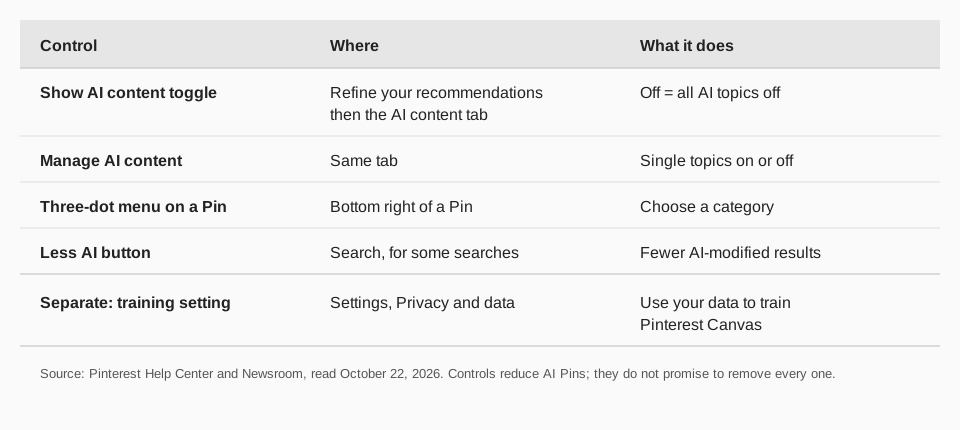
- Use the Show AI content toggle to reduce AI content in your feed. If you turn it off, all AI topics are turned off.
In the Pinterest app (iPhone and Android)
- Open the app and log in.
- Tap your profile picture at the bottom-right corner.
- Tap the more-options-refresh icon at the top-right.
- Tap Refine your recommendations.
- Tap the AI content tab, then use the Show AI content toggle.
The help page gives one set of app steps and does not list separate iPhone and Android versions. For a business account in the app, it says to tap your profile photo at the bottom right, tap the ellipsis icon at the top right, select Settings, and then choose Refine your recommendations. The newsroom post adds that the upgraded tuner reached Android and desktop first, with iOS following over the weeks after launch, so if the tab is missing, update the app.
How to remove AI from Pinterest by topic
If you only want less AI in some areas, leave the main toggle on and use Manage AI content on the same tab. Pinterest's help page says this section lets you turn individual AI topics on or off. The newsroom post (October 16, 2025) says the controls cover a set of categories: architecture, art, beauty, entertainment, men's, women's and children's fashion, health, home decor and sport. It says food and drink was added on December 12, 2025, and that more categories will come over time.
You can adjust your choices at any time. The newsroom post says the controls apply to eligible image Pins in supported categories, so a Pin outside those categories is not affected.
See less AI from a single Pin
Pinterest's newsroom post describes a quick option on a Pin. Tap the three-dot menu at the bottom right of a Pin and select a category. That adjusts your recommendations for that kind of content without opening settings.
The newsroom page does not spell out the exact wording of the menu items, so follow what your screen shows.
Use the Less AI button in search
For some searches, Pinterest shows a Less AI option that reduces AI-modified results. The Help Center's search article gives these steps:
- On the web: click the search bar, enter your terms and press Enter. Look for Less AI alongside the suggested guides below the search bar, or in the filter menu under the search bar.
- In the app: tap the search icon at the bottom, enter your terms, and tap the filter icon or the guides above the search bar to find Less AI.
Pinterest says it appears for some searches, and the page does not define "AI-modified" or say which searches offer it. If you do not see it, your search may not have the option.
What the GenAI label means
Pinterest's AI help page says it labels close-up views of image Pins in two cases: when the content owner says the content was modified or generated with AI, or when Pinterest's detection systems find it may have been generated or altered with AI, following the IPTC Photo Metadata Standard.
The newsroom post notes that the controls depend on that detection. It says labels depend on Pinterest's detection tools, so unflagged AI content may not carry a label, and it gives no accuracy figures. This is why a feed with the toggle off can still show a Pin that looks AI-made: the system may not have flagged it.
If your own Pins are labeled as AI
If you publish on Pinterest, the labels apply to you too. Pinterest's AI page says the Help Center has more on these labels and the appeals process, so if Pinterest labels a Pin that you made without AI, look there. The page does not say how long a decision takes.
How to stop Pinterest using your data to train its AI
This is a different setting from your feed. Pinterest's page "Manage GenAI settings" covers an opt-out for training Pinterest Canvas, its image generation model, on your data.
On the web: log in, click the More options icon at the bottom left, click Settings, select Privacy and data, check or uncheck the box next to Use your data to train Pinterest Canvas, then click Save.
In the app: tap your profile picture at the bottom right, tap your profile photo at the top left, tap Privacy and data, then tap the toggle next to Use your data to train Pinterest Canvas.
The page says that if you are under 18 you are automatically opted out and cannot opt in. It says you can opt out at any time, and it does not say whether data already used for training is affected.
A short checklist helps if you want the strongest setting you can get: switch off Show AI content, review Manage AI content for any topic still on, use Less AI when you search, and use the three-dot menu on Pins that slip through. Then check back after an update, since Pinterest says it will add categories over time.
Can you turn off AI on Pinterest completely?
Pinterest's AI help page does not say that you can. It describes reducing AI content in certain categories and refining your recommendations. It also lists other places Pinterest uses AI, such as recommendations across the home feed, search and related feeds, content moderation and ad creation, and none of the controls above switch those off.
Turning recommendations off does not change ads either: the Refine your recommendations page says turning recommendations on or off does not affect the ads you see on your home feed.
If you publish on Pinterest, use TrackMedia for your own Pins
The controls above change what you see. If you also post to Pinterest, TrackMedia handles your side of it: you write once and TrackMedia fits a version to Pinterest, with alt text, checks it before it goes out, and publishes it on a schedule or from a posting queue, alongside up to 20 other networks.
Links in your Pins are tracked in real time with UTM tags, so you see clicks, visitors and referrers for each Pin, and analytics include Pinterest's own saves and clicks. Our guides cover how to post on Pinterest, how to schedule Pins and the best time to post on Pinterest. Start free with TrackMedia: 15 posts a month, no card.
Questions people also ask
How do I get rid of AI on Pinterest?
Open Refine your recommendations, go to the AI content tab and switch off Show AI content. Then use Manage AI content for single topics and the Less AI button in search. It reduces AI Pins; Pinterest does not say it removes all of them.
How do I remove AI from Pinterest search results?
Use the Less AI button, which appears for some searches, next to the guides below the search bar or in the filter menu.
Why do I still see AI Pins after turning it off?
Pinterest says its controls apply to eligible image Pins in supported categories and rely on detection, so unflagged AI content may remain.
Does Pinterest label AI images?
Yes. It labels close-ups of image Pins that the owner says were generated or modified with AI, or that its detection flags.
Can I stop Pinterest training AI on my data?
There is a setting called Use your data to train Pinterest Canvas under Privacy and data. Switch it off to opt out.
How we checked this
We opened each page below on October 22, 2026 and copied the labels. We did not test the settings on a live account, and Pinterest updates them often, so check your own screen.
- Refine your recommendations (Pinterest Help): the steps, the AI content tab, the toggle and the ads note.
- Manage GenAI settings (Pinterest Help): the Pinterest Canvas training opt-out.
- AI at Pinterest (Pinterest Help): the labels and AI uses.
- Search for ideas on Pinterest (Pinterest Help): the Less AI button.
- Pinterest rolls out new tools to give users more control over GenAI content (Pinterest Newsroom, October 16, 2025): the categories, per-Pin menu and limits.