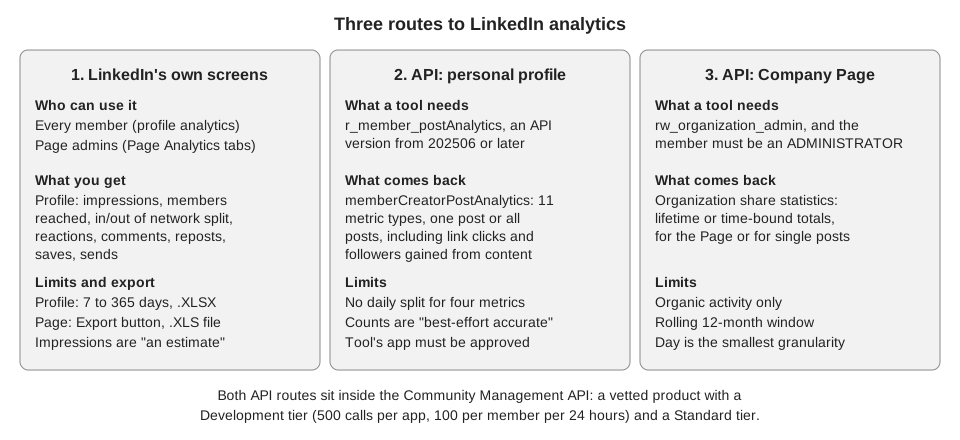
A third-party LinkedIn analytics tool can only show you what LinkedIn's API hands it, so judge any tool by the access it holds and the numbers it returns, and keep LinkedIn's own analytics as your reference. For a personal profile the access is one permission, r_member_postAnalytics. For a Company Page it is rw_organization_admin, held by a member with the ADMINISTRATOR role, and the share-statistics endpoint it unlocks returns organic activity over a rolling 12 months.
The API facts below come from LinkedIn's Marketing API documentation on Microsoft Learn, and the native-analytics facts come from LinkedIn Help, all read on October 6, 2026. We did not test any third-party tool, so this guide gives you questions to ask, not a ranking.
What can a LinkedIn analytics tool actually read?
A tool reads your analytics through LinkedIn's Community Management API. Microsoft Learn's Community Management overview lists it as a "Vetted Product with development and standard tiers", so the tool's developer has to apply and be approved. LinkedIn's Increasing Access page calls the Development tier the default tier provisioned for the Community Management API, with 500 API calls per app and 100 per member of an app in 24 hours, no calls allowed on endpoints that use BATCH_GET, push notifications disabled for the social-actions webhook, and integration and testing to be finished within twelve months. It describes the Standard tier as having no restrictions and says you must apply separately to upgrade.
The integration requirements page adds that LinkedIn is rolling out a Technical Sign Off process, in which a partner demos its product to LinkedIn. The page says the process is still being rolled out, and we found no public list of tools that have passed it, so ask a vendor directly.
These Learn pages also carry a deprecation notice: Marketing version 202510 will be sunset on October 15, 2026. Because r_member_postAnalytics works only from API version 202506, it is fair to ask any tool which API version it uses and whether it has migrated.
| What a tool wants to read | Permission and role | Limits LinkedIn states |
|---|---|---|
| Analytics for a member's posts | r_member_postAnalytics, supported only from API version 202506 | Daily breakdown not supported for four of the metrics |
| Organic post statistics for a Page | rw_organization_admin; the member must be an ADMINISTRATOR | Organic only; rolling 12-month window |
| Member Post Management program | r_member_social | LinkedIn calls it closed and is not accepting requests |
The last row means a newer tool cannot count on that permission. Learn's overview says r_member_social "is a closed permission". We did not find a Learn page spelling out what a tool can do without it, so we do not claim whether a given tool can import your older posts.
How do API metrics compare with LinkedIn's own analytics?
For a personal profile, most of what the API returns has a counterpart on LinkedIn's combined post analytics page, but the two lists are not identical. The Learn page for Member Post Statistics defines eleven metric types, and the table below sets the ones with a native label next to them.
| LinkedIn screen label | API metric type | Note |
|---|---|---|
| Impressions | IMPRESSION | LinkedIn Help calls the number "an estimate" |
| Members reached | MEMBERS_REACHED | No daily breakdown in the API |
| Reactions, Comments | REACTION, COMMENT | Same names |
| Reposts | RESHARE | Different name for the same idea |
| Saves | POST_SAVE | Same idea |
| Sends on LinkedIn | POST_SEND | Messaging sends |
| Not on the combined screen | LINK_CLICKS, PREMIUM_CTA_CLICKS, FOLLOWER_GAINED_FROM_CONTENT, PROFILE_VIEW_FROM_CONTENT | LinkedIn's single-post analytics page lists "Profile activity" and "Link engagement" |
One native item has no API match in the Learn metric list: the in-network and out-of-network percentages on the combined post analytics page. A tool built only on the API cannot copy that split from LinkedIn, and a tool that shows one should say where it comes from. Learn also says the counts are "best-effort accurate" and should not be used for billing, and LinkedIn Help says impressions are an estimate, so expect small gaps, not exact matches.
For Pages the gap can be bigger for a different reason. LinkedIn Help's Page content analytics page says its metrics cover "organic and sponsored posts", while Learn's Organization Share Statistics page says that endpoint returns organic statistics only. If you boost posts, a tool and the Content tab can legitimately disagree.
How do you judge a LinkedIn analytics tool?
Run the same few checks on any tool, free or paid. None needs more than a connected account and LinkedIn's own screens.
- Ask how it connects. LinkedIn's documented route is member consent through OAuth for an approved app. If a tool asks for your LinkedIn password instead, ask how it gets the data before you hand it over.
- Ask which permissions it requests. A profile tool should name
r_member_postAnalyticsor say what it does instead. A Page tool needs you to hold the ADMINISTRATOR role, so a content admin may not be able to connect it. - Compare one post at the same age. Pick a post, open its numbers in LinkedIn, then compare impressions, reactions and comments in the tool. Small differences are expected. Large ones, or a missing column, are worth a question.
- Watch how it shows missing data. A permission LinkedIn declines should leave a blank or a note, not a zero. A zero you cannot tell from a real zero will poison every average.
- Check the history it keeps. The Page API window is a rolling 12 months, and the profile screen offers up to 365 days, so ask whether the tool saves snapshots as it goes. Without that, older numbers drop out of view.
- Keep your own export. LinkedIn lets you export combined post analytics as .XLSX and Page analytics as .XLS, so you can always rebuild a report without the tool.
We found no universal benchmark for these numbers on the LinkedIn pages we read, and we do not offer one. The only fair baseline is your own earlier posts, read the same way each time.
Is native LinkedIn analytics enough?
For one profile or one Page, often yes. The combined post analytics page lets you pick a range from the past seven days to the past 365 days, switch between impressions and engagements, and export. LinkedIn's Page export instructions say to open Analytics, choose the Content, Visitors, Followers or Competitors tab, click Export and pick a timeframe.
A tool earns its place when you want several accounts in one view, a longer record than LinkedIn keeps on screen, or LinkedIn next to other networks. Our guide to managing multiple social media accounts covers that side of the decision. Other networks name and count things differently, as what the Instagram insights mean shows, so compare networks only on rates you calculate the same way.
What does TrackMedia read from LinkedIn?
TrackMedia's code includes a LinkedIn connector for personal profiles and one for Company Pages, and both pull post metrics from LinkedIn's API into the Analytics view. Which numbers arrive depends on what LinkedIn has granted the app and the connected member. Impressions, reach, clicks, shares and saves are left out when LinkedIn declines to send them, but reactions and comments are stored as 0 when neither source the code tries returns a count, so a 0 there can mean "not available".
- Profile posts: reactions (labeled "Reactions"), comments, impressions, members reached, reposts, link clicks and saves. For the account it asks for followers, first-degree connections, followers gained from content and profile views from content.
- Page posts: reactions, comments, impressions, reach, clicks and shares. For the account, followers and Page views.
By default the code asks for the member scopes r_member_postAnalytics, r_member_profileAnalytics and r_1st_connections_size for profile analytics, and organization scopes including rw_organization_admin for Pages, unless a deployment switches either bundle off. TrackMedia computes its own engagement rate as reactions plus comments plus shares plus clicks, divided by impressions and capped at 100%. LinkedIn does not send that figure, so do not mix it with the rate on LinkedIn's Page screens in one column.
The limits are plain. The code lists no demographics or in-network split, so use LinkedIn's own screens for those. We did not compare TrackMedia's totals with LinkedIn's screens on a live account, and we cannot say whether Company Page connections are available for your workspace. You can also schedule LinkedIn posts and then see and edit them from TrackMedia. To try it, create a free TrackMedia account.
How we checked this
We opened these pages in a browser on October 6, 2026. Permission names, tier limits, metric names and limits are copied from them.
- Increasing Access (Microsoft Learn): permissions, Development and Standard tiers, call limits, BATCH_GET and twelve-month terms,
r_member_postAnalyticsandr_member_profileAnalyticsversion notes. - Community Management overview: vetted product, tiers, closed
r_member_social. - Integration Requirements for Community Management: Technical Sign Off.
- Member Post Statistics: eleven metric types, daily-breakdown exceptions, "best-effort accurate".
- Organization Share Statistics: organic only, rolling 12 months, ADMINISTRATOR role.
- Combined post analytics, Content analytics for your LinkedIn Page and Export your LinkedIn Page analytics report (LinkedIn Help): native metrics, ranges and exports. We also read View post analytics for your content for the single-post screen.
We could not verify whether a registered legal entity is required to apply, what the Standard tier review decides in practice, or what any named third-party tool receives. We also did not read the Learn pages for Page follower and visitor statistics, so the Page API comparison covers share statistics only. The Learn pages show a "li-lms-2026-09" version label and warn that Marketing version 202510 is sunset on October 15, 2026, so API details can change. The TrackMedia statements come from reading its LinkedIn connector code, not from a test against a live LinkedIn account.