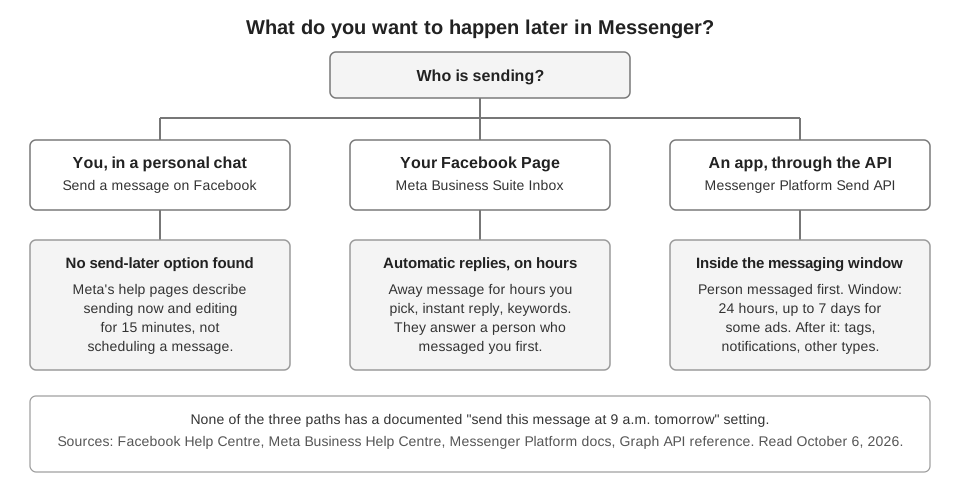
You cannot schedule a message on Facebook Messenger with any setting we could find in Meta's help pages: none lets you write a message and send it at a later time. What Meta does document is automatic replies for a Facebook Page, including an away message that runs on hours you choose, and a developer API whose message request has no send-time parameter and whose rules limit when an app may message someone.
This guide separates those three situations: you in a personal chat, a Page using Meta Business Suite, and an app using the Messenger Platform. We read Meta's pages on October 6, 2026, and we say where they are silent. A missing page does not prove a feature is absent, so check your own app before you rely on this.
Can you schedule a message on Facebook Messenger?
For a personal chat, we could not find a documented way. Facebook's Help Centre article Send a message on Facebook lists the steps for sending now (click Messenger, click New message, pick the person, type, press Enter or Send) and has no scheduling step. A search of the Help Centre for "schedule a message messenger" returned 25 results, and none had a title about scheduling a message.
The closest thing in the Help Centre is time-related only after you have sent. The article Edit a message on Facebook says you can edit a message for up to 15 minutes after you send it, and that each message can be edited up to five times. That is editing, not delaying.
The same Help Centre page says its content is about messages on Facebook and points to the Messenger Help Centre for the Messenger app. We opened the Messenger Help Centre home page and its trending topics list no scheduling article. We did not search every article in it, so the app itself may differ.
Can a Facebook Page schedule Messenger messages?
A Page can schedule when its automatic replies are active, which is not the same as scheduling a message to a person. Meta's Manage messages with Inbox in Meta Business Suite page lists what Inbox does: read and reply, organize and filter, set up automations, set a status, and search. Scheduled sends are not in that list.
The tools below are the nearest options. Each one replies to someone who messaged your Page first.
Away message on a schedule
Facebook's Create an away message for your Facebook Page says the message is sent automatically to people who message your Page while its messaging status is set to away. The page says you can schedule that status to match your business hours, or change it manually at any time.
- Switch into the Page. Click your profile photo, click See all profiles and choose the Page.
- Open Automations. Click Messenger in the top right of Facebook, then Automations in the top right.
- Find Away message. Click Try it the first time, or Edit if you made one before.
- Pick the channel and hours. Select the Channel, then choose the hours you are away under When this happens.
- Write the message under Message and click Save changes.
A related page, Set your Page's messaging status to away, says you can set the status to away for up to 12 hours by hand, from Available in the top right of your Inbox.
Instant reply and keyword automations
Meta's About Inbox automations in Meta Business Suite describes the templates. Instant reply answers when someone messages you for the first time, and Away message answers when you are not available. Others cover questions, location, contact information and hours.
Custom keyword automations, which are desktop only, can match up to five keywords or phrases. The page says keywords are case-sensitive and must match exactly. It also says Inbox sends a keyword automation after 15 minutes unless you respond personally before then. That is a built-in delay, not a time you choose.
Can an app schedule Messenger messages through Meta's API?
The Messenger Platform page Send a message (updated September 28, 2026 on the page) shows requests that send a message. Its sample requests contain a recipient and a message, some add a messaging_type, and its reply example adds a reply_to message ID. We found no send-time field on the page. The separate Send API Reference it links to opened with no content in our browser, so we read Meta's Graph API reference for Page Messages (v26.0) instead. For a POST to /{page_id}/messages it lists these parameters: folder, message, messaging_type, notification_type, payload, persona_id, recipient, reply_to, sender_action, tag and thread_control. None of them is a send time.
The page's first rule shapes everything else: to send messages on Messenger or Instagram, the conversation must be initiated by that person. After that, the standard messaging window applies. It lasts 24 hours for most user actions, and may last up to 7 days from a person's first message after a Click-to-Messenger or Click-to-Direct ad.
The page lists what an app can use outside that window:
- Tagged Message. Must carry a tag that matches an allowed use case and contain non-promotional content. The page says three tags (
CONFIRMED_EVENT_UPDATE,ACCOUNT_UPDATEandPOST_PURCHASE_UPDATE) return error code 100 from April 27, 2026. The Human Agent tag lets a person respond manually within 7 days. - One-time Notification. The person grants permission for one follow-up message, such as an appointment reminder. The page says it is not available for the Instagram Messaging API.
- Marketing Messages. The person grants permission for recurring promotional messages after the window ends.
- Sponsored Messages. Messages marked with the word Sponsored, for someone who messaged your Page before. They must follow Meta's advertising policies.
The page also describes Utility Messages (pre-approved template messages about orders, account updates and appointments) and Private Replies (a single message to a person who commented on or posted to your Page, sent within seven days). Our reading is that a tool holding a message in its own queue could send only while the standard messaging window or one of these routes is open. Meta's page does not discuss queues, so that part is inference. If you also message on Instagram, the same limits appear in our guide to scheduling Instagram DMs.
What can you do instead?
Match the tool to what you need at the set time. If you need an automatic answer during certain hours, use the away message with the hours you set. If you need to announce something to many people at a set time, Meta documents scheduled Page posts in Schedule a post and manage scheduled posts for your Facebook Page, and our guide to seeing and editing scheduled posts on Facebook covers it.
For a one-to-one message at a precise time, we found nothing in Meta's documentation to recommend. A calendar reminder on your own phone, followed by sending the message yourself, is the dependable fallback. We did not test any Messenger feature that Meta does not document.
Does TrackMedia schedule Messenger messages?
No. TrackMedia schedules posts to your Facebook Page, not Messenger messages. Its Facebook connection requests these permissions: pages_show_list, pages_manage_posts, pages_manage_engagement, pages_read_engagement, read_insights and business_management. No messaging permission is among them, so it can neither send nor schedule a Messenger message.
What it does for Facebook is Pages only, not personal profiles: text, links, up to 10 images or GIFs, or one video. A post waits in TrackMedia's own queue and publishes at the time you set, so it will not appear in Facebook's own scheduled list. You can change or unschedule it from the post page, and the publishing workflow and link analytics show clicks on the links inside it. For both Instagram and Facebook from one draft, see how to post to Instagram and Facebook at the same time.
If scheduled Page posts are the part you want help with, you can start free with TrackMedia.
How we checked this
We opened each page below in a browser on October 6, 2026, and copied the steps, labels and numbers from it. We did not use a live Page, schedule or send any message, or call the Send API. Facebook Help Centre pages are device-specific and we read the computer versions.
- Facebook Help Centre search for "schedule a message messenger": 25 results, none titled about scheduling a message.
- Send a message on Facebook (Facebook Help Centre): steps to send now.
- Edit a message on Facebook (Facebook Help Centre): 15 minutes, five edits.
- Messenger Help Centre: home page and trending topics only.
- Create an away message for your Facebook Page and Set your Page's messaging status to away (Facebook Help Centre): steps, scheduling of status, 12 hours.
- Manage messages with Inbox in Meta Business Suite and About Inbox automations in Meta Business Suite (Meta Business Help Centre): feature list, templates, keyword rules.
- Send a message (Meta for Developers, Messenger Platform): messaging window, message types, tags.
- Graph API Reference v26.0: Page Messages (Meta for Developers): the POST parameters for
/{page_id}/messages; no send-time parameter. - Schedule a post and manage scheduled posts for your Facebook Page (Meta Business Help Centre): only to confirm that scheduled Page posts exist.
What we could not verify: the Messenger mobile app's own menus, any Messenger setting that exists but is undocumented, the Send API Reference page (it opened with no content in our browser), Meta's separate pages on One-time Notifications and Marketing Messages, and the Help Centre's Android, iPhone and iPad variants. TrackMedia's behavior comes from its Facebook connector code, read the same day.