Pinterest has profile views only as a count, not a list of names. Its Pin stats show Profile visits, which Pinterest defines as the number of people who visited your profile after viewing your Pin. Pinterest's help pages describe no way to see which people visited.
This guide follows Pinterest's help pages on Pin stats and Pinterest Analytics, read on October 22, 2026. It gives the steps to find Profile visits, explains each audience number, and shows how to track the traffic that matters, which is clicks to your site.
Sources: Pin stats · Pinterest Analytics
Does Pinterest have profile views?
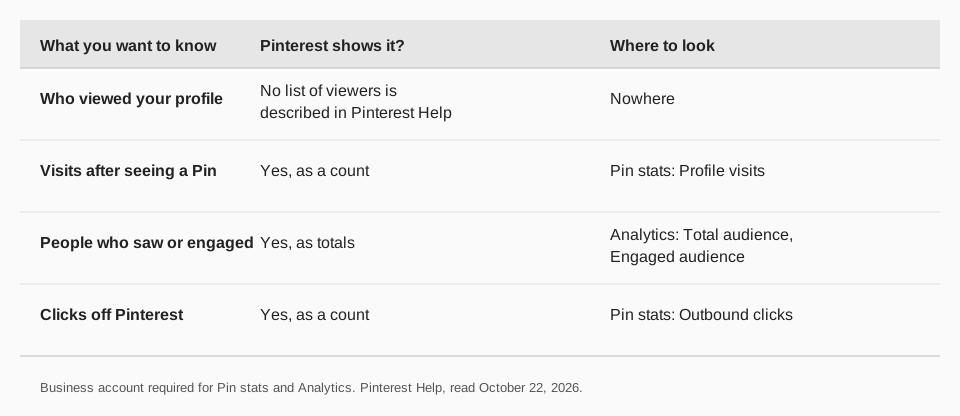
Yes, but only as Profile visits on each Pin. The Pin stats page defines the metric as "the number of people who visited your profile after viewing your Pin." It is a count tied to a single Pin, so it tells you which Pins make people curious about you, not who those people are.
Nothing on the two help pages we read lists viewers by name or gives an account-wide "profile views" figure. If you see a site or app that claims to show who viewed your Pinterest, Pinterest's help pages do not describe such a feature.
How do you see Profile visits on Pinterest?
You need a business account. The Pin stats page says "To view your Pin stats, you'll need to set up a business account." Then, on the web:
- Sign in to your Pinterest business account.
- Click your profile picture in the top-right corner.
- Click Created below your profile name.
- Select a Pin.
- Review the metrics below the Pin, or click See more stats to see all of them.
To see stats for Pins that other people created from your website, Pinterest says you also need to claim that website.
What if you only have a personal account?
Pinterest's creator page says a business account is free and that you can create one or convert a personal account. Pinterest's Analytics page adds that Analytics "may only be available to account owners above a certain age," so a missing menu can have that cause as well as account type.
Once you have the account, Pin stats start counting from the Pins you publish and the traffic they get, so check back after a few days of posting rather than expecting an instant picture. Pinterest does not say how long data takes to appear, so we cannot give a delay.
How do you see your overall audience?
Use Pinterest Analytics, also a business-account feature. Pinterest's help page gives these steps:
- Web: log in to your business account, click the hamburger icon at the top left, and under Analytics select Overview.
- App: log in to your business account, tap your profile picture at the bottom right, tap the chart bar icon at the top left, and select Analytics.
The page says Analytics shows how your Pins and ads perform, paid and organic. It reports two audience figures as totals: Total audience (people who saw or engaged with your Pins) and Engaged audience (people who engaged with your Pins). It says audience metrics aren't available in real time. The page does not say whether it identifies individual viewers, and it reports counts only.
What do the other Pinterest numbers mean?
| Metric | What Pinterest says it is | Why you care |
|---|---|---|
| Impressions | How many times your Pins or ads appeared on screen | Reach |
| Saves | Times people saved your Pin to a board | Interest |
| Pin clicks | Clicks that open your Pin in closeup | Curiosity |
| Outbound clicks | Actions that lead people off Pinterest | Traffic to you |
| Engagement rate | Engagements divided by impressions | Quality |
For most people, outbound clicks matter more than profile visits, because they are the visits that reach your site or shop. A rising Profile visits count with flat outbound clicks may mean your Pins spark curiosity but give no reason to leave.
Can you limit who sees your profile?
Pinterest's help results describe a setting that makes your profile private, which controls who can see your profile, boards and Pins. That page did not open for us today, so check Pinterest's privacy settings help for the current label and steps.
How to track Pinterest traffic with TrackMedia
Since Pinterest gives you counts, pair them with tracking on your own links. TrackMedia reads results from your Pinterest account and shows them next to your other networks.
- Pin results. Impressions, saves, clicks and engagement rate per Pin, including Pins you did not publish with us.
- Account numbers. Followers, following, Pin count and monthly views for the connected account.
- Link tracking. UTM-tagged links show clicks, visitors and referrers per post and per network, so you see who actually arrived on your site.
- Best times. A view built from your own posts shows when yours land.
Publish Pins from the same composer you use for 20 other networks, with a board, link and alt text. Our guides on how to post on Pinterest, the best time to post on Pinterest and UTM naming conventions help you set it up, and you can start free with TrackMedia. To turn Pinterest traffic into revenue, read how to make money on Pinterest.
Questions people also ask
Can you see who viewed your Pinterest?
No list of viewers is described in Pinterest's help pages. You see counts: Profile visits per Pin and audience totals in Analytics.
Do I need a business account to see these numbers?
Yes. Pinterest says you need a business account to view Pin stats and Pinterest Analytics.
What are Profile visits on Pinterest?
The number of people who visited your profile after viewing your Pin.
Are the audience numbers live?
No. Pinterest says audience metrics aren't available in real time.
How we checked this
We opened the two Pinterest help pages below on October 22, 2026. Several other Pinterest help pages returned errors that day, so we did not rely on them. We did not test the steps on a live account, and Pinterest changes its menus. TrackMedia statements come from its published features and Pinterest connector.
- Review your Pin stats (Pinterest Help): Profile visits, steps, business-account requirement.
- Review Pinterest Analytics (Pinterest Help): metrics, audience totals, steps on web and app.